Acumatica 2026 R2 is the latest release of Acumatica Cloud ERP, officially announced as generally available on October 1, 2026. This release introduces new AI capabilities, enhanced analytics, a more consistent user experience, and industry-specific improvements designed to help businesses streamline workflows, improve access to information, and make more informed decisions.
One of the major highlights is the expansion of embedded artificial intelligence through AI Assistant, AI Automation, and AI Anomaly Detection. The release also introduces a Native Data Warehouse foundation for reporting and analytics, connectivity with compatible external AI tools through the Model Context Protocol (MCP), and enhancements for manufacturing, construction, distribution, and e-commerce. Together, these updates reflect Acumatica’s continued focus on connecting business data, intelligent capabilities, and everyday operational workflows.
These developments matter because businesses need more than a system that records transactions. They need reliable information, efficient processes, and the ability to identify issues and respond to changing operational demands. The practical value of each feature, however, depends on a company’s requirements, system configuration, and existing business processes.
In this guide, we explore what is new in Acumatica 2026 R2, explain its key AI and analytics capabilities, examine enhancements across different industries, and discuss what existing customers should consider before upgrading. Whether you are already using Acumatica or evaluating cloud ERP solutions, this overview will help you understand the release and identify the updates most relevant to your business.
Table of contents
- What Is Acumatica 2026 R2?
- What’s New in Acumatica 2026 R2? Key Features Explained
- Acumatica 2026 R2 Features by Industry
- What Do the New Acumatica 2026 R2 Features Mean for Businesses?
- Acumatica 2026 R2 vs. Previous Releases: What’s Changed?
- Should You Upgrade to Acumatica 2026 R2?
- Frequently Asked Questions About Acumatica 2026 R2
- Conclusion: Is Acumatica 2026 R2 Right for Your Business?
- Discuss Your Acumatica ERP Requirements With Netsense
What Is Acumatica 2026 R2?
Acumatica 2026 R2 is a release of Acumatica Cloud ERP, a cloud-based enterprise resource planning platform that helps businesses manage financials, operations, and industry-specific processes within a connected system. Officially announced as generally available on October 1, 2026, this release focuses on embedding artificial intelligence into everyday workflows, improving reporting and analytics, modernizing the user experience, and expanding functionality across key industries.
The release reflects Acumatica’s continued effort to help businesses access relevant information more efficiently, reduce repetitive manual work, and manage increasingly complex operations. Rather than focusing on a single product area, Acumatica 2026 R2 introduces updates across AI, data analytics, platform usability, and industry-specific workflows.
Key Objectives of the 2026 R2 Release
Acumatica 2026 R2 centers on four key areas of improvement.
1) Bringing AI into everyday business workflows
New capabilities, including AI Assistant, AI Automation, and AI Anomaly Detection, help users interact with ERP data, automate selected tasks, and identify unusual patterns that may require further investigation.
2) Improving reporting and access to business data
The release introduces a Native Data Warehouse foundation and enhancements to Generic Inquiries and reporting. These improvements are designed to support more efficient analytics while helping businesses access information for operational and financial decisions.
3) Creating a more consistent user experience
Acumatica continues its transition to the Modern UI, making it the default interface across the platform in 2026 R2. This change also gives existing customers an opportunity to review older forms, dashboards, and customizations that may require attention before Classic UI-only functionality is retired in a future release.
4) Expanding industry-specific functionality
The release includes enhancements for manufacturing, construction, distribution, and commerce. These updates address different operational requirements, from production planning and shop floor reporting to vendor collaboration, inventory availability, and e-commerce integrations.
Major Feature Categories in Acumatica 2026 R2
The main updates can be grouped into the following categories:
| Feature category | Key updates | Business relevance |
|---|---|---|
| Artificial intelligence | AI Assistant, AI Automation, and AI Anomaly Detection | Supports information discovery, selected workflow automation, and exception monitoring. |
| Analytics and reporting | Native Data Warehouse and Generic Inquiry enhancements | Provides an improved foundation for reporting and access to business information. |
| AI connectivity | Model Context Protocol (MCP) connections for compatible external AI tools | Enables governed access to supported Acumatica data through compatible AI applications. |
| User experience | Expanded Modern UI coverage and usability improvements | Creates a more consistent interface and requires attention to legacy functionality. |
| Manufacturing | Shop Floor Kiosk 2.0 and Advanced Planning and Scheduling enhancements | Supports production reporting, scheduling, and operational visibility. |
| Construction | Vendor Portal and construction workflow enhancements | Supports vendor collaboration and project-related processes. |
| Distribution | Available-to-Promise and improved picking strategies | Helps teams assess projected inventory availability and warehouse fulfillment processes. |
| Commerce and payments | Enhancements to supported commerce integrations and payment workflows | Improves selected e-commerce, payment, and collaboration processes. |
The relevance of each category depends on the features a business uses, its existing configuration, and its operational priorities.
New Features vs. Enhancements to Existing Capabilities
An important distinction when evaluating Acumatica 2026 R2 is that not every update is an entirely new feature. The release combines newly introduced capabilities with improvements to existing functionality.
For example, the Native Data Warehouse introduces a new foundation for reporting and analytics, while Generic Inquiry optimization builds on an existing Acumatica capability. Similarly, Shop Floor Kiosk 2.0 extends manufacturing functionality introduced in an earlier release, while the Modern UI transition continues work already underway.
Understanding this distinction helps businesses assess what has genuinely changed, which existing processes may benefit, and whether an update requires changes to their current configuration or workflows.
For existing Acumatica customers, the most useful approach is to review the release notes against their current system and identify the updates that address specific business needs. For organizations evaluating Acumatica for the first time, the release provides a broader view of the platform’s AI capabilities, analytics foundation, and industry-specific functionality.
The following sections examine these features in more detail, explaining what each update does and what businesses should consider when evaluating its practical value.
What’s New in Acumatica 2026 R2? Key Features Explained
Acumatica 2026 R2 introduces enhancements across artificial intelligence, analytics, user experience, and business productivity. Rather than focusing on a single area, the release brings intelligent capabilities closer to everyday ERP workflows while improving how users access and work with business information.
The major highlights include AI Assistant enhancements, AI-powered automation, AI Anomaly Detection, a Native Data Warehouse foundation, connectivity with external AI tools, and continued development of the Modern UI. The release also improves existing platform capabilities, including Generic Inquiries, reporting, scheduling, and mobile functionality.
Understanding these updates requires looking beyond the feature names. The following sections explain what each capability does, how businesses may use it, and what to consider before implementing it.
AI Assistant

Acumatica’s AI Assistant helps users find and interpret business information through natural-language questions. Instead of manually navigating multiple screens or building every inquiry from scratch, users can ask questions about supported ERP data and receive answers in a more accessible format.
With Acumatica 2026 R2, AI Assistant can address more complex business questions, including comparisons involving previous periods and specific dates. For example, finance teams can investigate how a balance has changed over time and identify the transactions behind those changes. Users can also turn relevant answers into dashboard widgets for continued monitoring.
This approach can make ERP information easier to explore without requiring every user to have advanced reporting skills.
Potential use cases include:
- Finance: Investigating changes in account balances, reviewing financial information, and exploring transaction-level details.
- Operations: Asking questions about inventory, orders, or other operational information exposed through supported inquiries.
- Management: Exploring performance indicators and turning useful insights into dashboard views.
- Reporting: Using conversational questions to investigate data before conducting a more detailed analysis.
For example, a finance manager investigating an unexpected change in an account balance could ask the assistant to compare the current period with a previous period. The resulting information can help the manager identify transactions that deserve closer examination.
However, AI Assistant should be treated as a way to support analysis, not as a replacement for financial review or professional judgment. The accuracy and usefulness of its responses depend on the underlying data, the inquiries made available to the assistant, and the clarity of the question.
Businesses should also confirm the relevant subscription, enablement requirements, AI usage allowances, and permissions before deploying the capability. AI Assistant availability and configuration requirements should be checked against Acumatica’s current documentation.
AI Automation
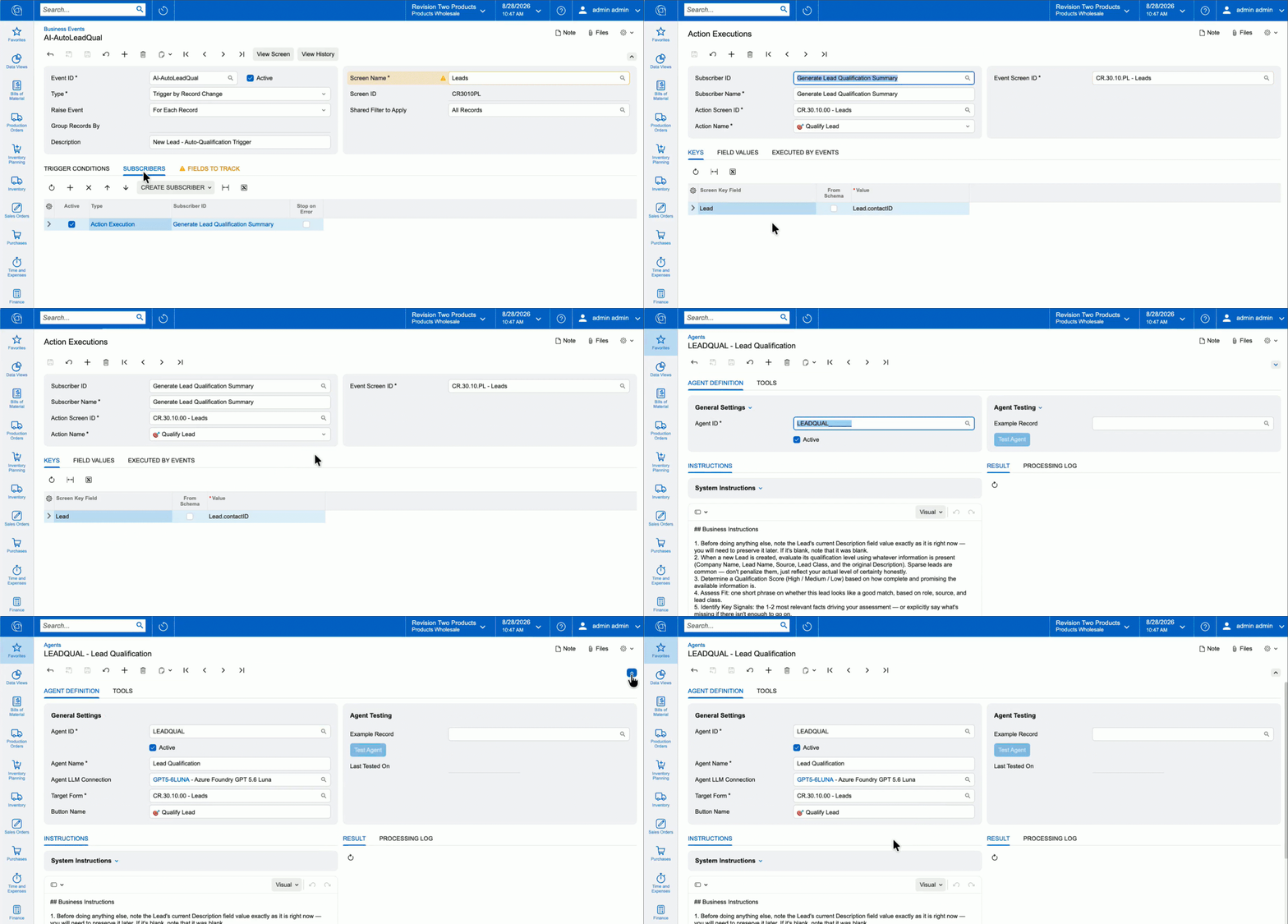
AI Automation extends the use of artificial intelligence beyond answering questions. It enables businesses to configure AI agents that can perform defined tasks and support selected workflows within Acumatica.
An AI agent can be configured using natural-language instructions and connected to supported business processes. Depending on the configuration, agents can be triggered by Business Events, Import/Export Scenarios, or existing workflows. Multiple agents can also pass work between one another to support more complex, multi-step processes.
The purpose is to reduce repetitive manual work while keeping automation connected to the organization’s business rules and ERP data.
Potential applications include:
- Automating selected repetitive administrative activities.
- Supporting multi-step workflows that involve several defined tasks.
- Evaluating information against specified business criteria.
- Helping employees process routine work more consistently.
- Triggering follow-up activities when defined business conditions are met.
For example, a business could explore an AI-assisted workflow that evaluates selected customer or transaction information against defined criteria before a follow-up action is initiated. More complex workflows may involve multiple agents, depending on the capabilities and configuration available.
These examples illustrate potential applications, not out-of-the-box workflows guaranteed to be available in every Acumatica environment.
Effective automation requires careful planning. Businesses should define the agent’s responsibilities, specify the information it can access, establish approval requirements, and determine which actions require human intervention.
Sensitive data masking, access permissions, monitoring, and AI usage should also be considered. An automated process should not be allowed to make consequential business changes without appropriate controls.
The key consideration is not simply how much work AI can automate, but whether the automation is reliable, governed, and appropriate for the business process.
AI Anomaly Detection
AI Anomaly Detection helps identify unusual patterns in business information that may warrant further investigation.
In a complex ERP environment, employees may have to review large volumes of transactions and operational records. Unusual activity can be difficult to identify consistently when teams rely entirely on manual checks.
Anomaly detection provides another way to surface information that differs from expected patterns, helping employees focus their attention on potential exceptions.
Potential applications include:
- Identifying unusual patterns in supported business data.
- Highlighting records that may require additional review.
- Supporting exception-based monitoring.
- Helping teams prioritize investigations rather than reviewing every record in the same way.
For example, a finance team might use anomaly detection to help identify unusual transaction patterns for further examination. An operations team could investigate unexpected changes in supported operational data.
The important distinction is that an anomaly is not necessarily an error, a fraudulent transaction, or a sign of operational failure. It is an indication that the information may deserve closer attention.
Employees should validate the underlying records, investigate the circumstances, and determine whether corrective action is necessary.
Businesses should also confirm which data and scenarios are supported by the configured capability before relying on it for a particular monitoring requirement.
Native Data Warehouse and Analytics Improvements
Acumatica 2026 R2 introduces a Native Data Warehouse foundation designed to improve the way reporting and analytics access ERP information.
Traditionally, reporting workloads can compete with everyday transactional activities for system resources. When reports process large datasets, the additional workload may affect the responsiveness of other operations, depending on the system configuration and reporting design.
Acumatica’s Native Data Warehouse addresses this challenge by allowing reporting and analytics to run against a dedicated, performance-optimized copy of ERP data rather than directly against the live transactional database.
This provides a foundation for separating analytical workloads from routine activities such as order entry, invoicing, and approvals.
Generic Inquiry Optimization
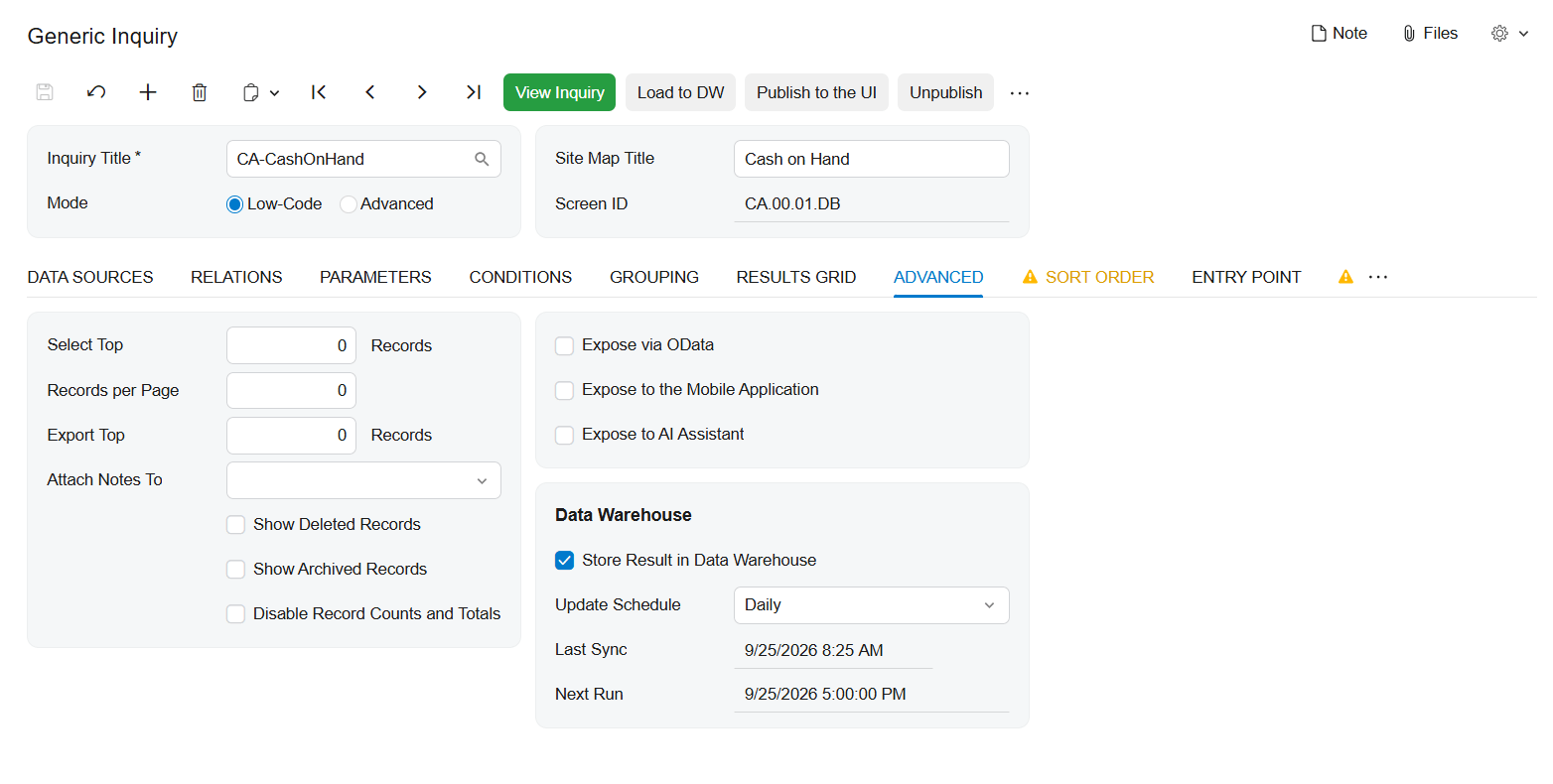
The release also introduces Generic Inquiry optimization, which prepares and stores the results of large or frequently used inquiries.
These optimized results can help dashboards, pivot views, OData access, and supported MCP connections retrieve information more efficiently. Results can be refreshed on a schedule or on demand, depending on the configuration.
This is particularly relevant when users repeatedly access large datasets through dashboards or reporting views.
Additional improvements include Grouped Table views, stronger reporting security, improved scheduling, and new Generic Inquiries.
Why These Improvements Matter
For finance and operations teams, reporting performance affects how easily they can access information and investigate business conditions.
Potential benefits include:
- More efficient access to supported reporting datasets.
- Improved responsiveness for selected dashboards and pivot views.
- Reduced competition between analytical workloads and live transactional processing.
- Greater flexibility in presenting and reviewing business information.
- A stronger foundation for connecting reporting with AI-assisted analysis.
For example, a management team that regularly reviews a large operational inquiry may benefit from optimized results rather than repeatedly processing the same dataset.
Nevertheless, the actual performance impact depends on the inquiry design, dataset size, refresh frequency, system configuration, and workload. Businesses should test important reports against their own requirements rather than assume every report will automatically become faster.
The Native Data Warehouse is also a foundation for further development. Its introduction should not be interpreted as a guarantee that every future analytics capability is already available in the current release.
Model Context Protocol (MCP) and External AI Connectivity
The Model Context Protocol (MCP) is a standard that allows compatible AI applications to connect with supported external data sources and tools.
In Acumatica 2026 R2, organizations can use MCP connections to provide compatible external AI tools, including ChatGPT and Claude, with governed access to supported Acumatica data. Acumatica’s announcement also identifies Gemini among the compatible external AI tools.
This creates another way for employees to interact with business information without manually exporting and uploading the same data into a separate AI workspace.
How MCP Connectivity Works
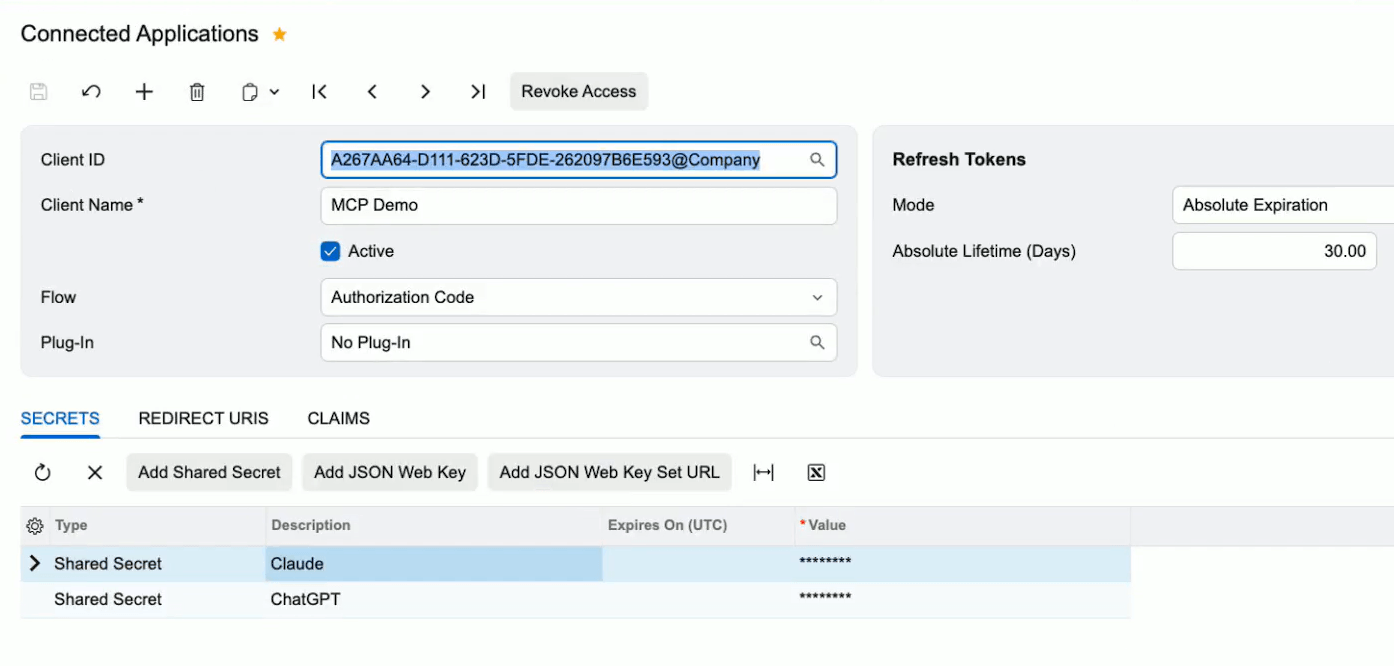
At a high level, an MCP connection provides a defined interface through which a compatible AI application can access information or tools exposed by an MCP server.
For Acumatica, the release describes MCP servers that allow external AI tools to access published Generic Inquiries under defined permissions. This gives organizations a way to make selected ERP information available to supported AI applications while retaining access controls.
For example, an authorized employee could use a compatible AI application to investigate information from a published inquiry, subject to the connection’s configuration and permissions.
This does not mean that an external AI application automatically receives unrestricted access to the entire ERP system.
Security and Governance Considerations
Acumatica identifies several controls for these connections, including role-based permissions, inherited security, and field-level data masking.
These controls are important because ERP systems may contain sensitive financial, customer, employee, and operational information.
Before enabling external AI connectivity, businesses should evaluate:
- Data access: Which inquiries and records should be available to external AI tools?
- User permissions: Do existing access rights appropriately restrict the information each user can retrieve?
- Sensitive information: Which fields require masking or additional protection?
- Monitoring: How will access and AI usage be reviewed?
- Business policies: Does the proposed use comply with internal security and data governance requirements?
Acumatica’s announced MCP functionality provides read-only access to published Generic Inquiries. Businesses should not assume that the connection can execute arbitrary ERP transactions or make unrestricted changes to business records.
The available functionality, compatible applications, and configuration requirements should be verified before implementation.
Modern UI and User Experience Enhancements
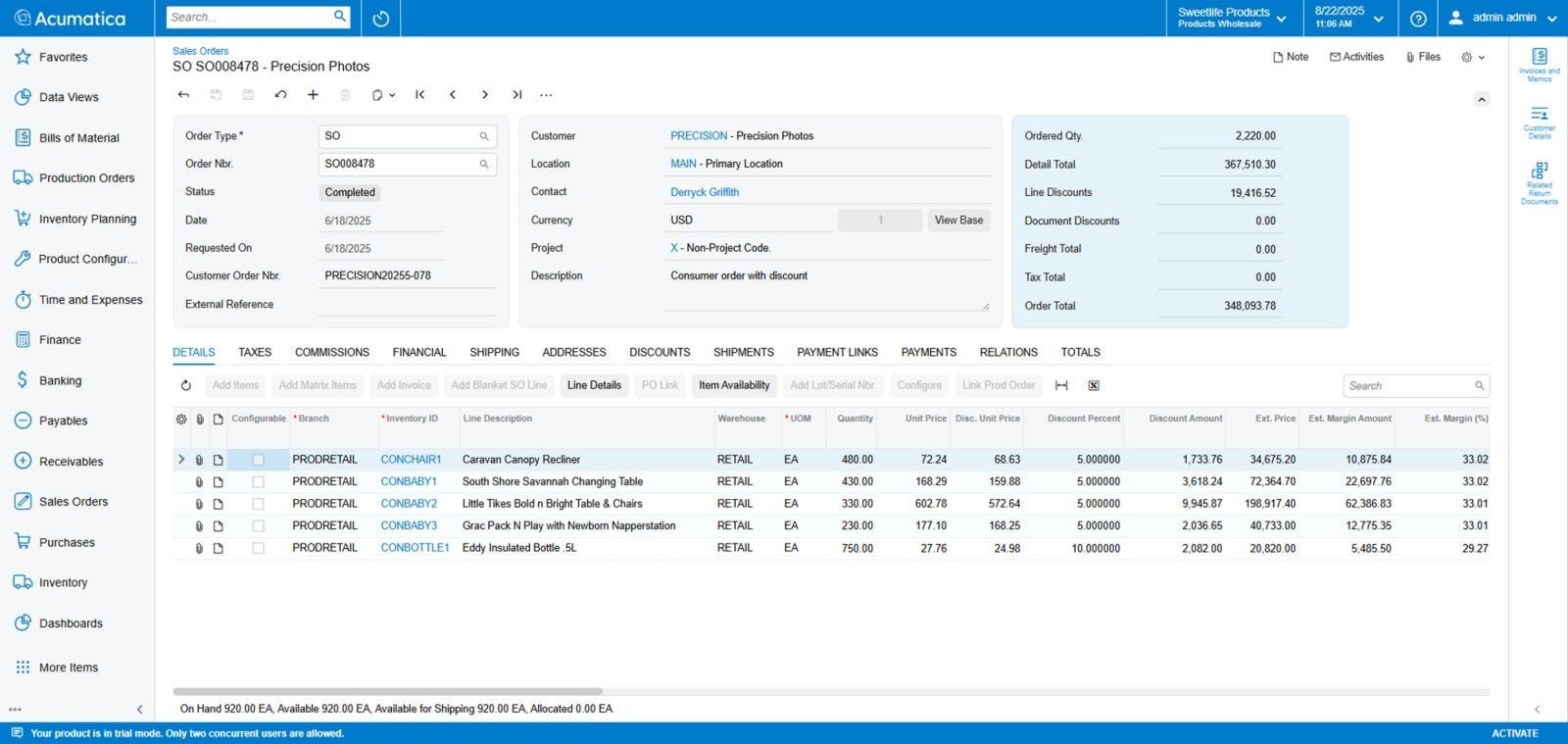
Acumatica 2026 R2 continues the transition toward a consistent Modern UI experience across the platform.
The Modern UI is now the default experience for Acumatica customers. This is more than a visual change: it has implications for organizations that continue to rely on Classic UI screens, older workflows, or customizations built around legacy functionality.
A more consistent interface can help standardize how users interact with the system. However, existing customers should evaluate how the transition affects their specific environment.
What Existing Customers Need to Know
Businesses should review the following areas before or during their transition:
- Classic UI-only screens: Identify forms and screens that still depend on the older interface.
- Customizations: Review custom screens, extensions, and workflows for compatibility.
- Dashboards and reporting: Check dashboards, pivot views, and related components that may require changes.
- Business processes: Identify activities that depend on legacy functionality.
- User training: Prepare employees for changes to navigation and everyday workflows.
Acumatica’s release information indicates that Classic UI-only functionality is scheduled for further retirement in 2027 R1. This makes the transition an important planning consideration for customers that still depend on legacy screens or customizations.
Organizations should consult the relevant release documentation and test their own environment to determine which changes are necessary.
The objective is to maintain business continuity while ensuring that users and customizations are ready for the evolving platform.
Other Platform and Productivity Enhancements
In addition to its AI, analytics, and interface developments, Acumatica 2026 R2 includes several improvements to existing platform capabilities.
Although these enhancements may not receive as much attention as the AI features, they can be important for organizations that rely on reporting, mobile workflows, and day-to-day system administration.
Generic Inquiry and Reporting Enhancements
Beyond optimization for large datasets, the release introduces additional reporting and usability improvements.
Grouped Table views allow users to organize information into expandable hierarchies, including subtotals and totals, without requiring every presentation to be created through Report Designer.
The release also includes stronger reporting security, improvements to scheduling, and new Generic Inquiries.
These changes can help users organize and access information more effectively, while security enhancements support more appropriate access to business data.
Mobile Functionality
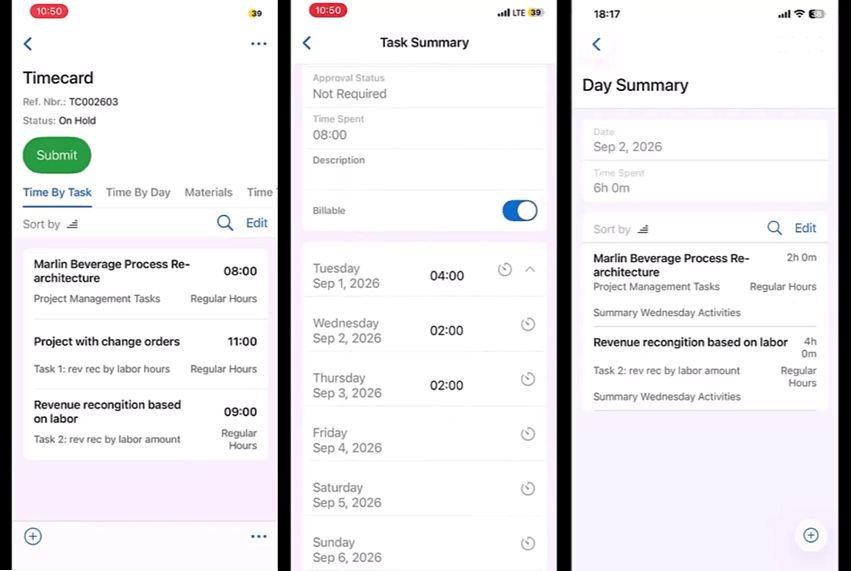
Acumatica 2026 R2 introduces mobile clock-in and clock-out functionality with offline support.
For supported workflows, offline capability can help employees record time when a reliable network connection is unavailable. The information can then be synchronized when connectivity is restored, subject to the feature’s operating requirements.
Businesses should verify the supported mobile workflows and synchronization behavior before incorporating the capability into their procedures.
License and Resource Visibility
The release also adds improved visibility into license and resource consumption.
This can help administrators and relevant stakeholders monitor system usage and understand resource consumption more clearly.
Greater visibility is useful when planning capacity, reviewing usage, or investigating potential constraints. However, organizations should assess the available monitoring information against their specific licensing and operational requirements.
Additional Business and Usability Improvements
Acumatica 2026 R2 also includes enhancements across industry workflows, commerce integrations, payments, and other platform capabilities.
The specific changes vary by application and configuration. Businesses should consult the official release notes to determine which enhancements apply to the modules they use.
Taken together, these improvements demonstrate that Acumatica 2026 R2 is not solely an AI release. It also advances the reporting foundation, interface consistency, and operational capabilities that support everyday ERP use.
For existing customers, the most practical next step is to compare the release changes with current business requirements, identify relevant enhancements, and establish an appropriate testing and upgrade plan.
Acumatica 2026 R2 Features by Industry
Acumatica 2026 R2 introduces industry-specific enhancements designed to address practical challenges across manufacturing, construction, distribution, and retail and e-commerce. Rather than applying the same improvements to every business, the release focuses on workflows that influence production scheduling, project coordination, inventory availability, order fulfillment, and commerce operations.
The value of these updates depends on how each business operates, which Acumatica applications it uses, and how its existing workflows are configured. The following sections explain the key industry enhancements and their potential operational benefits.
Acumatica 2026 R2 for Manufacturing
Manufacturers need to coordinate production schedules, material availability, labor, and shop floor activities while maintaining accurate inventory and production records. Acumatica 2026 R2 builds on its manufacturing capabilities with enhancements to Shop Floor Kiosk, Advanced Planning and Scheduling (APS), and production planning.
Shop Floor Kiosk 2.0
The enhanced Shop Floor Kiosk helps production operators record and manage shop floor activities in a more connected workflow. Updates include issuing materials for specific production operations, recording material substitutions, capturing lot and serial attributes, and correcting relevant production information directly through the kiosk.
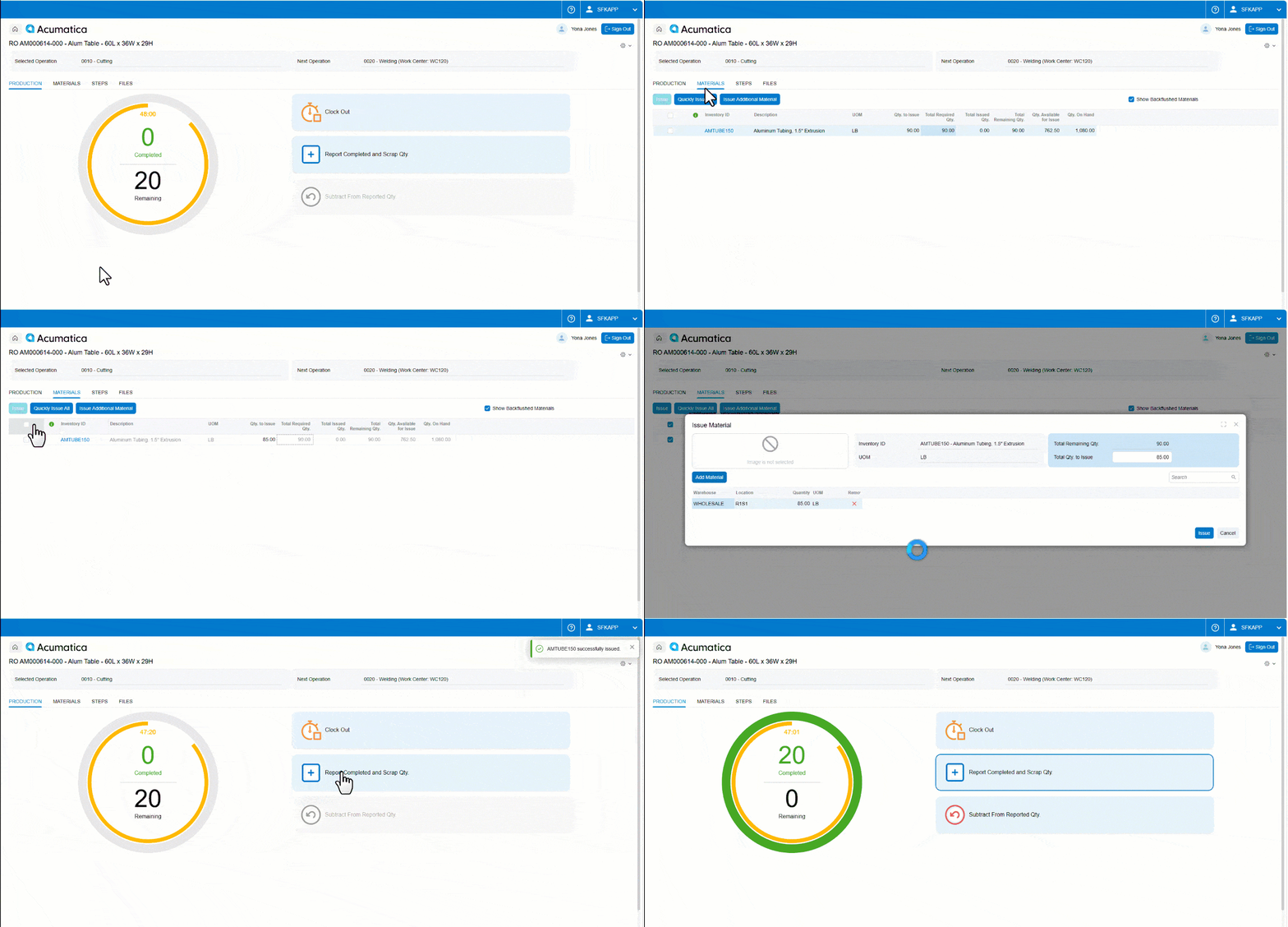
These capabilities can help manufacturers improve the accuracy of material consumption records, work-in-progress (WIP) costing, and production reporting. More reliable shop floor data also gives production managers a stronger basis for investigating discrepancies between planned and actual production.
Advanced Planning and Scheduling (APS)
Acumatica 2026 R2 enhances its APS capabilities to help manufacturers plan production around actual work center capacity, operating calendars, shifts, and production requirements. The scheduling engine supports finite and infinite scheduling logic, with more precise scheduling and improved handling of overlapping shifts.
For manufacturers managing multiple production orders or changing delivery commitments, more accurate capacity planning can help identify scheduling constraints and improve visibility into when operations are expected to finish. However, the usefulness of these schedules still depends on the accuracy of production data, work center settings, and planning assumptions.
Production Planning and Shop Floor Reporting
The release also expands production planning and reporting capabilities, including manufacturing-focused Generic Inquiries that can be used with AI Assistant to investigate production schedules, material requirements, and production order risks.
This gives teams additional ways to explore questions such as which production orders are at risk of delay, which materials are still outstanding, and which orders may be ready to begin production. Instead of relying exclusively on manually assembled reports, users can access relevant information through supported inquiry and AI capabilities.
Material Visibility and Production Traceability
More detailed material issuance, substitution, and lot or serial attribute recording can strengthen the connection between production activities and inventory records. This is particularly useful when manufacturers need to understand which materials were used in an operation, investigate discrepancies, or review production history.
The practical benefit is improved visibility into the relationship between material consumption, production progress, and inventory accuracy. Traceability outcomes will depend on the processes, controls, and data captured by the business.
What These Enhancements Mean for Manufacturers
Taken together, the manufacturing improvements can help businesses build more realistic production schedules, record shop floor activities more accurately, and identify material or scheduling issues earlier.
For manufacturers dealing with frequent schedule changes, material shortages, or differences between planned and actual production, these enhancements provide opportunities to strengthen coordination between planning, inventory, and shop floor execution. They do not eliminate production constraints, but they can give teams better information to manage them.
Acumatica 2026 R2 for Construction
Construction businesses must coordinate projects, subcontractors, suppliers, purchasing, service activities, and financial commitments. Delays in communication or incomplete project information can affect costs, schedules, and project profitability.
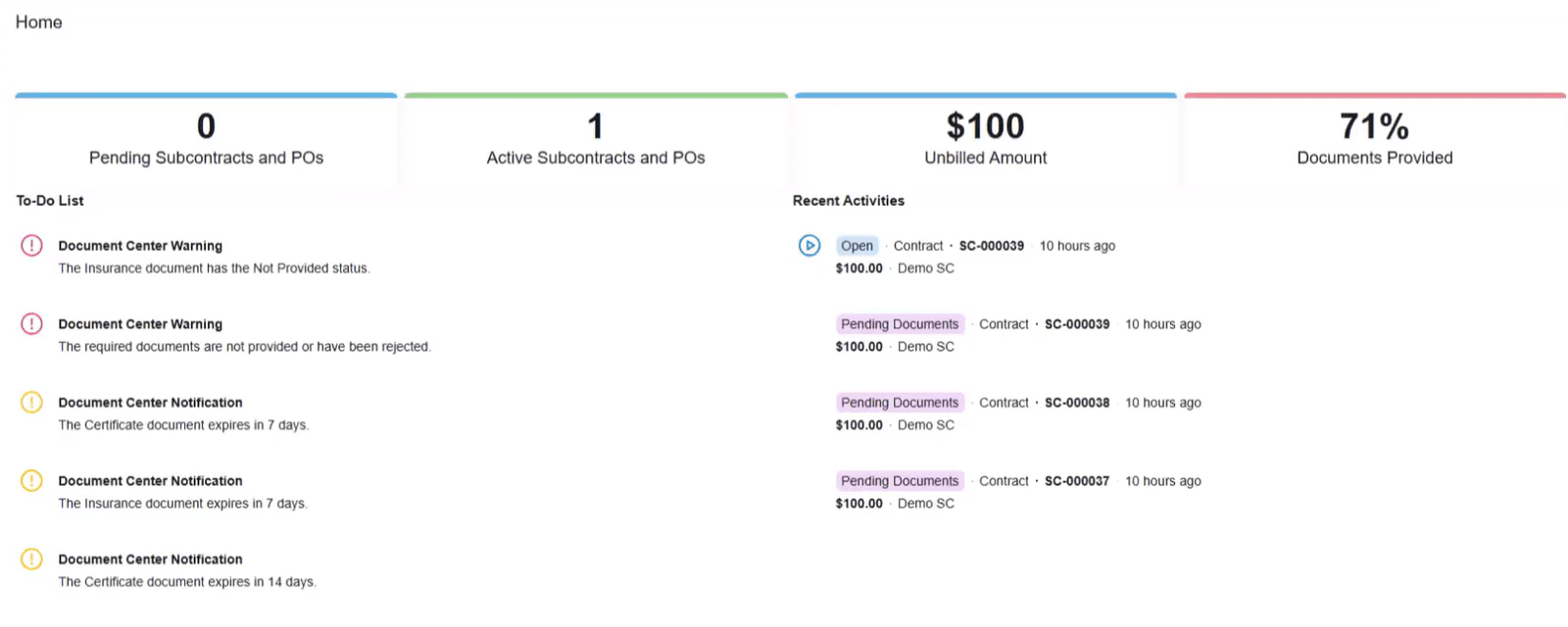
Acumatica 2026 R2 expands construction-related capabilities with a new Vendor Portal, construction exchange applications, and enhancements to Service Management and project workflows.
Construction Vendor Portal
The new Vendor Portal provides vendors and subcontractors with self-service access to relevant information, including subcontracts, purchase orders, and compliance documents.
By making selected information available through a dedicated portal, construction businesses can reduce reliance on scattered email exchanges and manual document requests. Vendors and subcontractors can access the information they need through the supported portal experience, while the business can improve the organization of project-related communication.
The portal is also part of Acumatica’s broader direction toward more connected collaboration between contractors and their external partners.
Service Management Enhancements
Updates to Service Management support businesses that need to coordinate service activities alongside their broader operational processes. A more modernized application experience can help users navigate service workflows and access relevant operational information more efficiently.
For construction firms with maintenance, field service, or after-project service requirements, the potential benefit is a more connected view of service-related work. The precise impact will depend on the services the company provides and how its workflows are configured.
Vendor and Subcontractor Collaboration
Construction projects often involve multiple external parties, each with different responsibilities, documents, and deadlines. Providing structured access to relevant purchasing and compliance information can help reduce communication gaps and make it easier to coordinate project requirements.
When combined with appropriate internal processes, portal-based collaboration can also help teams organize document exchanges and follow up on outstanding information. Access permissions and document responsibilities should be established clearly to ensure that each party sees the information relevant to its role.
Project Workflows and Operational Visibility
Acumatica 2026 R2 also introduces and enhances project-related capabilities, including parent-child project structures and improvements to change management and project cost visibility.
Parent-child projects can help businesses organize related project phases, sites, or scopes while supporting consolidated billing and reporting where appropriate. Other enhancements help teams review commitments associated with change requests and monitor billed versus pending amounts.
These capabilities can support better visibility into project activity, financial commitments, and changes that may affect project performance. Their value is especially relevant when a business manages complex projects with multiple phases or external parties.
What These Enhancements Mean for Construction Businesses
The construction improvements focus on connecting project information and collaboration more effectively. Better access to vendor documents, more structured project relationships, and enhanced change-related visibility can help teams reduce manual coordination and understand project status more clearly.
For contractors managing multiple projects and subcontractors, the key consideration is whether these capabilities address existing gaps in document management, project reporting, service coordination, or change control.
Acumatica 2026 R2 for Distribution
Distributors must balance inventory availability, customer delivery commitments, warehouse capacity, and order fulfillment. Inaccurate availability information or inefficient picking processes can lead to missed delivery dates, additional handling, and avoidable operational costs.
Acumatica 2026 R2 introduces Available-to-Promise (ATP) functionality and enhancements to intelligent picking and materials management to help distribution businesses manage these challenges.
Available-to-Promise (ATP)
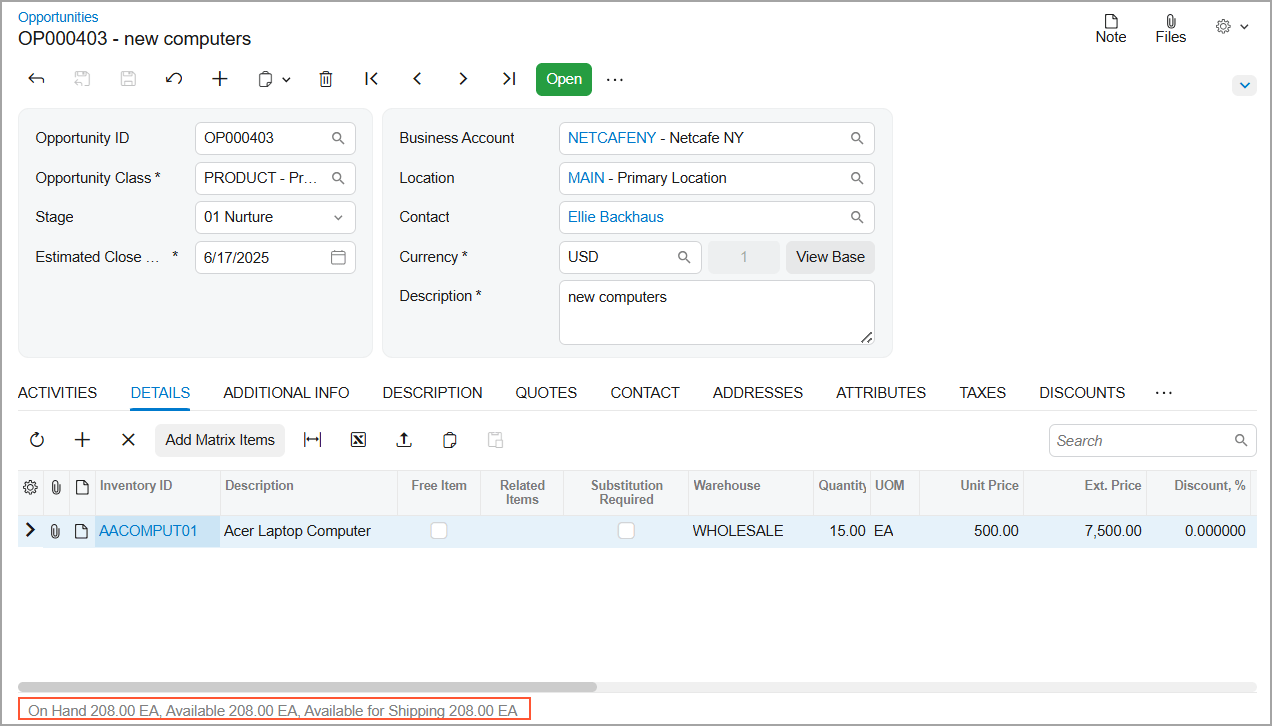
Available-to-Promise helps users assess projected supply and demand when reviewing sales orders. By presenting relevant availability information at the order line, ATP helps teams make more informed decisions about expected shipment dates.
For distributors, this can improve the process of responding to customer requests and setting delivery expectations. Rather than relying only on current on-hand inventory, teams can consider projected supply and demand when evaluating whether an order can be fulfilled by a requested date.
ATP supports better-informed commitments; it does not guarantee a delivery date independently of supplier performance, warehouse capacity, transportation, or other operational constraints.
Intelligent Picking Strategies
Acumatica 2026 R2 enhances picking strategies to better support different warehouse inventory movements and fulfillment requirements. Depending on the configured workflow, picking can accommodate approaches involving individual units, cases, bulk inventory, and fast-pick zones.
This flexibility can help warehouses organize picking activities around how products are stored and handled. A business with high order volumes or varied product sizes may benefit from workflows that reduce unnecessary movement and make inventory retrieval more efficient.
The actual improvement will depend on warehouse layout, inventory organization, order profiles, and the picking methods the business adopts.
Inventory Availability and Order Fulfillment
Reliable inventory information is essential for fulfilling orders accurately. When availability data and order fulfillment processes are better connected, distribution teams can assess supply constraints earlier and coordinate purchasing, replenishment, and shipping decisions more effectively.
The ATP enhancements in 2026 R2 support this objective by helping users evaluate projected supply and demand during order entry. Businesses should still ensure that inventory records, replenishment parameters, and supply planning data are maintained accurately.
Warehouse Operations and Distribution Workflows
Intelligent picking and unified materials management can help distributors coordinate inventory handling and fulfillment activities across warehouse workflows. These enhancements are particularly relevant to businesses that manage multiple storage zones, varied product types, or high volumes of customer orders.
By improving how inventory is allocated and retrieved, businesses may be able to reduce unnecessary warehouse handling and improve fulfillment consistency. Results will depend on the fit between the system configuration and the company’s actual warehouse processes.
What These Enhancements Mean for Distributors
For distribution businesses, the main opportunity is to improve the connection between order promises and warehouse execution. Better visibility into projected availability can support more realistic delivery commitments, while adaptable picking strategies can help teams handle orders more efficiently.
These improvements are most relevant to distributors seeking to strengthen order accuracy, manage inventory complexity, and improve the reliability of fulfillment operations.
Acumatica 2026 R2 for Retail and E-commerce
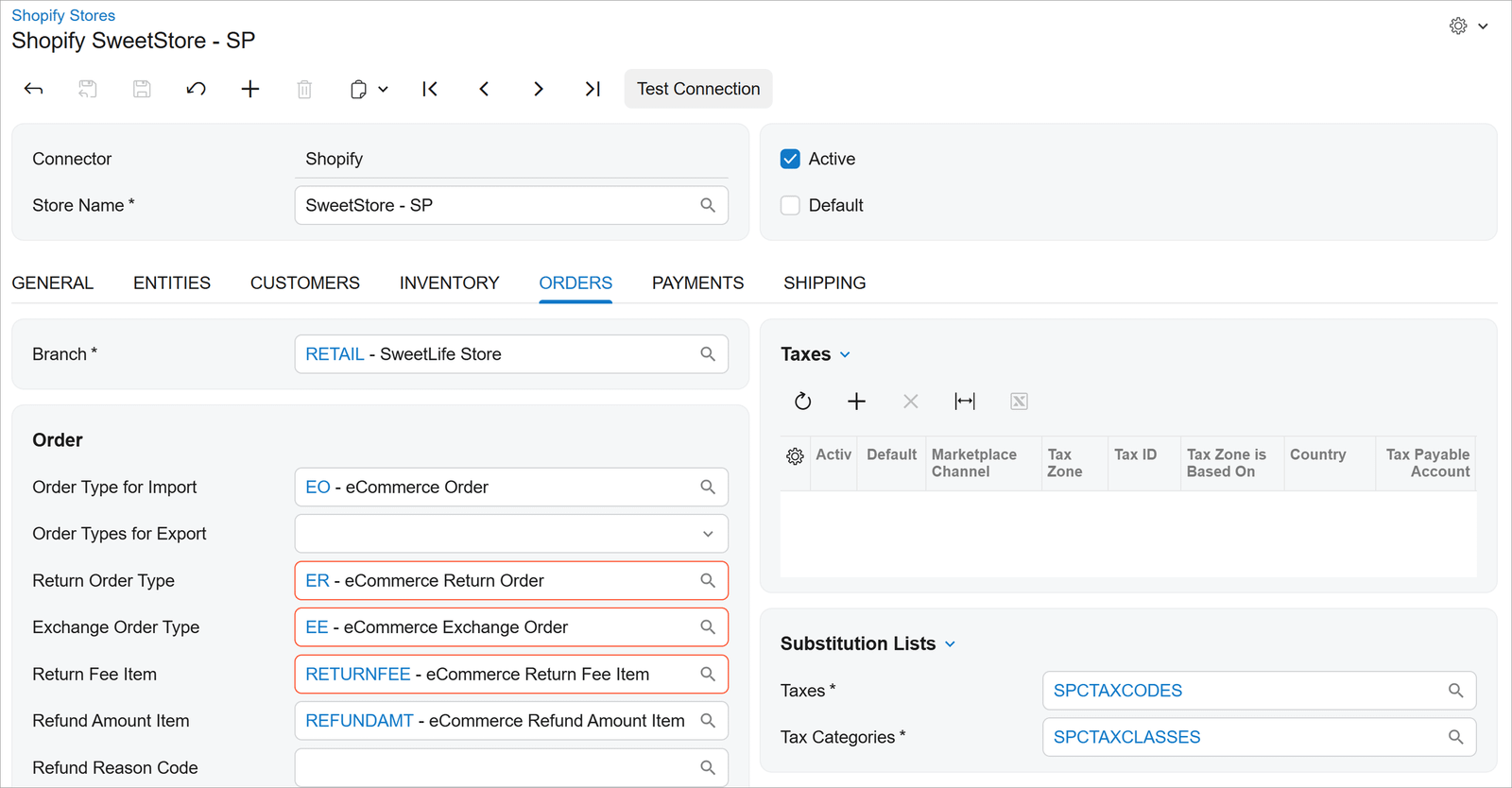
Retailers and e-commerce businesses must keep product, customer, order, inventory, shipping, and payment information aligned across their sales channels. Integration problems can create additional manual work, delay order processing, and make it harder to maintain consistent operational records.
Acumatica 2026 R2 includes improvements to supported e-commerce integrations, expanded BigCommerce capabilities, and enhancements involving Shopify and payment workflows.
Updates to Supported E-commerce Integrations
The release includes improvements intended to strengthen connector stability and streamline data exchange between Acumatica and supported commerce platforms. These updates build on existing integration capabilities rather than introducing an entirely new e-commerce model.
More reliable integration can help reduce interruptions in workflows that transfer orders and related information between an online store and the ERP system. However, the exact capabilities available will depend on the commerce platform, connector version, and integration configuration.
Enhancements to Commerce Platforms and Payment Workflows
Acumatica 2026 R2 includes expanded BigCommerce capabilities, including two-way synchronization for B2B accounts, and improvements to Shopify order exchange and reconciliation. The release also includes Acumatica Payments integrations intended to support smoother payment-related workflows.
For businesses operating online stores, these enhancements can help maintain better alignment between commerce activity and back-office processes. More consistent order and account information can reduce reconciliation work, while integrated payment workflows can help teams manage transactions within supported processes.
The benefits depend on the specific platform, payment configuration, and business requirements. Not every integration or payment workflow will be available in every setup.
Integration Compatibility and Configuration Considerations
Before adopting the new capabilities, businesses should confirm that their commerce platform, connector, Acumatica version, and payment configuration are supported. They should also review how customer accounts, products, inventory, orders, shipping information, and payments are mapped between systems.
Testing is important when upgrading existing integrations. Businesses should verify that synchronization rules, reconciliation processes, exception handling, and reporting continue to work as expected after the update.
What These Enhancements Mean for Retail and E-commerce Businesses
The e-commerce improvements in Acumatica 2026 R2 are intended to help businesses maintain more reliable connections between online sales channels and back-office operations.
For retailers managing multiple channels or B2B commerce requirements, improved integration and payment workflows can reduce some of the manual effort involved in keeping operational records aligned. The greatest benefit is likely to come when the ERP configuration and commerce integrations are designed around the company’s actual order-to-cash processes.
Choosing the Most Relevant Acumatica 2026 R2 Enhancements
The most valuable features in Acumatica 2026 R2 will depend on a business’s industry, operational priorities, and existing system configuration.
Manufacturers may prioritize production scheduling and shop floor accuracy. Construction firms may focus on vendor collaboration and project visibility. Distributors may benefit most from improved availability planning and picking workflows, while retailers and e-commerce businesses may place greater importance on integration reliability and payment processes.
Before upgrading or enabling specific capabilities, businesses should confirm feature availability, licensing or subscription requirements, configuration needs, and compatibility with existing customizations and integrations. This helps ensure that the release’s enhancements address real operational priorities rather than adding complexity without a clear business benefit.
What Do the New Acumatica 2026 R2 Features Mean for Businesses?
The value of an ERP upgrade is not determined by the number of new features it introduces. What matters is how those capabilities help a business improve visibility, reduce manual work, identify problems earlier, and make better-informed decisions.
Acumatica 2026 R2 combines AI-assisted analysis, workflow automation, enhanced reporting capabilities, and industry-specific improvements. These capabilities can support different priorities across finance, operations, IT, and business leadership. However, the results depend on how the system is configured, the quality of the underlying data, and whether the new capabilities address actual business needs.
Benefits for Finance Teams
Finance teams need accurate financial information, reliable reporting, and the ability to identify discrepancies before they become larger problems. Acumatica 2026 R2 introduces enhancements that can help finance professionals access relevant information, investigate unusual patterns, and improve their understanding of business performance.
Improved Financial Reporting and Visibility
Enhanced analytics and the Native Data Warehouse can support reporting by working with a dedicated copy of ERP data rather than running analytical workloads directly against the live transactional database. This architecture can help improve reporting performance while supporting access to business information for analysis.
For finance teams, more accessible reporting can make it easier to review financial results, investigate variances, and compare performance across relevant periods or business areas. The usefulness of these insights still depends on data quality, reporting design, and appropriate access to financial information.
AI-Assisted Financial Analysis
AI Assistant can help users investigate business questions using supported Acumatica data. Finance professionals may use it to explore changes in financial results, investigate transaction details, or examine information for specific periods.
For example, a finance manager could investigate why expenses increased compared with a previous period or identify transactions associated with a change in a particular account. This can help shorten the initial investigation process, although users should validate the results before using them for formal financial reporting or decisions.
Identifying Unusual Patterns That Need Investigation
AI Anomaly Detection can help surface unusual patterns in business data that may warrant further review. For finance teams, these signals can provide another way to identify unexpected movements or activity that differs from established patterns.
An anomaly does not automatically indicate an accounting error, fraud, or a control failure. Instead, it highlights an area that may require investigation. Finance professionals remain responsible for reviewing the underlying transactions, applying accounting judgment, and determining whether corrective action is necessary.
Business impact: Finance teams may gain better access to financial information and additional tools for investigating variances. The greatest value comes when these capabilities complement established reporting, reconciliation, and financial control processes.
Benefits for Operations Teams
Operations teams coordinate the day-to-day activities that keep a business running, from production and inventory management to purchasing, order fulfillment, and service delivery. Delays often occur when information is fragmented, exceptions go unnoticed, or employees must manually coordinate repetitive tasks.
Acumatica 2026 R2 provides capabilities that can help businesses improve workflow execution and access operational information more efficiently.
Workflow Automation
AI Automation allows businesses to configure agents to support selected workflows using natural-language instructions and supported system triggers. Depending on the configuration, agents can participate in processes initiated by Business Events, Import/Export Scenarios, or workflows.
For operations teams, this creates opportunities to reduce repetitive manual activities and connect steps within defined business processes. Automated workflows can help employees spend less time coordinating routine tasks and more time addressing exceptions that require human judgment.
Automation should be introduced with clear permissions, appropriate validation, and defined escalation procedures. Processes involving financial commitments, customer obligations, or other consequential decisions may require additional review and approval controls.
Better Access to Operational Information
AI Assistant and enhanced reporting capabilities can help users retrieve and investigate supported operational information without relying exclusively on manually assembled reports.
Depending on the available data and configuration, employees may be able to explore questions about production orders, inventory availability, order status, or other operational activities. Faster access to relevant information can help teams understand what is happening and decide which issues need attention.
The results are only as reliable as the underlying data and the information available to the user. Businesses should maintain consistent data entry practices and ensure that operational records are updated appropriately.
Identifying Exceptions and Process Bottlenecks
AI Anomaly Detection and improved reporting can help teams identify unusual patterns that may indicate operational issues. For example, an unexpected change in activity or a deviation from normal patterns may prompt a closer review of inventory movements, production performance, or transaction activity.
When combined with operational reporting and clearly defined responsibilities, these signals can help teams investigate potential problems earlier.
However, anomaly detection is not a substitute for operational monitoring or root-cause analysis. Teams still need to determine why an issue occurred, assess its impact, and implement the appropriate response.
Business impact: Operations teams may improve their ability to coordinate work, investigate exceptions, and reduce avoidable manual effort. The benefits are strongest when automation and reporting are aligned with clearly defined operational processes.
Benefits for IT Teams
IT teams are responsible for maintaining ERP reliability, protecting business information, managing integrations, and ensuring that system changes do not disrupt essential workflows. As ERP platforms introduce more AI capabilities and external connectivity, technical readiness and governance become increasingly important.
Also Read: ERP and AI Readiness: Key Insights from Netsense Executive Lunch & Learn in Malaysia
Acumatica 2026 R2 introduces capabilities that IT teams should evaluate alongside existing customizations, integrations, and security requirements.
System Readiness and Compatibility
The move to the Modern UI as the default experience in Acumatica 2026 R2 makes upgrade readiness an important consideration. Organizations should review their existing screens, customizations, dashboards, and workflows to identify any areas that may require testing or adjustment.
IT teams should also confirm the compatibility of third-party integrations and other components that support daily operations. Testing in an appropriate environment before deploying changes can help identify potential issues and reduce the risk of disruption.
An upgrade assessment should cover both technical compatibility and business-critical workflows. A system may be technically upgradeable while still requiring preparation to ensure that users can complete their everyday tasks.
External AI Connectivity and Access Controls
Acumatica’s support for the Model Context Protocol (MCP) creates opportunities to connect compatible external AI tools to supported ERP information. This can help users explore business data through additional interfaces without relying on manual exports for every question.
However, external AI connectivity requires careful governance. IT teams should review which data is exposed, which inquiries are published, which users or services are authorized to access it, and how authentication and permissions are managed.
Acumatica’s documented MCP approach includes controls such as role-based permissions and field-level data masking for supported access. Published Generic Inquiries provide a controlled way to expose selected information, rather than unrestricted access to the entire ERP environment.
Organizations should verify the specific connector, permissions, and security behavior before enabling an external AI integration. They should also establish internal policies governing sensitive information, monitoring, and acceptable use.
Customization, Integration, and Security Considerations
ERP environments often contain custom workflows, third-party applications, and integrations that have developed over several years. Changes to the interface, reporting architecture, or automation capabilities may affect how these components interact.
Before upgrading, IT teams should inventory critical customizations and integrations, confirm supported configurations, and test relevant workflows. They should also review how automated processes and external connections interact with existing approval rules and access permissions.
A structured readiness assessment can help the organization distinguish between capabilities that can be adopted immediately and those that require further configuration, testing, or development.
Business impact: IT teams can use the release as an opportunity to modernize ERP usage while strengthening compatibility checks, access governance, and integration management. The objective is not simply to enable more features, but to introduce them without compromising reliability or security.
Benefits for Business Leaders
Business leaders need a clear view of performance, the ability to respond to operational changes, and confidence that technology investments support organizational priorities. New ERP capabilities are valuable when they help leaders address these needs rather than adding complexity without a measurable purpose.
Acumatica 2026 R2 provides opportunities to improve access to information, support more efficient processes, and evaluate how technology can contribute to business objectives.
Better Access to Relevant Business Information
Enhanced analytics and AI-assisted interaction can make it easier for authorized users to explore business information and investigate questions about performance.
For business leaders, this may help shorten the path from identifying a concern to understanding which information needs further review. Instead of relying solely on static reports, leaders may be able to explore supported questions and direct follow-up investigations more efficiently.
AI-generated answers should still be validated against the underlying records, particularly when they inform financial commitments, operational changes, or strategic decisions. Faster access to information is most useful when accompanied by sound judgment and reliable data.
Opportunities to Improve Operational Processes
Automation and industry-specific enhancements can help businesses identify opportunities to reduce manual work and improve coordination across departments.
For example, a manufacturer may prioritize production scheduling and shop floor visibility, while a distributor may focus on inventory availability and order fulfillment. A construction business may place greater importance on vendor collaboration and project visibility, whereas an e-commerce business may prioritize reliable commerce integrations.
These examples illustrate why businesses should evaluate ERP improvements in the context of their own processes. The objective is to address specific operational constraints rather than adopting every available feature.
Evaluating Technology Investments Against Business Priorities
Not every new capability will deliver the same value to every organization. Business leaders should assess each potential improvement against its expected benefits, implementation effort, operational risks, and ongoing costs.
A practical evaluation can begin with three questions:
- What business problem are we trying to solve? Identify a measurable issue, such as slow reporting, repeated manual work, limited inventory visibility, or delays in production planning.
- Which capability addresses that problem? Determine whether an Acumatica 2026 R2 feature can support the desired outcome and whether additional configuration or integration work is required.
- How will we measure the result? Define suitable indicators, such as reporting turnaround time, order fulfillment performance, time spent on manual tasks, or the frequency of process exceptions.
This approach helps leaders distinguish between features that are interesting and capabilities that have a credible business case. It also provides a basis for prioritizing implementation work and reviewing results after deployment.
Business impact: Business leaders can use Acumatica 2026 R2 as an opportunity to align ERP improvements with measurable priorities. The goal should be better decisions, more effective processes, and a stronger return on technology investment—not simply a longer list of enabled features.
Ultimately, Acumatica 2026 R2 offers capabilities that may benefit different teams in different ways. Finance teams can focus on reporting and investigation, operations teams on workflow execution, IT teams on readiness and governance, and business leaders on strategic value. The next step is to determine which enhancements are relevant to the organization’s current environment and whether an upgrade is the right way to address its priorities.
Acumatica 2026 R2 vs. Previous Releases: What’s Changed?
Acumatica 2026 R2 builds on the capabilities introduced in earlier releases, including 2025 R2, with further developments in embedded AI, analytics, industry-specific workflows, and user experience. Rather than replacing the entire ERP platform, the release extends existing functionality while introducing new capabilities designed to help businesses access information, automate selected processes, and manage industry-specific requirements more effectively.
For existing Acumatica customers, understanding these changes is important when deciding whether to upgrade, which features to prioritize, and what technical preparation may be necessary.
Major Changes Introduced in Acumatica 2026 R2
Several changes stand out in the 2026 R2 release:
- Expanded AI capabilities: AI Assistant, AI Automation, and AI Anomaly Detection support business-question analysis, selected workflow automation, and the identification of unusual patterns in ERP data.
- Native Data Warehouse: Reporting and analytics can use a dedicated, performance-optimized copy of ERP data rather than running analytical workloads directly against the live transactional database.
- External AI connectivity through MCP: Organizations can connect compatible external AI tools to supported Acumatica data through governed access to published information.
- Further progress toward a unified user interface: The Modern UI becomes the default experience, with the option to switch back to Classic UI removed in the standard 2026 R2 configuration.
- Industry-specific enhancements: Manufacturing, construction, distribution, and e-commerce receive additional capabilities targeting production execution, project collaboration, order fulfillment, and commerce integrations.
- Reporting and usability improvements: Enhancements include optimized Generic Inquiries, Grouped Table views, improved reporting security, scheduling improvements, and additional operational visibility.
Together, these changes reflect Acumatica’s continued development of an ERP platform that combines transactional processing with more accessible analytics, intelligent assistance, and specialized business workflows.
New Features vs. Improvements to Existing Functionality
Not every capability highlighted in Acumatica 2026 R2 is entirely new. Some introduce new functionality, while others extend features that customers may already use.
This distinction matters because the implementation effort and potential benefits will differ depending on the customer’s current Acumatica version, configuration, and business requirements.
| Area | What existed in earlier releases? | What changes in 2026 R2? | Why it matters |
|---|---|---|---|
| AI Assistant and AI capabilities | Acumatica had been developing embedded AI capabilities and configurable AI automation in earlier releases. | AI capabilities are expanded across business-question analysis, anomaly detection, and workflow automation. | Gives users additional ways to investigate ERP data and automate selected tasks. |
| Analytics and reporting | Customers already had reporting tools, dashboards, Generic Inquiries, and other analytical capabilities. | Native Data Warehouse introduces a dedicated data foundation for analytics, while Generic Inquiry optimization and other reporting improvements support performance and usability. | Can improve access to business information and help separate analytical workloads from live transactional processing. |
| External AI connectivity | External AI tools could be used separately, but access to ERP information required appropriate integration or data-sharing arrangements. | MCP provides a governed approach for compatible external AI tools to access supported Acumatica data through published inquiries. | Creates new opportunities for AI-assisted analysis while retaining access controls. |
| Modern UI | Modern UI was already generally available in 2025 R2, alongside the transition from Classic UI. | Modern UI becomes the default in 2026 R2, and switching back to Classic UI is no longer available in the standard configuration. | Makes customization compatibility, testing, and user readiness more important for existing customers. |
| Manufacturing | Previous releases included improvements to scheduling views and lot and serial traceability. | Shop Floor Kiosk 2.0, APS Engine integration, and additional production-planning and reporting capabilities extend manufacturing workflows. | Supports more connected production planning and shop floor execution. |
| Construction | Previous releases included capabilities such as the Project 360 Dashboard and project document management. | The release adds construction-focused collaboration capabilities, including a Vendor Portal and Construction Exchange applications, alongside Service Management improvements. | Can help improve vendor collaboration and visibility across project-related workflows. |
| Distribution | Earlier releases included capabilities such as Order Orchestration and AI-assisted product recommendations. | Available-to-Promise (ATP), intelligent picking strategies, and unified materials management extend distribution workflows. | Helps businesses assess projected availability and improve warehouse fulfillment processes. |
| Retail and e-commerce | Existing commerce integrations supported connections between Acumatica and online sales channels. | Connector stability, BigCommerce capabilities, Shopify order exchange, and payment integrations receive further improvements. | Can help businesses maintain more consistent connections between commerce and back-office operations. |
The comparison reflects the capabilities described in Acumatica’s official 2025 R2 and 2026 R2 announcements. Feature availability and exact behavior may vary by application, configuration, and integration.
What Has Changed for Existing Acumatica Customers?
For businesses already using Acumatica, the most relevant changes are not necessarily the features with the most visibility. The priority should be identifying which updates address existing operational challenges and which changes require preparation before upgrading.
1) Review Modern UI readiness
The transition to Modern UI is one of the most important considerations for existing customers. Although Modern UI was already available in earlier releases, 2026 R2 makes it the default interface and removes the standard option to switch back to Classic UI.
Organizations should review Classic UI-only screens, dashboards, pivot tables, and customizations. Acumatica has indicated that functionality available only in Classic UI will no longer be available starting with 2027 R1. Customers should therefore use the transition period to identify affected components, test alternatives, and prepare users.
2) Assess the relevance of new AI capabilities
Customers should determine whether AI Assistant, AI Automation, and AI Anomaly Detection can address specific needs, such as investigating financial variances, reducing repetitive work, or identifying unusual operational patterns.
Before adoption, businesses should verify feature availability, subscription requirements, configuration needs, and appropriate permissions. They should also define how AI-generated results will be reviewed and validated.
3) Review reporting and analytics requirements
The Native Data Warehouse and Generic Inquiry improvements may be particularly relevant to businesses that depend on large inquiries, dashboards, pivot views, or recurring reports.
Customers should identify reports that currently perform poorly or place demands on the transactional environment. They can then assess whether the new capabilities address those problems and whether existing reporting workflows need to be adjusted.
4) Check integrations and customizations
Businesses often rely on third-party applications, customized screens, external reporting tools, and industry-specific workflows. An upgrade assessment should include these dependencies, not just the standard ERP functionality.
IT teams and implementation partners should confirm compatibility, test critical business processes, and review security settings before deploying changes to a production environment.
5) Prioritize industry-specific enhancements
Not every organization needs to adopt every new capability. Manufacturers may prioritize production scheduling and shop floor reporting, while distributors may focus on projected inventory availability and warehouse picking. Construction businesses may prioritize vendor collaboration, while retailers may focus on commerce integration reliability.
A targeted assessment helps customers focus on the changes that are most likely to improve business performance.
Should You Upgrade from an Earlier Acumatica Release?
Acumatica 2026 R2 may be worth evaluating if your business needs improved reporting performance, additional AI-assisted capabilities, more efficient industry-specific workflows, or a structured path toward the Modern UI.
However, a newer release does not automatically mean an immediate upgrade is the right decision for every organization. The decision should consider business priorities, current system limitations, customization complexity, integration dependencies, testing requirements, and the availability of the required features.
Before making a decision, existing customers should ask:
- Which current business problems could the new release help address?
- Are the relevant features available under our current subscription and configuration?
- Do any customizations, dashboards, or integrations require changes?
- What testing, training, and deployment work will be necessary?
- How will we measure the benefits after upgrading?
A structured review of these questions can help businesses develop a realistic upgrade plan and avoid treating the release as a technical change without a clear business objective.
Ultimately, Acumatica 2026 R2 represents a combination of new capabilities and continued development of existing functionality. For existing customers, the most effective approach is to compare the release against their current environment, prioritize relevant improvements, and prepare carefully for changes that affect everyday workflows.
Should You Upgrade to Acumatica 2026 R2?
Upgrading to a new ERP release should be a business decision, not simply a technical exercise. Acumatica 2026 R2 introduces expanded AI capabilities, improvements to analytics and industry-specific workflows, and a significant step in the transition to the Modern UI. For some organizations, these changes may address existing operational challenges. For others, the priority may be preparing customizations, integrations, and users for the new release.
The right decision depends on your current Acumatica version, business requirements, system configuration, and readiness for change. Before committing to an upgrade, evaluate the potential benefits alongside the technical work and resources required.
When an Upgrade May Be Worth Considering
Acumatica 2026 R2 may be worth evaluating if your organization has specific requirements that align with the release’s enhancements.
You need better reporting and analytics.
If your teams rely on large Generic Inquiries, dashboards, pivot views, or recurring reports, the reporting and analytics improvements in 2026 R2 may be relevant. Generic Inquiry optimization can prepare and store large data sets to help dashboards and pivot views load faster, while the Native Data Warehouse provides a dedicated foundation for analytics.
Before upgrading for reporting reasons, identify which reports are currently slow or difficult to maintain and confirm whether the new capabilities address those specific limitations.
You want to explore embedded AI and workflow automation.
AI Assistant, AI Automation, and AI Anomaly Detection introduce additional ways to investigate ERP information, automate selected workflows, and identify unusual patterns.
These capabilities may be valuable if employees spend significant time gathering information manually, investigating operational exceptions, or coordinating repetitive tasks. However, organizations should first confirm the features available to them, the required configuration, and any applicable subscription or AI usage requirements.
Your industry has operational requirements addressed by the release.
The release includes enhancements for manufacturing, construction, distribution, and retail and e-commerce.
For example, manufacturers may be interested in Shop Floor Kiosk 2.0 and production planning improvements. Distributors may prioritize Available-to-Promise (ATP) and intelligent picking, while construction businesses may evaluate the new Vendor Portal and related project workflows.
An upgrade assessment should focus on the capabilities relevant to your operations rather than assuming that every industry-specific enhancement will apply to your business.
You need to prepare for the Modern UI transition.
Acumatica 2026 R2 makes Modern UI the default experience and removes the standard option to switch back to Classic UI. Forms that are available only in Classic UI are scheduled to become unavailable starting with 2027 R1.
If your organization still depends on Classic UI-only forms, dashboards, pivot tables, or customizations, the transition requires particular attention. Upgrading to 2026 R2 should involve a plan to identify affected components, validate their Modern UI alternatives, and prepare users for changes to their daily workflows.
Organizations should not assume that every customization will require rewriting. Business logic may remain unaffected, while interface-specific customizations may need review or modification.
What to Check Before Upgrading
Once your organization has identified a potential business case, the next step is to assess its technical and operational readiness.
1) Confirm your current Acumatica version.
Document the version and build currently in use, along with any relevant customizations, extensions, and integration dependencies. Your starting version can affect the upgrade path, preparation work, and testing requirements.
Ask your Acumatica partner to confirm the supported upgrade path and identify any intermediate steps or prerequisites.
2) Review existing customizations and integrations.
Many ERP environments contain customized screens, reports, workflows, and connections to third-party applications. These components should be reviewed before an upgrade.
Pay particular attention to custom forms or dashboards that depend on Classic UI, integrations that interact with modified screens or data structures, and third-party applications whose compatibility with 2026 R2 has not been confirmed.
Obtain confirmation from relevant software vendors or integration providers where necessary.
3) Validate business-critical workflows.
Identify the processes that must continue working correctly after the upgrade. Depending on your organization, these may include financial closing, purchasing, order processing, inventory movements, production reporting, project billing, and customer invoicing.
Prepare test scenarios that reflect actual business operations, including exceptions and approval steps. Confirm that each critical workflow performs as expected in the upgraded environment before approving production deployment.
4) Review data security and access permissions.
New AI capabilities and external AI connectivity make access governance an important part of upgrade planning.
Review user roles, permissions, published Generic Inquiries, field-level data access, and any external connections being introduced or modified. Confirm that users and services can access only the information appropriate to their responsibilities.
If you plan to use AI Assistant or MCP-based integrations, verify the supported security model and the configuration required for your intended use case.
5) Prepare users through training and change management.
Even when underlying business processes remain unchanged, interface changes can affect how employees complete everyday tasks.
Identify the users most affected by the Modern UI transition and provide appropriate training before deployment. Demonstrations, updated work instructions, and opportunities to test common tasks can help reduce confusion during the transition.
Involve representatives from finance, operations, sales, purchasing, and other relevant departments when evaluating workflows that cross functional boundaries.
6) Plan testing, deployment, and rollback procedures.
An upgrade should follow a documented deployment plan rather than relying on a direct change to the production environment.
Where supported by your implementation approach, use a test or staging environment to validate customizations, integrations, reports, permissions, and critical workflows. Define acceptance criteria, assign responsibility for testing, and record any unresolved issues.
Also agree on the deployment window, backup and recovery arrangements, communication plan, and contingency procedures with your Acumatica partner. Confirm the available recovery options and limitations before deployment; do not assume that returning to an earlier version will be a simple or immediate process.
A structured readiness assessment reduces uncertainty and helps the business make a more informed upgrade decision.
Questions to Ask Your Acumatica Partner
Your Acumatica partner can help evaluate how the release applies to your environment and what preparation is needed. Before approving an upgrade, discuss the following questions.
Which new features are most relevant to our business?
Ask your partner to map the 2026 R2 enhancements to your operational priorities. Request specific examples of how the features could address identified problems, along with any limitations or additional work required.
This helps separate capabilities with a clear business case from features that may not currently provide meaningful value.
Will our existing customizations or integrations be affected?
Request an assessment of custom screens, reports, dashboards, workflows, third-party extensions, and external integrations. Clarify which components have been verified as compatible, which require changes, and which still need testing.
For Classic UI-dependent functionality, ask how it will be handled in the Modern UI and what needs to be completed before the 2027 R1 retirement of Classic UI-only forms.
What licensing, subscription, or configuration requirements apply?
Confirm whether the capabilities you intend to use are included in your current subscription or require additional licensing, configuration, services, or AI usage allowances.
For AI Assistant, for example, Acumatica’s guidance states that the feature requires Acumatica 2026 R1 or later and should be discussed with your Acumatica VAR or Customer Success Manager to confirm subscription availability and activation requirements.
Ask for a clear explanation of any additional costs before finalizing the scope.
How should the upgrade be tested and deployed?
Agree on the testing scope, responsibilities, timeline, deployment approach, and acceptance criteria. Ask how business-critical processes will be validated and how unresolved compatibility issues will be managed.
You should also establish the contingency plan, including backup and recovery arrangements, and understand what support will be available during and after deployment.
What is the recommended upgrade timeline for our environment?
Ask your partner to consider your current version, customization complexity, integration dependencies, internal resources, and readiness for the Modern UI transition.
The objective is to establish a realistic timeline that balances the potential benefits of the new release with the preparation needed to protect business continuity.
Make the Upgrade Decision Based on Business Readiness
Acumatica 2026 R2 offers meaningful developments in AI, analytics, usability, and industry-specific functionality, but the decision to upgrade should be based on more than the release announcement.
Start by identifying the business problems you want to solve. Confirm that the relevant capabilities address those needs, assess your technical dependencies, and establish a practical plan for testing and deployment.
For existing Acumatica customers, the Modern UI transition deserves particular attention because it affects how users interact with the system and how certain legacy forms and customizations must be prepared for future releases.
A structured discussion with your Acumatica partner can help you understand the available options, prioritize the most relevant enhancements, and determine the appropriate upgrade path for your organization.
Frequently Asked Questions About Acumatica 2026 R2
What Is Acumatica 2026 R2?
Acumatica 2026 R2 is a release of Acumatica Cloud ERP that introduces expanded AI capabilities, enhanced analytics, improvements to the user experience, and industry-specific functionality. It includes AI Assistant, AI Automation, AI Anomaly Detection, Native Data Warehouse, MCP connectivity for compatible external AI tools, and enhancements for manufacturing, construction, distribution, and e-commerce.
The release is designed to help businesses improve access to information, automate selected workflows, and manage operational processes more effectively.
When Was Acumatica 2026 R2 Released?
Acumatica announced the general availability of Acumatica 2026 R2 on October 1, 2026. The release includes platform-wide improvements and enhancements for specific industry editions.
Businesses planning to upgrade should confirm the supported upgrade path, feature availability, and technical requirements for their existing Acumatica environment.
What Are the Main New Features in Acumatica 2026 R2?
The main highlights of Acumatica 2026 R2 include AI Assistant, AI Automation, AI Anomaly Detection, Native Data Warehouse, MCP connectivity, and further development of the Modern UI experience.
The release also introduces or enhances industry-specific capabilities, including Shop Floor Kiosk 2.0 and production planning for manufacturing, a Vendor Portal for construction, Available-to-Promise (ATP) and intelligent picking for distribution, and improvements to supported e-commerce integrations.
Additional enhancements to Generic Inquiries, reporting security, Grouped Table views, scheduling, and mobile functionality support everyday business operations.
What AI Capabilities Are Included in Acumatica 2026 R2?
Acumatica 2026 R2 highlights three key AI capabilities: AI Assistant, AI Automation, and AI Anomaly Detection.
- AI Assistant helps users investigate business questions using supported ERP data and can turn answers into reusable dashboard widgets.
- AI Automation supports configurable AI agents that can participate in selected workflows and automate repetitive tasks.
- AI Anomaly Detection helps identify unusual patterns in business data that may require further investigation.
These capabilities can help employees access information and identify issues more efficiently. However, AI-generated answers and anomaly alerts should be reviewed appropriately, and automated processes must be configured with suitable permissions and controls.
Availability and usage requirements may vary by feature. Businesses should confirm the applicable subscription, configuration, and AI usage requirements with their Acumatica partner.
What Is the Native Data Warehouse in Acumatica 2026 R2?
The Native Data Warehouse is a dedicated, performance-optimized copy of Acumatica ERP data designed to support reporting and analytics. Instead of running analytical workloads directly against the live transactional database, reporting can use this separate data foundation.
This approach helps reduce competition between analytics and everyday transactions, such as order entry, invoicing, and approvals. Combined with Generic Inquiry optimization and other reporting enhancements, it can improve access to business information and support more responsive dashboards and analytical workflows.
The actual benefits depend on the reports being used, data volumes, configuration, and the business’s reporting requirements.
How Does MCP Work With Acumatica?
The Model Context Protocol (MCP) allows compatible external AI tools, such as ChatGPT and Claude, to connect to supported Acumatica data through a governed integration.
In Acumatica 2026 R2, administrators can expose selected information through published Generic Inquiries, allowing compatible AI tools to retrieve and analyze that information without requiring users to export and upload data manually for every query.
The documented approach supports controls such as role-based permissions, inherited security, and field-level data masking. Access is governed rather than unrestricted, and published Generic Inquiries provide read-only access to the exposed information.
Before enabling MCP, businesses should review permissions, the information being exposed, authentication, and internal data governance requirements. They should also verify compatibility and configuration requirements for the intended AI tool.
What Is New in Acumatica 2026 R2 for Manufacturing?
Acumatica 2026 R2 enhances manufacturing operations through Shop Floor Kiosk 2.0, Advanced Planning and Scheduling (APS) improvements, and additional production planning and reporting capabilities.
Shop Floor Kiosk enhancements allow operators to record material usage for specific operations, issue substitute materials, correct reported quantities, and capture lot and serial attributes. APS improvements support more precise production scheduling based on work center capacity and operating calendars.
These enhancements can help manufacturers improve shop floor data accuracy, production scheduling, material visibility, and production reporting. The results depend on the accuracy of operational data and how the manufacturing environment is configured.
What Is New in Acumatica 2026 R2 for Construction?
Acumatica 2026 R2 introduces a Construction Vendor Portal and Construction Exchange-related capabilities, alongside enhancements to Service Management and project workflows.
The Vendor Portal gives vendors and subcontractors self-service access to relevant information, such as subcontracts, purchase orders, and compliance documents. Other project-related enhancements support better organization of project structures, change management, and visibility into project commitments.
These capabilities can help construction businesses improve collaboration with external parties and access project information more efficiently. The features available to a particular business depend on its Acumatica applications, configuration, and requirements.
What Is New in Acumatica 2026 R2 for Distribution?
Acumatica 2026 R2 introduces Available-to-Promise (ATP) functionality and enhancements to intelligent picking and materials management.
ATP helps users assess projected supply and demand when reviewing sales orders, supporting more informed decisions about expected shipment dates. Intelligent picking enhancements accommodate different warehouse inventory movements and fulfillment requirements.
Together, these capabilities can help distributors improve order fulfillment planning, warehouse efficiency, and the reliability of customer delivery commitments. Actual results depend on inventory accuracy, warehouse processes, and system configuration.
Should Existing Acumatica Customers Upgrade to 2026 R2?
Existing Acumatica customers should evaluate 2026 R2 based on their business priorities, current system limitations, and readiness for the changes introduced in the release.
An upgrade may be worth considering if the organization needs enhanced reporting, wants to adopt relevant AI capabilities, or could benefit from new industry-specific functionality. Customers should also pay attention to the transition to Modern UI, which becomes the default experience in 2026 R2.
However, an upgrade is not automatically the best immediate decision for every business. Customers should assess compatibility, customizations, integrations, subscription requirements, testing needs, and user readiness before deciding on a timeline.
What Should Businesses Check Before Upgrading to Acumatica 2026 R2?
Before upgrading, businesses should review their current Acumatica version, supported upgrade path, customizations, integrations, and business-critical workflows.
They should also verify feature availability and subscription requirements, assess security permissions, test relevant processes in an appropriate environment, and prepare users for interface or workflow changes.
A deployment plan should define testing responsibilities, acceptance criteria, backups, recovery arrangements, and contingency procedures. Working with an Acumatica implementation partner can help identify potential compatibility issues and establish a realistic upgrade plan.
The goal is to ensure that the release’s capabilities support the organization’s requirements while minimizing disruption to daily operations.
Conclusion: Is Acumatica 2026 R2 Right for Your Business?
Acumatica 2026 R2 represents an important step in the evolution of Acumatica Cloud ERP, combining expanded AI capabilities, modern analytics, a more consistent user experience, and industry-specific enhancements. From AI Assistant and AI Automation to the Native Data Warehouse and improvements across manufacturing, construction, distribution, and e-commerce, the release introduces new ways for businesses to access information and improve operational workflows.
However, the value of these enhancements depends on how well they address your organization’s actual requirements. Better reporting may be a priority for one business, while another may benefit more from workflow automation, production planning, inventory visibility, or improved collaboration with vendors and customers. Existing Acumatica customers should also assess system compatibility, customizations, integrations, and readiness for the Modern UI transition before planning an upgrade.
To understand the full scope of the release, review the official Acumatica 2026 R2 release documentation and identify the enhancements most relevant to your business. Confirm feature availability, subscription requirements, and implementation considerations with your Acumatica partner before making an upgrade decision.
If you are evaluating Acumatica for the first time or considering how it could support your next stage of growth, the next step is to assess your current business processes, operational challenges, and ERP requirements. A structured evaluation can help you determine whether Acumatica’s capabilities align with your goals and which implementation approach makes the most sense for your organization.
Discuss Your Acumatica ERP Requirements With Netsense
Choosing the right ERP system starts with understanding your business requirements, operational challenges, and long-term goals.
Netsense Business Solutions helps businesses evaluate and implement Acumatica Cloud ERP, with services covering ERP consulting, implementation, customization, system integration, and ongoing support. Our approach focuses on aligning ERP capabilities with your business processes, industry requirements, and growth objectives.
Whether you are considering Acumatica for the first time, planning to upgrade your existing ERP environment, or exploring how new capabilities such as AI and advanced analytics could support your operations, our team can help you assess your options and identify the next steps.
Contact Netsense to Discuss Your Acumatica ERP Requirements
Speak with our team about your current systems, business priorities, and ERP requirements to explore an approach that fits your organization.