Acumatica can provide a central system for managing finance and core business operations. Yet supplier-facing procurement activities can still take place across email threads, PDF documents, spreadsheets and phone calls.
The impact is felt across the purchasing cycle. Vendor registration documents may arrive in different formats and require manual entry. RFQs are sent by email, quotations return as attachments, and procurement teams compare responses in separate spreadsheets.
The same fragmentation can continue after dispatch. If suppliers cannot provide delivery updates through a shared process, teams may only discover a delay when expected goods fail to arrive.
The issue is not simply the number of emails. It is the lack of a consistent connection between external supplier activity and internal procurement records.
Table of contents
- What Is a Vendor Portal for Acumatica?
- Common Procurement Challenges Businesses Face
- Introducing Netsense Vendor Portal for Acumatica
- Key Features of Netsense Vendor Portal
- How Netsense Vendor Portal Works with Acumatica
- Business Benefits of Using a Vendor Portal with Acumatica
- Who Can Benefit from Netsense Vendor Portal?
- Why Integrate Supplier Collaboration with Acumatica ERP?
- Frequently Asked Questions About Netsense Vendor Portal
- Explore Netsense Vendor Portal for Acumatica
What Is a Vendor Portal for Acumatica?
A vendor portal for Acumatica is a supplier-facing interface that enables vendors to participate in selected procurement activities connected with an organisation’s Acumatica ERP environment.
A vendor portal does not replace the ERP. Acumatica remains the core business system for internal operations and records, while the portal provides an external channel for supplier collaboration. The internal team can continue working with areas such as purchase orders, approvals, purchase receipts and payments in Acumatica.
Also Read: Acumatica 2026 R2: New Features, AI Enhancements and Business Benefits
This distinction matters. ERP users and external suppliers have different responsibilities and access needs. A portal creates a supplier-facing interaction layer without requiring every vendor to work directly inside the organisation’s ERP environment. The objective is to connect the two sides of the process more consistently.
Common Procurement Challenges Businesses Face
Manual Vendor Onboarding
When new suppliers are onboarded through email and paper-based documents, registration forms and bank letters can arrive in different formats. Staff may need to review the information and key vendor master details into Acumatica manually.
Inefficient Supplier Sourcing and RFQ Processes
If RFQs are distributed by email and quotations return as attachments, sourcing can become limited to the vendors a buyer already knows.
Delayed Procurement Communication
Urgent purchase orders can be held up while approvals are chased through inboxes, phone calls or messaging applications. Without a clear workflow for status and escalation, procurement teams may struggle to see where a request is waiting.
Limited Purchase Order Visibility
After a purchase order is issued, buyers still need to know whether the supplier has received and acknowledged it. When confirmation is handled through separate messages, the latest status may not be visible to everyone who needs it.
Shipment and Delivery Tracking Challenges
A supplier may know that goods have been dispatched, but the buying organisation may not have an accessible update on delivery status. If vendors cannot submit shipment information through a common channel, delays may only become apparent when goods do not arrive as expected.
Manual Vendor Invoice Processing
When invoices are re-keyed and matched manually against purchase orders and delivery notes, accounts payable staff must coordinate information from multiple sources. This creates additional administrative work and makes it harder to identify duplicate or premature payments.
Introducing Netsense Vendor Portal for Acumatica
Netsense Vendor Portal is a supplier collaboration solution built for Acumatica. It is designed to close the operational gap between an organisation’s internal procurement activities and the suppliers who participate in those processes.
The product’s central proposition is straightforward: your team stays in Acumatica; your vendors work in the portal. Acumatica serves as the control centre for internal activities such as purchase orders, approvals, purchase receipts, bills and payments.
The relationship can be understood in three layers:
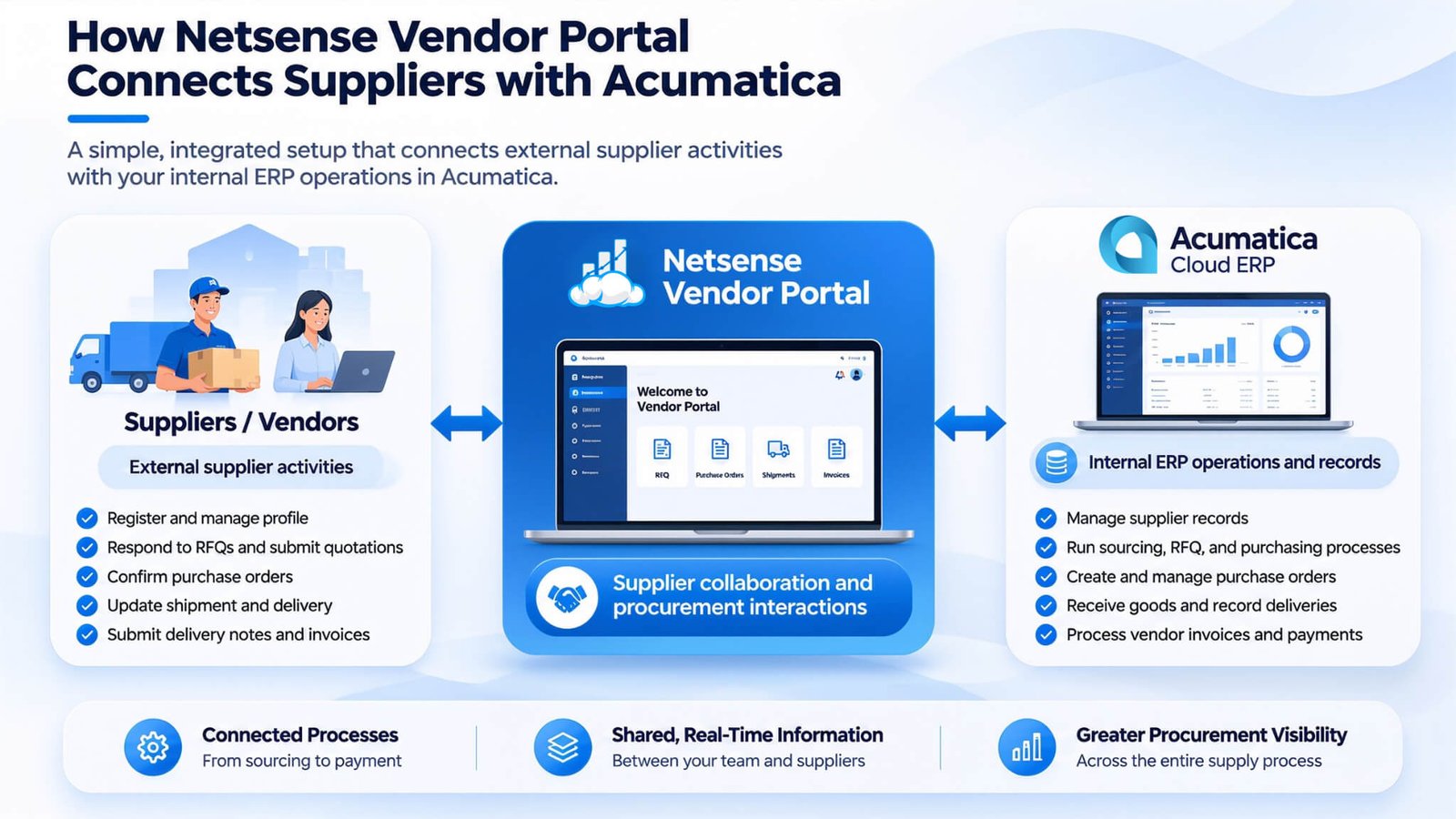
This model is intended to give suppliers a structured channel to participate in procurement without shifting the internal team away from its ERP environment. The exact activities available to each supplier depend on the organisation’s configured process and access arrangements.
Key Features of Netsense Vendor Portal
Vendor Onboarding and Vendor Management
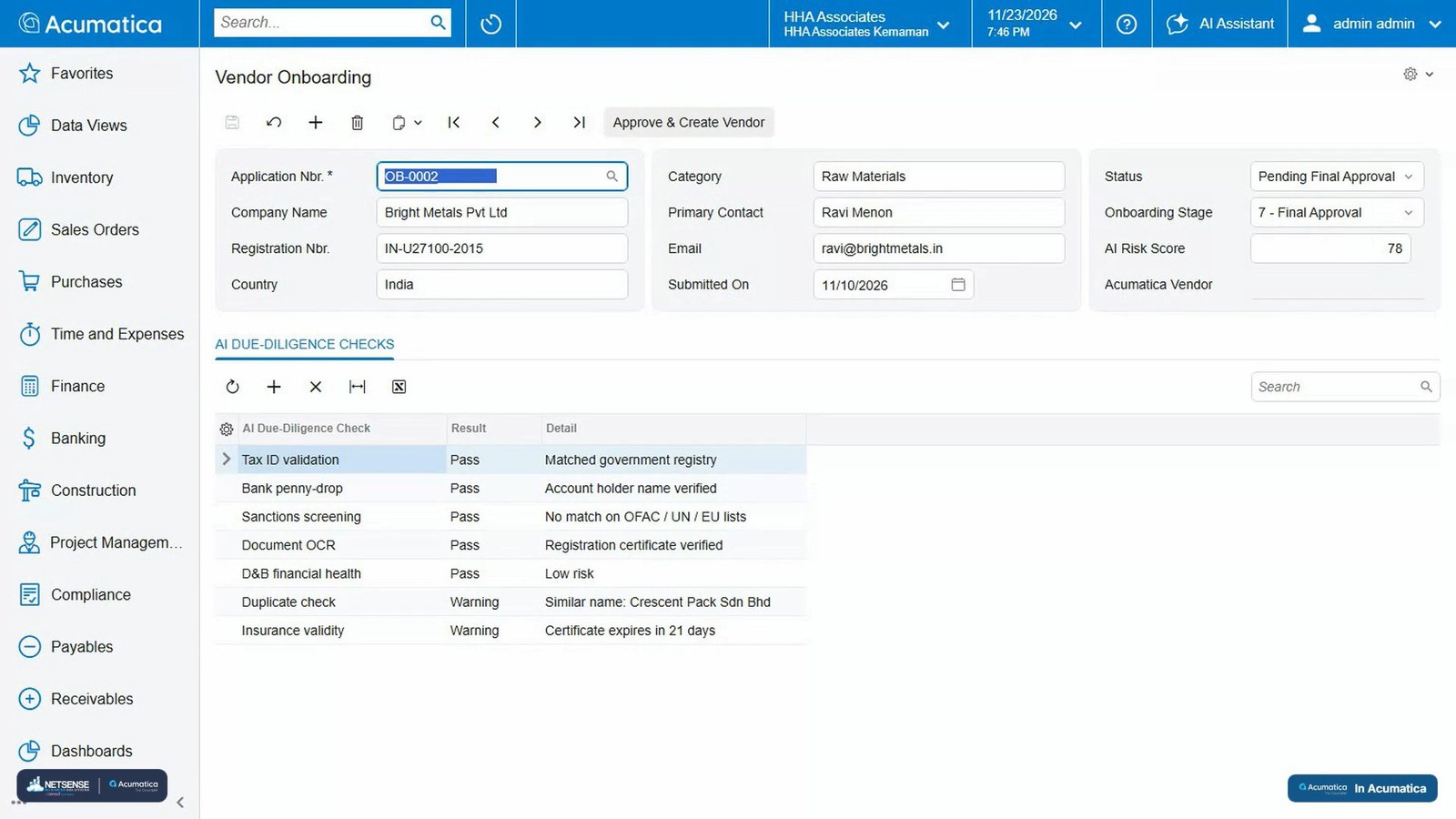
The portal provides a digital channel for bringing suppliers into the procurement process. This provides a more structured alternative to fragmented onboarding, where registration forms and bank letters arrive through email and vendor master information is keyed into Acumatica by hand.
Vendor Access and Role Management
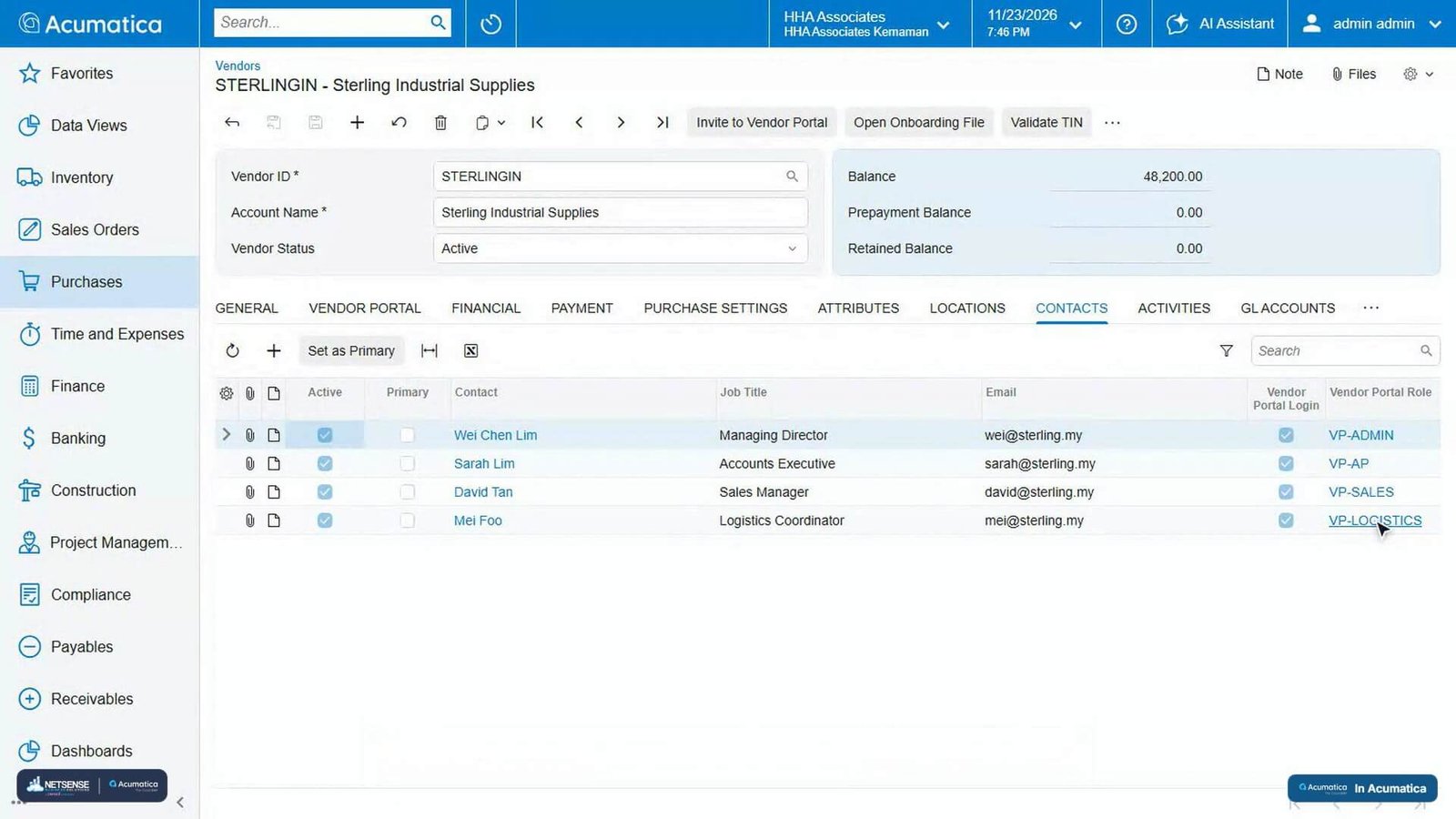
Supplier-facing access needs to be distinct from internal ERP responsibilities. The portal is presented as the interface vendors use, while internal users continue to manage core operations in Acumatica.
AI-Assisted Vendor Discovery
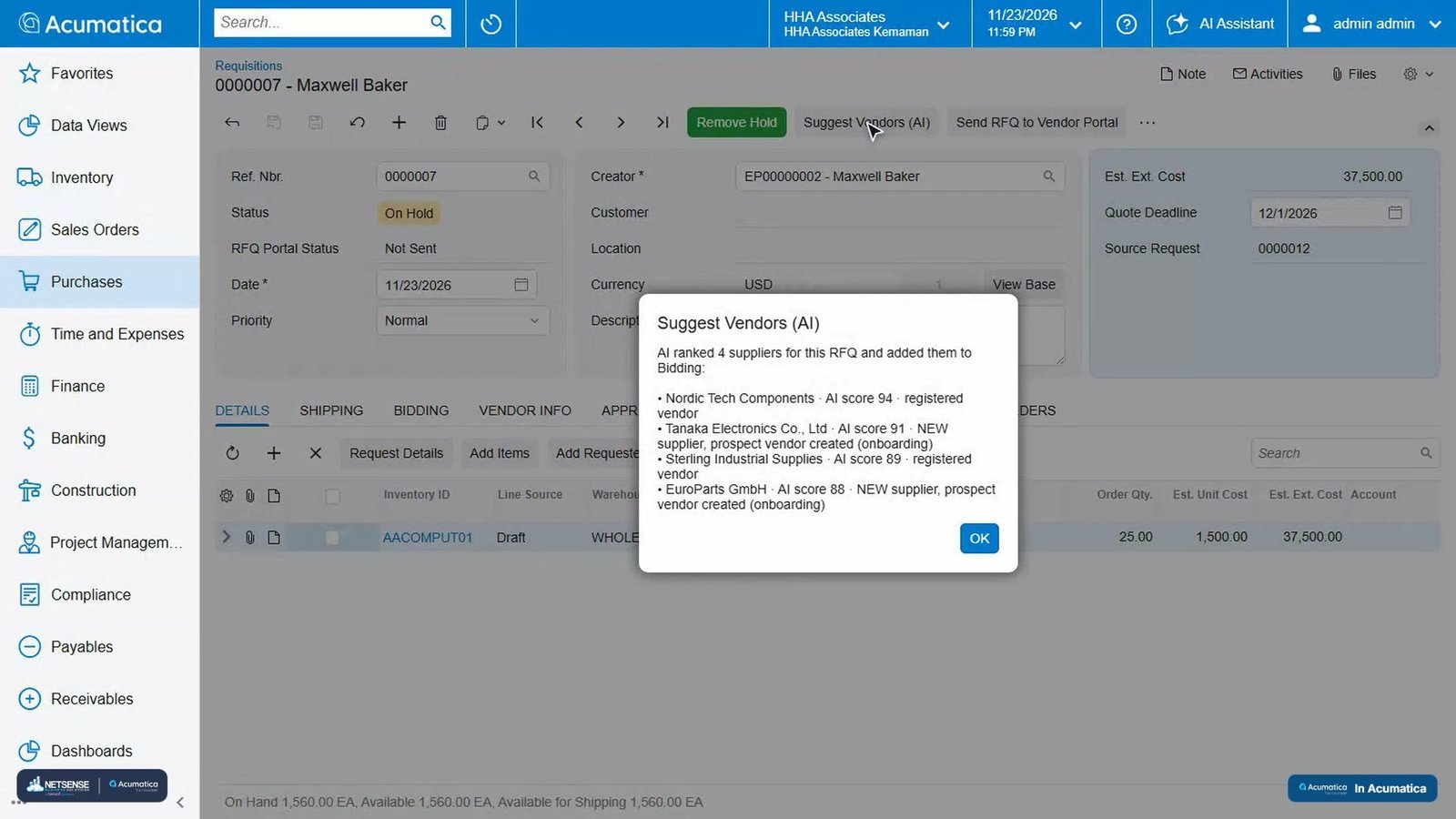
The portal’s sourcing proposition includes AI-ranked and AI-discovered suppliers. This capability is intended to help buyers broaden supplier discovery beyond repeatedly inviting only the usual vendors. It introduces an AI-assisted way to identify and rank potential suppliers as part of sourcing.
Also Read: AI in ERP: How Artificial Intelligence Is Transforming ERP Systems and Business Operations
RFQ and Supplier Quotation Management
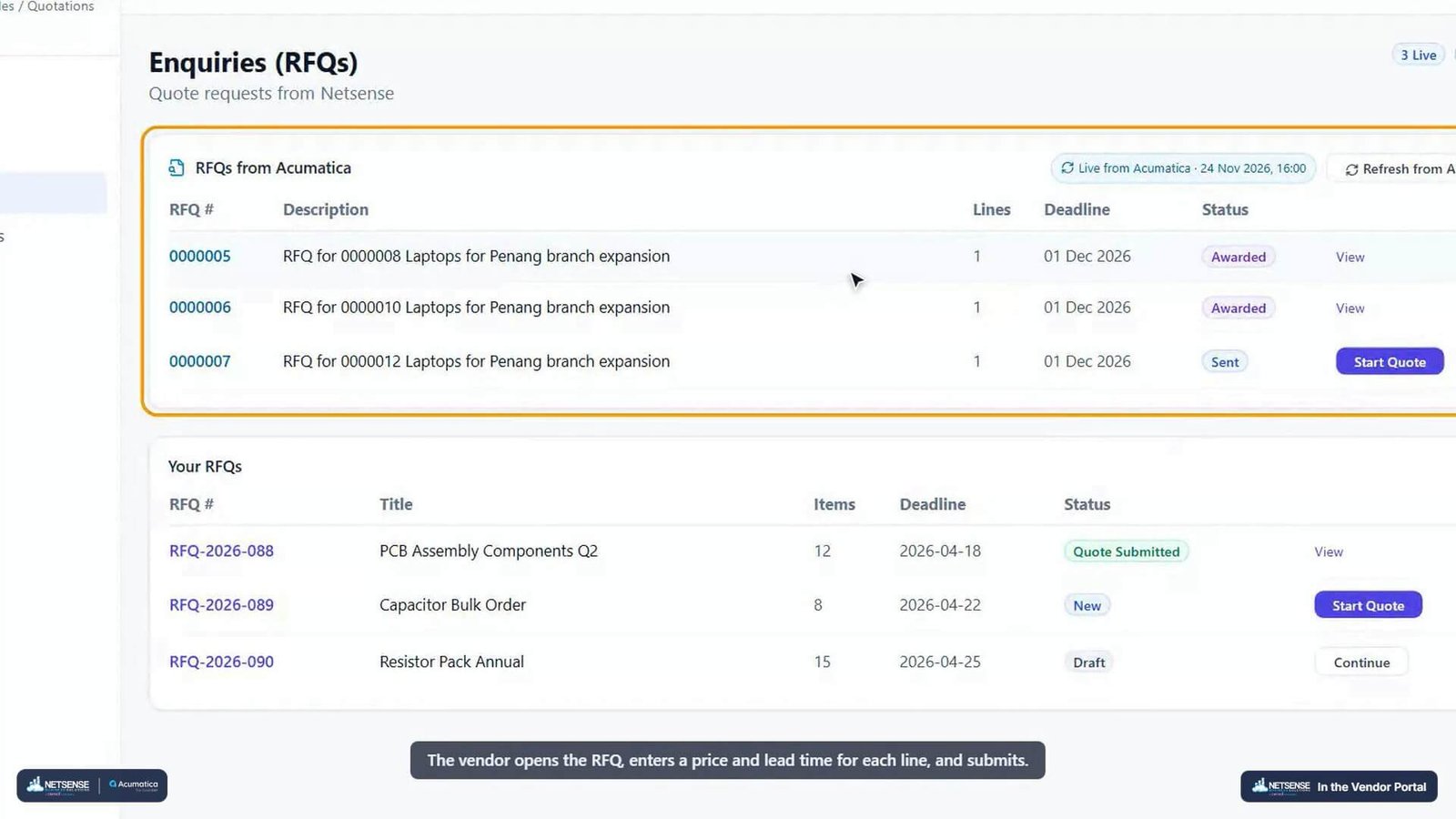
The portal supports the RFQ and quotation stage of procurement. Rather than relying only on email invitations and quotation attachments, suppliers can participate in the sourcing process through the portal and submit their quotations.
Purchase Order Management
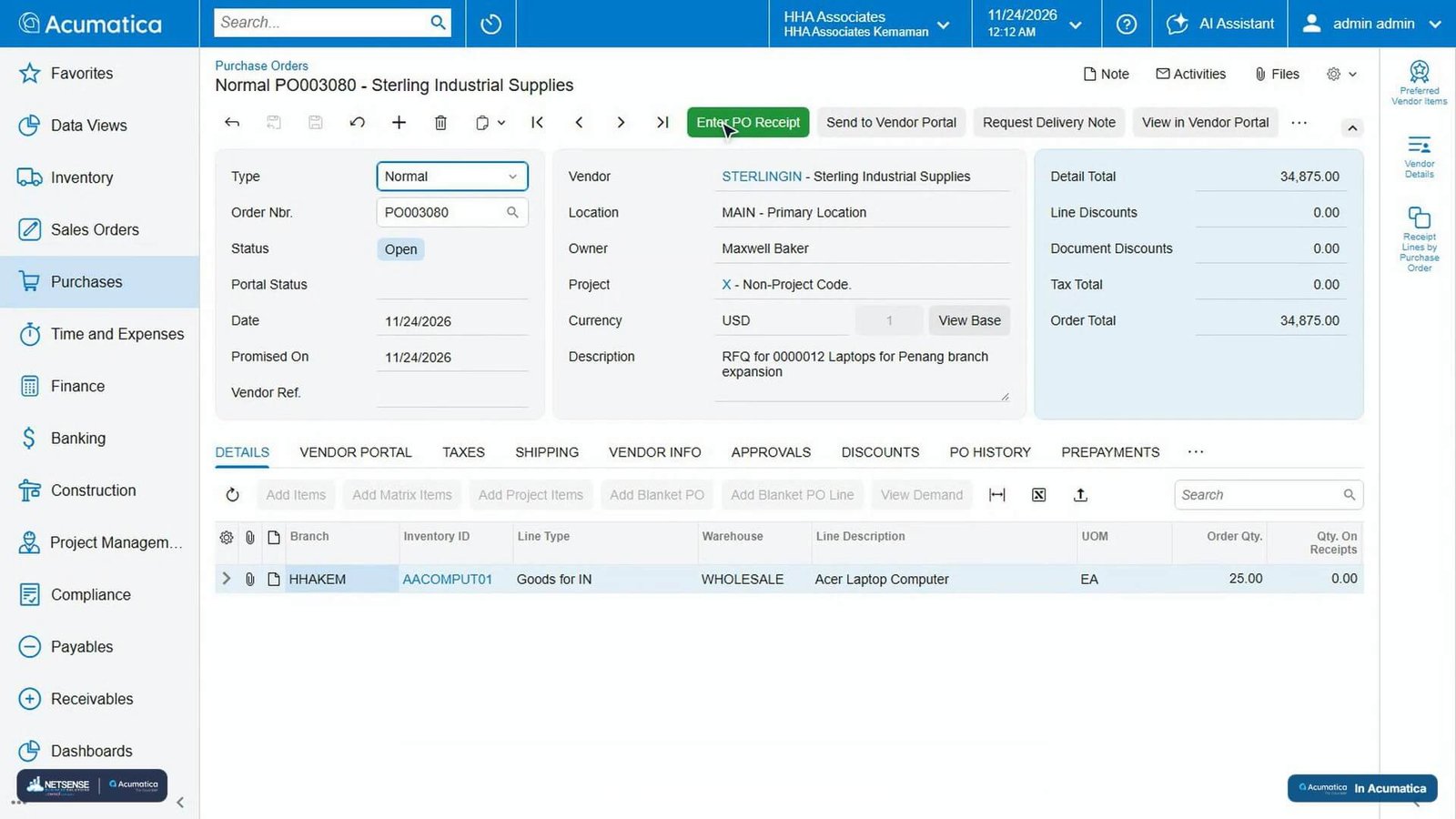
Once a sourcing decision has been made and a purchase order is issued through the internal process, the supplier-facing workflow includes purchase order acknowledgement. This gives vendors a defined way to respond to the order rather than leaving confirmation solely in an email conversation.
Purchase Order Visibility and Tracking
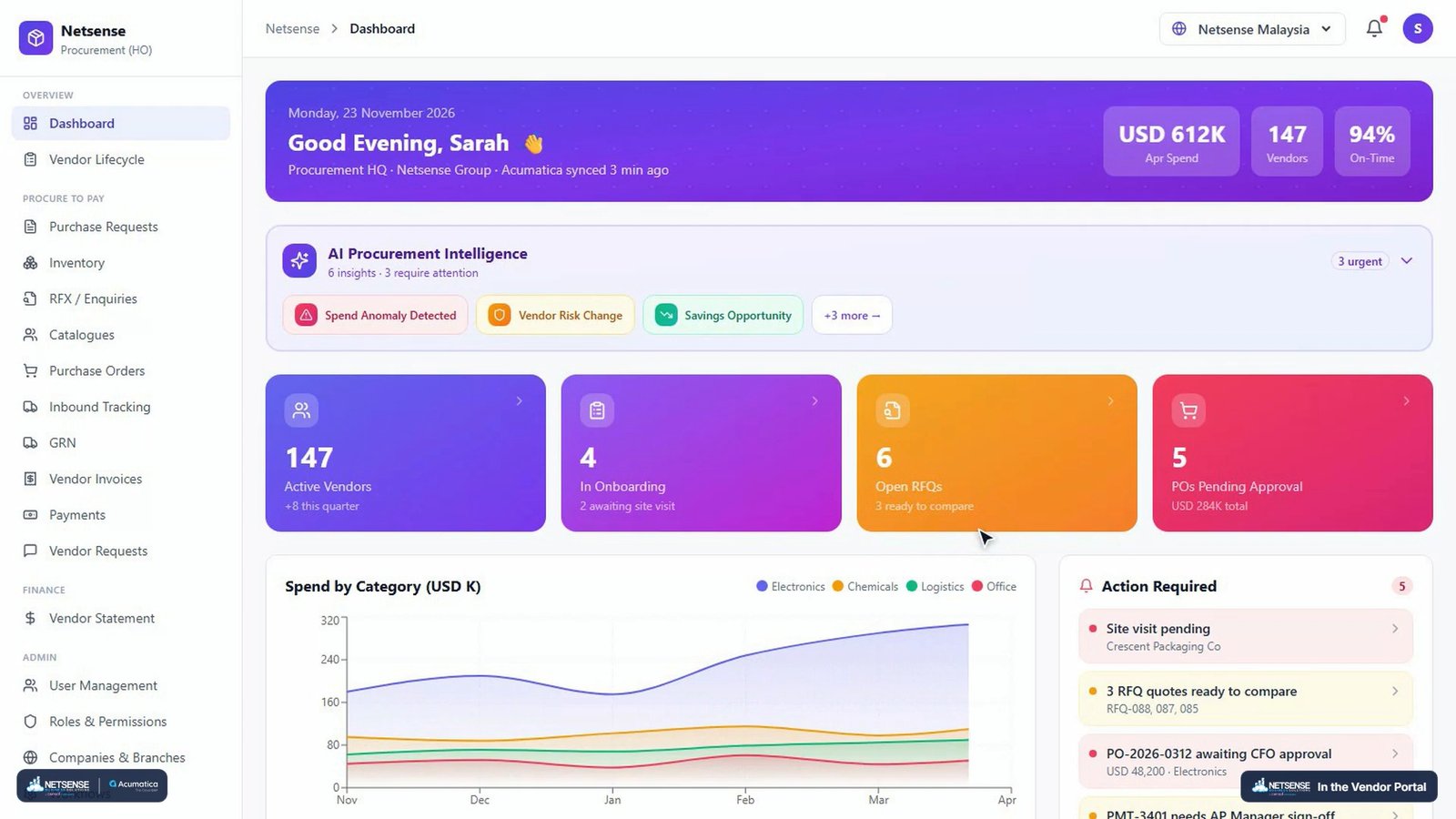
A supplier-facing view of purchase orders helps vendors and buyers work from a clearer reference for order collaboration. The portal’s purchase order acknowledgement and order-related views are intended to reduce uncertainty about whether an order has been received and acknowledged. Internal purchase order management remains within Acumatica.
Inbound Shipment Tracking
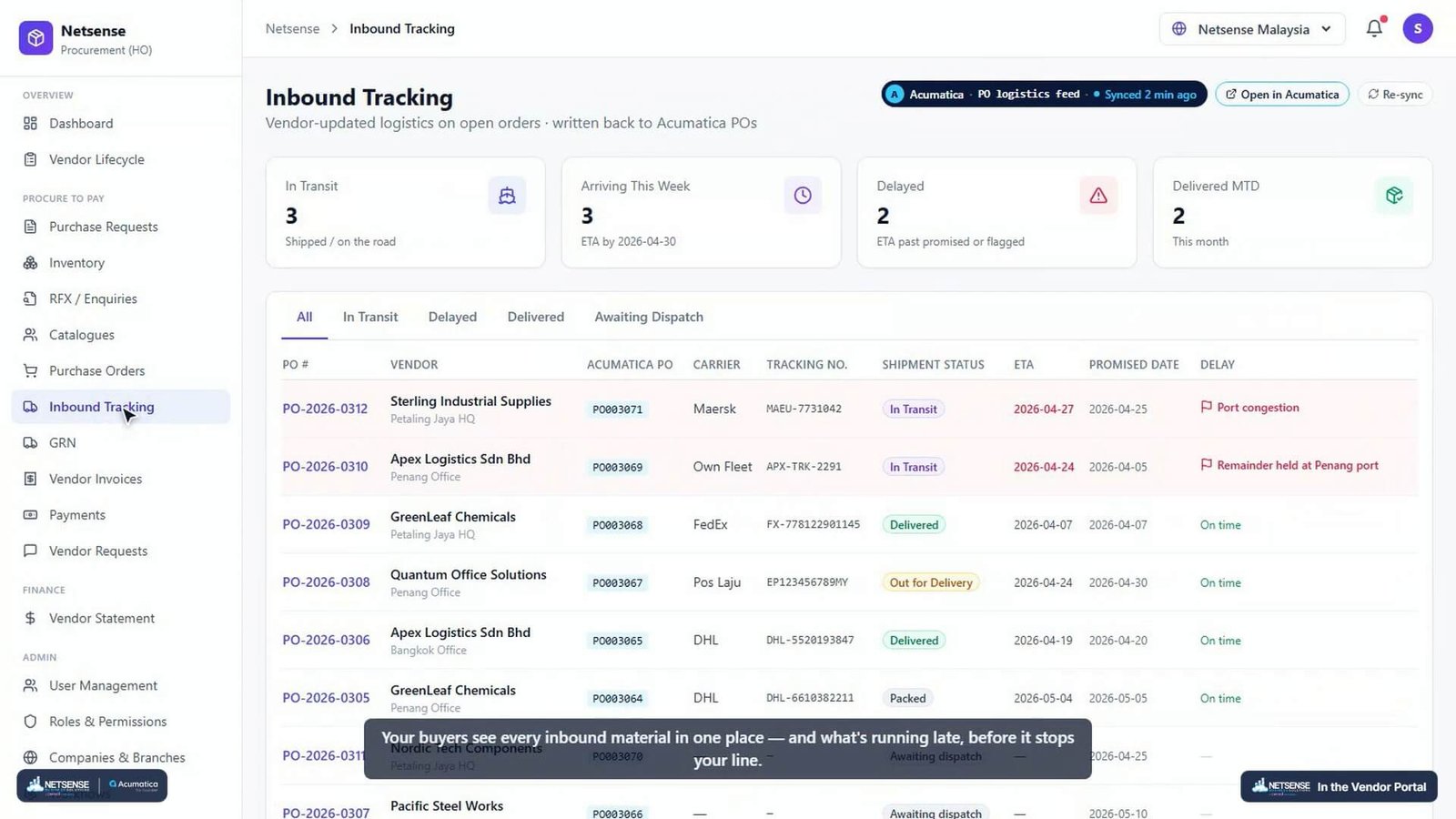
The portal includes shipment updates from suppliers. This addresses a common visibility gap: without a shared channel for delivery updates, delays may only be discovered after goods fail to arrive. Supplier-provided shipment information can give the buying organisation earlier visibility of expected inbound materials.
Goods Receipt and Delivery Note Submission
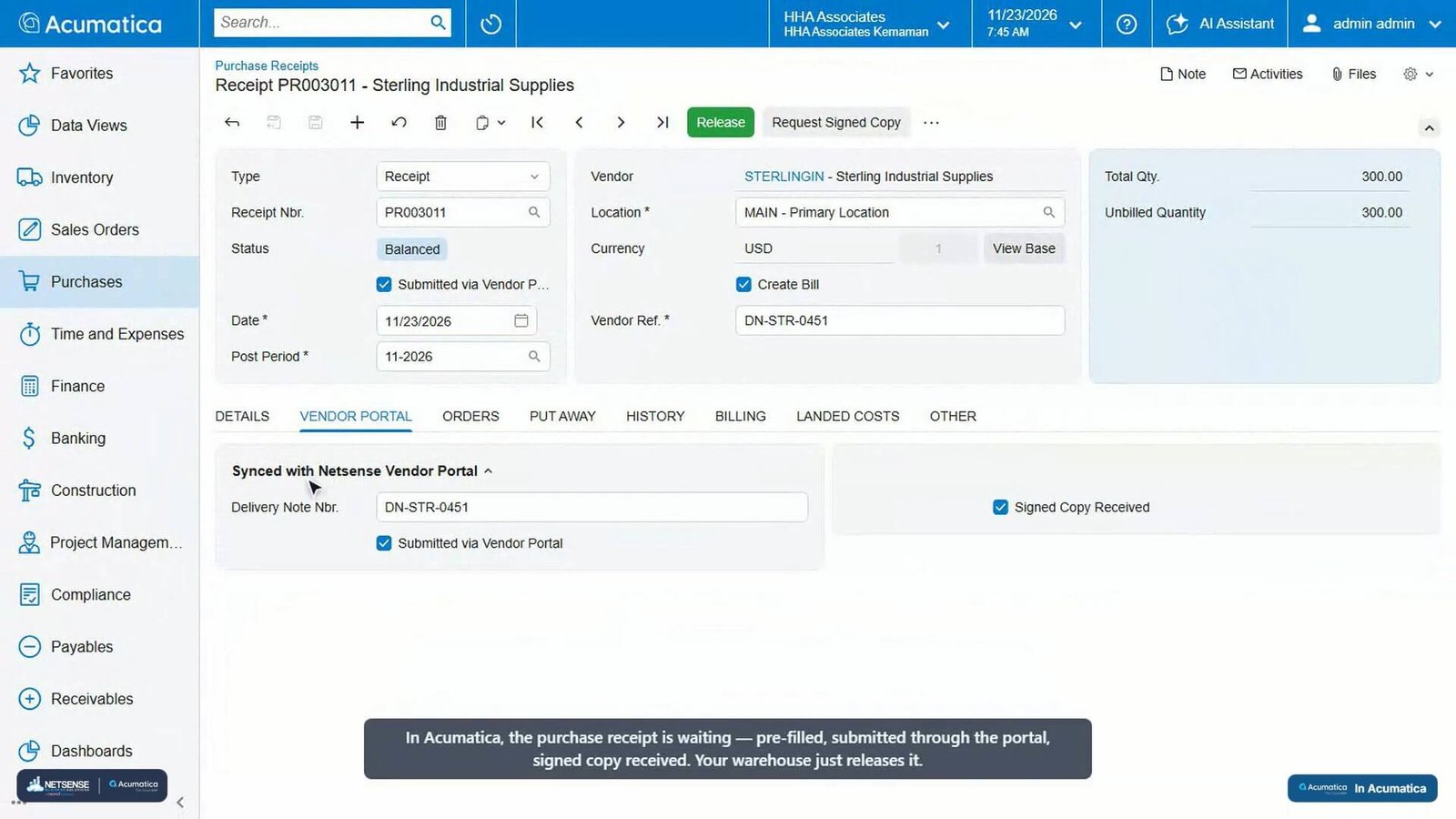
The supplier workflow includes delivery note submission, while the internal Acumatica environment includes purchase receipt processing. This supports a more connected hand-off between the supplier’s delivery documentation and the organisation’s receiving process. These activities form connected steps on the supplier and internal ERP sides
Vendor Invoice Submission and Management
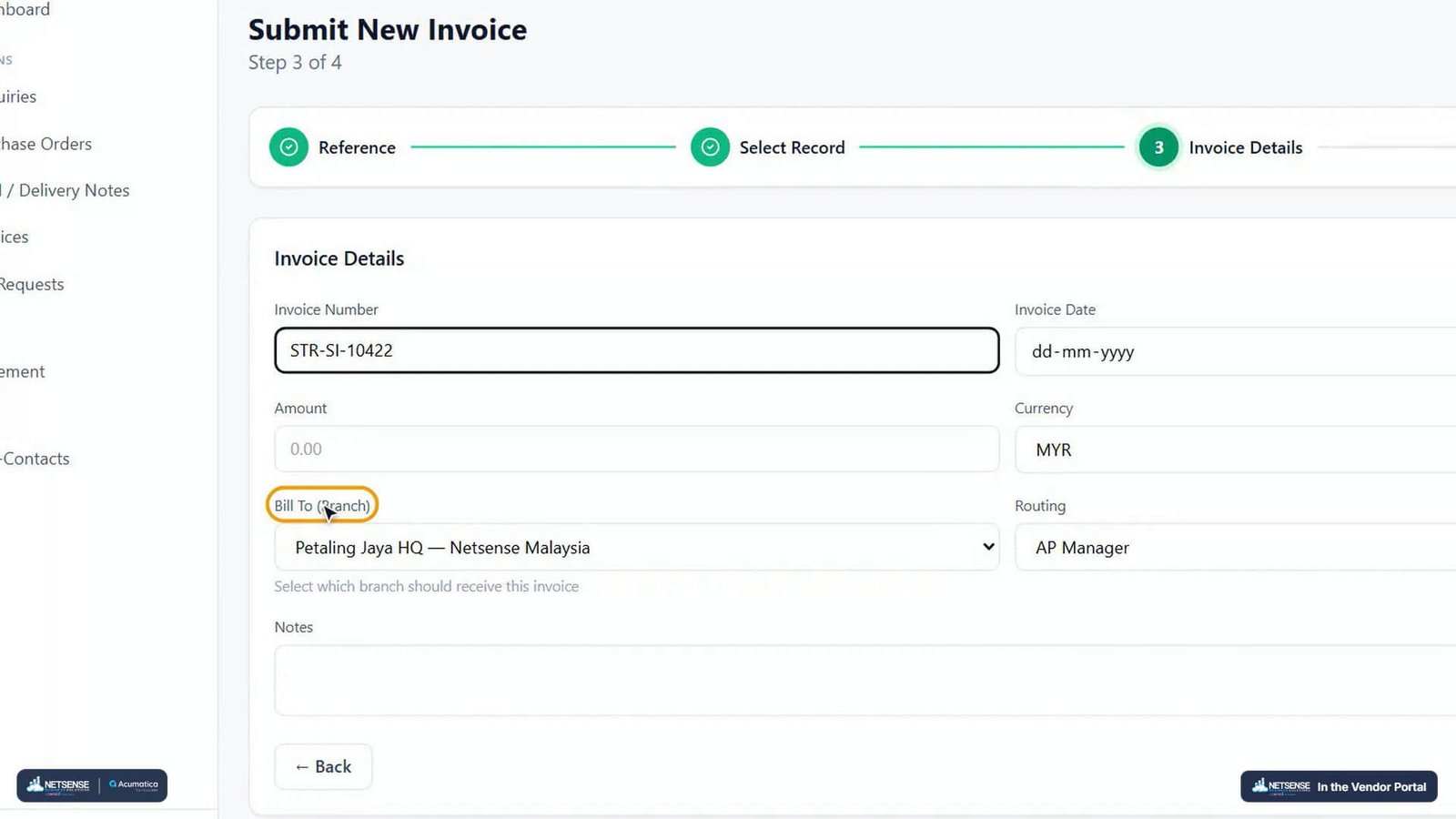
The portal includes invoice submission by vendors. This provides a defined supplier channel for sending invoice information and documents, rather than relying exclusively on email. The internal team continues to manage bills and payment-related activities in Acumatica. Organisations should retain their own invoice review, matching and approval controls.
How Netsense Vendor Portal Works with Acumatica
Vendor Registration and Onboarding
A supplier begins by completing the onboarding activities made available through the portal. The organisation can use this channel to collect supplier registration information and supporting documents in a more structured manner.
Supplier Sourcing and RFQ
When a purchasing requirement needs supplier input, the sourcing process can use the portal to engage vendors. RFQs can be supported by AI-assisted supplier discovery, providing a route to reach beyond the usual supplier list.
Quotation Submission and Review
Invited suppliers submit their quotations through the supplier-facing process. Procurement staff can then review the responses as part of their evaluation and selection process.
Purchase Order Collaboration
Following the internal purchasing decision, the purchase order is managed within the Acumatica environment. The supplier can then use the portal to acknowledge the PO. This creates a clearer point of collaboration after the order is issued and helps reduce reliance on informal confirmation messages.
Shipment and Delivery Updates
As the order moves toward fulfilment, suppliers can provide shipment updates through the portal. This gives the buying organisation information about inbound deliveries and helps teams identify potential delays earlier than they might through a process based only on waiting for goods to arrive.
Goods Receipt Processing
When goods arrive, delivery note information submitted through the supplier process can support the receiving workflow. The internal team handles purchase receipt activities in Acumatica, where the organisation maintains its operational record of goods received.
Vendor Invoice Submission
The supplier can submit an invoice through the portal. The internal finance team continues its bill, review and payment processes in Acumatica. This division keeps supplier submission separate from internal financial control while providing a more defined channel for invoice documents.
Business Benefits of Using a Vendor Portal with Acumatica
Improve Supplier Collaboration
A dedicated portal gives suppliers a consistent place to participate in onboarding, sourcing, order acknowledgement, shipment updates and document submission. Buyers spend less time coordinating routine interactions across disconnected channels and can direct suppliers to a defined process.
Increase Procurement Visibility
When supplier activity is channelled through a shared portal, the organisation has a clearer way to follow important procurement interactions. Visibility into quotation responses, PO acknowledgement and shipment updates can help teams understand what has happened and what may require attention.
Reduce Manual Communication and Administrative Work
Structured supplier submissions can reduce repeated email follow-ups and the need to gather the same information from multiple conversations. The potential benefit is a more organised process for collecting supplier information, quotations, delivery notes and invoices.
Improve Purchase Order Tracking
Supplier acknowledgement provides a clearer response point after a PO is issued. Combined with shipment updates, it helps procurement teams follow the order beyond the moment it leaves the internal purchasing process.
Support More Structured Invoice Processing
Vendor invoice submission through the portal gives suppliers a defined channel for sending invoices. Finance teams can continue to review and manage bills in Acumatica, supporting a clearer separation between external submission and internal financial processing.
Strengthen Procurement Control Across Operations
Connecting supplier-facing activity with the ERP environment can reduce information fragmentation. It gives procurement, operations and finance teams a more consistent process to work with, while keeping internal records and decisions within Acumatica. The portal supports process structure; policies, approval authority and control design remain the organisation’s responsibility.
Who Can Benefit from Netsense Vendor Portal?
Manufacturing Companies
Manufacturers often coordinate suppliers around material availability and delivery timing. A supplier channel for RFQs, order acknowledgement and shipment updates can help purchasing teams follow inbound supply information that may affect production planning.
Also Read: Acumatica ERP for Manufacturing: Key Features for Modern Operations
Distribution Businesses
Distributors may manage a broad supplier base and recurring purchase orders. A portal can provide a more consistent way to handle supplier interactions and track order and delivery information across purchasing activities.
Construction Companies
Construction businesses coordinate suppliers and deliveries across projects and locations. A structured supplier collaboration process can help teams manage RFQs, order confirmations and delivery documentation with greater visibility.
Multi-Branch Organisations
Where purchasing and deliveries involve multiple branches, information can become fragmented between local teams and head office. A supplier portal connected to the ERP process can support more consistent supplier interactions and a clearer view of purchasing activity.
Businesses Managing Multiple Suppliers
Any organisation that works with multiple vendors and needs repeatable onboarding, sourcing, order and invoice processes may benefit from a dedicated supplier interface. Suitability depends on the organisation’s supplier volume, process complexity and operational requirements.
Also Read: How Acumatica Helps Multi-Company Businesses Scale Faster
Why Integrate Supplier Collaboration with Acumatica ERP?
Supplier collaboration is part of procurement, not a separate activity that ends when an email is sent. Vendor information, quotations, purchase orders, deliveries and invoices all have a relationship with internal business operations.
A vendor portal designed for Acumatica helps connect the external supplier experience with the organisation’s internal ERP environment. Vendors use the portal for the interactions made available to them, while the internal team continues to manage purchasing, receiving and financial processes in Acumatica.
For organisations already using Acumatica, the value is not simply adding another application. It is creating a more structured way for suppliers to participate in processes that the business already manages through its ERP.
Frequently Asked Questions About Netsense Vendor Portal
What is Netsense Vendor Portal for Acumatica?
Netsense Vendor Portal is a supplier collaboration solution built for Acumatica. It provides vendors with a dedicated interface for selected procurement activities, while the organisation’s internal team continues to work in Acumatica.
How does a vendor portal work with Acumatica ERP?
The portal provides the supplier-facing channel for activities such as onboarding, RFQs, quotation submission, PO acknowledgement, shipment updates, delivery notes and invoices. Internal users continue to manage core ERP activities in Acumatica.
Can suppliers access purchase orders through the vendor portal?
The supplier workflow shown in the product includes purchase order collaboration and PO acknowledgement. The organisation’s purchase order management remains within Acumatica.
Can vendors submit quotations and respond to RFQs?
Yes. The portal supports RFQ and supplier quotation interactions, allowing invited suppliers to submit quotations through the supplier-facing process.
Can suppliers update shipment and delivery information?
The portal includes shipment updates and delivery note submission, giving suppliers a defined channel to provide delivery-related information.
Can vendors submit invoices through the portal?
Yes. Vendor invoice submission is included in the portal workflow. The internal team continues to manage bills and payment activities in Acumatica.
How does a vendor portal improve procurement visibility?
It gives suppliers a shared channel for key interactions such as quotation responses, PO acknowledgement and shipment updates. This can make supplier activity easier for the buying organisation to follow than relying only on separate emails and attachments.
Who should consider using Netsense Vendor Portal?
Businesses using Acumatica that manage multiple suppliers, recurring purchasing, RFQs, deliveries or vendor invoices may consider the portal. Manufacturing, distribution, construction and multi-branch organisations may find the supplier collaboration use cases particularly relevant.
Explore Netsense Vendor Portal for Acumatica
Supplier collaboration has a direct impact on how well procurement information moves between a business and its vendors. When onboarding, sourcing, purchase order acknowledgement, shipment updates, delivery notes and invoice submission are managed through disconnected channels, teams can spend valuable time chasing information and reconciling documents.
Netsense Vendor Portal for Acumatica provides a dedicated supplier-facing interface for these interactions while allowing the internal team to continue working in Acumatica. It is designed to help organisations create a more structured connection between external supplier activities and internal procurement operations.
If your business uses Acumatica and wants to improve how suppliers participate in procurement, Netsense Business Solutions can help you explore whether the Vendor Portal fits your operational requirements. Discuss your current supplier processes, procurement challenges and desired workflow with the Netsense team.