Acumatica and SAP Business One are both capable ERP solutions for small and mid-sized businesses, but they are designed for different growth strategies.
Acumatica is generally a better fit for growing companies that prioritize cloud accessibility, scalability, multi-entity management, and broad user adoption across departments. Its licensing model is particularly attractive for organizations expecting user counts to increase as the business expands.
SAP Business One is often a strong choice for small and medium-sized businesses that require core ERP functionality, deployment flexibility, and a proven ERP platform backed by the SAP ecosystem. It can be especially suitable for companies with stable user counts and less complex growth requirements.
For CFOs and IT managers evaluating long-term business growth, Acumatica often provides greater flexibility for scaling operations, while SAP Business One remains a reliable option for organizations seeking a traditional ERP approach. The right choice depends on your company’s growth plans, operational complexity, deployment preferences, and total cost of ownership over the coming years.
Table of contents
- Acumatica vs SAP Business One at a Glance
- Understanding Acumatica and SAP Business One
- Acumatica vs SAP Business One: Core Feature Comparison
- Acumatica vs SAP Business One Pricing Comparison
- Acumatica vs SAP Business One Implementation Comparison
- Acumatica vs SAP Business One for Manufacturing Companies
- Acumatica vs SAP Business One for Distribution Companies
- Acumatica vs SAP Business One for Multi-Entity Businesses
- Acumatica vs SAP Business One for CFOs
- Acumatica vs SAP Business One for IT Managers
- Total Cost of Ownership (TCO) Comparison
- Pros and Cons
- Why Companies Move from SAP Business One to Acumatica
- When SAP Business One Is the Better Choice
- When Acumatica Is the Better Choice
- Final Verdict: Which ERP Fits Growing Companies Better?
- Why Work with Netsense Business Solutions
- Ready to Evaluate Acumatica for Your Business?
- Frequently Asked Questions (FAQ)
Acumatica vs SAP Business One at a Glance
For many CFOs and IT managers, the challenge is not finding an ERP system with the right features—it’s identifying which platform will continue supporting the business as it grows. While both Acumatica and SAP Business One deliver comprehensive ERP capabilities, they differ significantly in deployment philosophy, licensing structure, scalability, and long-term operational flexibility.
The table below provides a high-level comparison of the two solutions across the criteria most commonly evaluated during ERP selection projects.
| Criteria | Acumatica | SAP Business One |
|---|---|---|
| Deployment | Cloud-first ERP platform | Cloud or on-premises deployment |
| Licensing Model | Resource-based licensing, not primarily tied to user count | User-based licensing model |
| Cloud Access | Designed for cloud accessibility from any location | Available through cloud deployment options |
| Mobile Access | Native mobile-friendly experience | Mobile and web client access available |
| User Scalability | Well-suited for organizations with growing user counts | Additional users typically require additional licenses |
| Multi-Entity Management | Strong support for multi-company and multi-entity operations | Supports multiple entities with additional configuration requirements |
| Financial Management | Comprehensive financial management and consolidation capabilities | Robust financial and accounting functionality |
| Accounts Payable & Receivable | Advanced automation and workflow support | Comprehensive AP and AR management |
| Inventory Management | Real-time inventory visibility across locations | Strong inventory control and tracking capabilities |
| Warehouse Management | Advanced warehouse and distribution functionality | Suitable for standard warehouse operations |
| Manufacturing Management | Broad manufacturing and production capabilities | Core manufacturing functionality available |
| Project Accounting | Strong project-based accounting and cost tracking | Available through extensions and configuration |
| CRM Functionality | Integrated CRM capabilities | Built-in CRM functionality |
| Reporting & Dashboards | Real-time dashboards and role-based analytics | Standard reporting and dashboard tools |
| Business Intelligence | Embedded analytics and operational insights | Reporting and analytical tools available |
| Customization Flexibility | Highly configurable modern platform architecture | Extensive customization options through partner ecosystem |
| Third-Party Integrations | Extensive API and integration capabilities | Large ecosystem of integrations and add-ons |
| Remote Workforce Support | Built for distributed and hybrid work environments | Supported depending on deployment model |
| Upgrade Process | Simplified cloud-based upgrade approach | Varies depending on deployment and customization level |
| Infrastructure Requirements | Reduced infrastructure management burden | Greater flexibility, especially for on-premises environments |
| Security & Access Controls | Role-based security and governance controls | Comprehensive security framework |
| Ease of Use | Modern user experience designed for broad adoption | Familiar ERP interface with extensive functionality |
| Scalability | Designed to support long-term business growth | Suitable for growing SMBs with moderate complexity |
| Multi-Currency Support | Yes | Yes |
| Global Operations Support | Strong support for multi-country operations | Strong international business capabilities |
| Total Cost of Ownership (TCO) | Often advantageous for businesses with expanding user bases | Can be cost-effective for organizations with stable user counts |
| Partner Ecosystem | Global network of implementation partners | Extensive SAP partner ecosystem worldwide |
| AI Readiness | Modern cloud platform supporting future innovation initiatives | Evolving capabilities within the SAP ecosystem |
| Best Fit | Growing companies prioritizing scalability, cloud accessibility, and operational flexibility | Small and midsize businesses seeking a proven ERP platform with flexible deployment options |
Key Takeaways
At a high level, Acumatica and SAP Business One deliver many of the same core ERP capabilities, including financial management, inventory control, purchasing, reporting, and operational visibility. The biggest differences emerge when evaluating long-term growth requirements.
Acumatica tends to stand out for organizations pursuing a cloud-first strategy, expanding user access across departments, managing multiple entities, or preparing for significant growth over the next several years.
SAP Business One remains a strong contender for businesses that value deployment flexibility, have established processes built around traditional ERP models, or want to leverage the broader SAP ecosystem.
For most growing companies, the decision ultimately comes down to whether future scalability, user expansion, and cloud adoption are strategic priorities—or whether a more traditional ERP deployment approach better aligns with current business needs.
Understanding Acumatica and SAP Business One
Before comparing features, pricing, and scalability, it is important to understand the philosophy behind each ERP platform. While Acumatica and SAP Business One share many core ERP capabilities, they were built with different approaches to business growth, deployment, and user adoption.
Understanding these differences can help CFOs and IT managers determine which platform aligns more closely with their organization’s long-term strategy.
What Is Acumatica?
Acumatica is a cloud ERP platform designed for small and mid-sized businesses that need a scalable, modern system to manage financials, operations, inventory, purchasing, manufacturing, customer relationships, and business reporting.
Unlike many traditional ERP solutions, Acumatica was developed with a cloud-first architecture, enabling organizations to access business data from anywhere while maintaining a single source of truth across departments.
One of Acumatica’s most distinctive characteristics is its licensing approach. Rather than focusing primarily on user-based licensing, Acumatica is designed to support broad user adoption across the organization. This makes it particularly attractive for companies that expect user counts to grow as the business expands.
Acumatica is commonly adopted by organizations that:
- Are replacing disconnected systems and spreadsheets.
- Require real-time visibility across multiple departments.
- Need support for multiple subsidiaries or business entities.
- Are pursuing digital transformation initiatives.
- Want to standardize processes across growing operations.
- Prefer a cloud-first technology strategy.
Industries commonly using Acumatica include:
- Manufacturing
- Wholesale Distribution
- Retail & Commerce
- Construction
- Professional Services
- Field Services
For growing organizations, Acumatica is often viewed as a platform that can scale alongside business expansion without requiring a complete ERP replacement a few years later.
What Is SAP Business One?
SAP Business One is an ERP solution designed specifically for small and medium-sized businesses. It provides an integrated platform for managing finance, accounting, purchasing, inventory, sales, production, and customer relationships.
As part of the broader SAP ecosystem, SAP Business One brings many of the business process principles and operational controls associated with enterprise ERP systems into a solution tailored for smaller organizations.
One of SAP Business One’s strengths is deployment flexibility. Businesses can choose between cloud and on-premises environments depending on their operational requirements, compliance considerations, and internal IT strategy.
SAP Business One is commonly adopted by organizations that:
- Need a proven ERP platform for core business operations.
- Have established accounting and operational processes.
- Require strong inventory and financial controls.
- Want flexibility in deployment options.
- Prefer alignment with SAP technologies and methodologies.
Industries commonly using SAP Business One include:
- Manufacturing
- Distribution
- Wholesale Trade
- Retail
- Consumer Products
- Professional Services
For many organizations, SAP Business One provides a structured and reliable ERP foundation that supports operational efficiency and business management without the complexity of enterprise-level ERP platforms.
Key Difference in Philosophy
Although both solutions support similar business functions, their strategic focus is different.
Acumatica is designed around the idea of enabling growth through cloud accessibility, broad user adoption, and operational scalability.
SAP Business One is designed around delivering a comprehensive ERP foundation for small and medium-sized businesses through a mature and proven business management platform.
This distinction becomes increasingly important as organizations evaluate future growth plans, workforce expansion, multi-entity operations, and long-term technology investments.
Who Typically Uses Each ERP?
The table below summarizes which types of organizations are most commonly aligned with each platform.
| Business Scenario | Generally Better Fit |
|---|---|
| Small business with straightforward operational requirements | SAP Business One |
| Company evaluating its first ERP system | SAP Business One |
| Business with relatively stable employee growth | SAP Business One |
| Organization requiring on-premises deployment | SAP Business One |
| Existing investment in SAP technologies | SAP Business One |
| Fast-growing company expecting significant user growth | Acumatica |
| Multi-entity or multi-subsidiary organization | Acumatica |
| Cloud-first business strategy | Acumatica |
| Organization with distributed or remote teams | Acumatica |
| Company planning regional expansion across multiple countries | Acumatica |
| Business seeking broad ERP access across departments | Acumatica |
| Mid-sized company preparing for long-term scalability | Acumatica |
Bottom Line
Both Acumatica and SAP Business One are capable ERP platforms, but they serve different business priorities.
SAP Business One is often a strong fit for organizations seeking a proven ERP solution with flexible deployment options and well-established business management functionality.
Acumatica tends to be the stronger choice for growing companies that prioritize scalability, cloud accessibility, operational flexibility, and the ability to support future expansion without being constrained by traditional ERP limitations.
For CFOs and IT managers, the decision should not be based solely on current requirements. The most successful ERP projects are those that support where the business intends to be in three, five, or even ten years—not just where it is today.
Acumatica vs SAP Business One: Core Feature Comparison
At a high level, both Acumatica and SAP Business One deliver the core capabilities most businesses expect from a modern ERP system. Financial management, inventory control, purchasing, reporting, and operational visibility are available in both platforms.
The real differences become apparent when organizations evaluate scalability, operational complexity, multi-entity requirements, cloud accessibility, and industry-specific functionality.
For CFOs and IT managers, the goal is not simply to compare feature availability. The more important question is which platform can support business growth without creating operational constraints in the future.
Financial Management
Financial management is the foundation of every ERP system. Both Acumatica and SAP Business One provide comprehensive financial functionality, including general ledger, accounts payable, accounts receivable, cash management, fixed assets, and financial reporting.
Acumatica Strengths
- Real-time financial visibility
- Multi-entity accounting and consolidation
- Role-based financial dashboards
- Strong automation capabilities
- Cloud-based access to financial data
SAP Business One Strengths
- Mature accounting framework
- Comprehensive financial controls
- Strong multi-currency support
- Established reporting capabilities
- Proven financial management functionality
Verdict: Both solutions perform strongly in this category. Acumatica gains an advantage for organizations requiring advanced multi-entity visibility and cloud accessibility.
Winner: Acumatica (Slight Edge)
Purchasing
Efficient procurement processes are critical for maintaining profitability and supply chain efficiency.
Acumatica Strengths
- Automated purchasing workflows
- Vendor management
- Requisition management
- Approval workflows
- Real-time purchasing visibility
SAP Business One Strengths
- Purchase order management
- Vendor master management
- Procurement reporting
- Inventory-linked purchasing processes
For organizations with more complex approval structures and growing procurement teams, Acumatica typically offers greater workflow flexibility.
Winner: Acumatica
Inventory Management
Inventory accuracy directly impacts working capital, customer satisfaction, and operational efficiency.
Acumatica Strengths
- Real-time inventory visibility
- Multi-location inventory tracking
- Lot and serial number tracking
- Inventory forecasting
- Automated replenishment
SAP Business One Strengths
- Inventory tracking and control
- Batch and serial number management
- Inventory valuation methods
- MRP integration
Both platforms provide strong inventory capabilities, but Acumatica often delivers greater visibility across multiple locations and business units.
Winner: Acumatica
Warehouse Management
Warehouse operations become increasingly important as businesses scale.
Acumatica Strengths
- Warehouse management functionality
- Mobile warehouse operations
- Barcode support
- Picking and packing processes
- Real-time warehouse visibility
SAP Business One Strengths
- Warehouse inventory control
- Bin location management
- Inventory movement tracking
- Standard warehouse processes
Organizations operating multiple warehouses or distribution centers often find Acumatica more scalable as operational complexity increases.
Winner: Acumatica
CRM
A modern ERP should help organizations maintain visibility across both operational and customer-facing activities.
Acumatica Strengths
- Integrated CRM functionality
- Opportunity management
- Lead tracking
- Customer service visibility
- Unified customer and financial data
SAP Business One Strengths
- Customer management capabilities
- Sales opportunity tracking
- Contact management
- Customer activity history
Both solutions provide CRM functionality, although Acumatica’s cloud-first design creates a more connected experience between front-office and back-office processes.
Winner: Acumatica
Manufacturing
Manufacturing companies often require specialized functionality beyond standard ERP capabilities.
Acumatica Strengths
- Manufacturing resource planning (MRP)
- Production management
- Engineering change control
- Product configuration
- Shop floor visibility
- Production analytics
SAP Business One Strengths
- Bills of Materials (BOM)
- Production orders
- Capacity planning
- Material requirements planning
For manufacturers experiencing growth and increasing production complexity, Acumatica generally offers broader functionality.
Winner: Acumatica
Distribution
Distribution companies require strong inventory, purchasing, warehouse, and fulfillment capabilities.
Acumatica Strengths
- Demand planning
- Warehouse optimization
- Real-time inventory visibility
- Procurement automation
- Distribution analytics
SAP Business One Strengths
- Inventory and order management
- Purchasing integration
- Supply chain visibility
- Distribution reporting
Acumatica is particularly strong in wholesale distribution environments where inventory accuracy and operational visibility are critical.
Winner: Acumatica
Project Accounting
Project accounting is essential for organizations managing customer projects, internal initiatives, or project-based billing.
Acumatica Strengths
- Project budgeting
- Resource tracking
- Cost management
- Revenue recognition
- Project profitability analysis
SAP Business One Strengths
- Cost tracking capabilities
- Project monitoring
- Basic project reporting
Organizations in professional services, construction, engineering, and project-driven industries often find Acumatica’s project accounting capabilities more comprehensive.
Winner: Acumatica
Reporting & Analytics
ERP data is only valuable if decision-makers can easily access and understand it.
Acumatica Strengths
- Real-time dashboards
- Role-based reporting
- Operational KPIs
- Financial analytics
- Business-wide visibility
SAP Business One Strengths
- Standard reporting tools
- Financial reporting
- Operational reporting
- Dashboard functionality
For CFOs and department leaders seeking immediate business insights, Acumatica generally provides a more modern reporting experience.
Winner: Acumatica
Mobile Accessibility
The ability to access ERP data from anywhere has become increasingly important for modern organizations.
Acumatica Strengths
- Cloud-native access
- Mobile-friendly user experience
- Remote workforce support
- Browser-based accessibility
SAP Business One Strengths
- Mobile applications available
- Web client support
- Remote access capabilities
Both solutions support mobility, but Acumatica was designed from the ground up with cloud accessibility as a core principle.
Winner: Acumatica
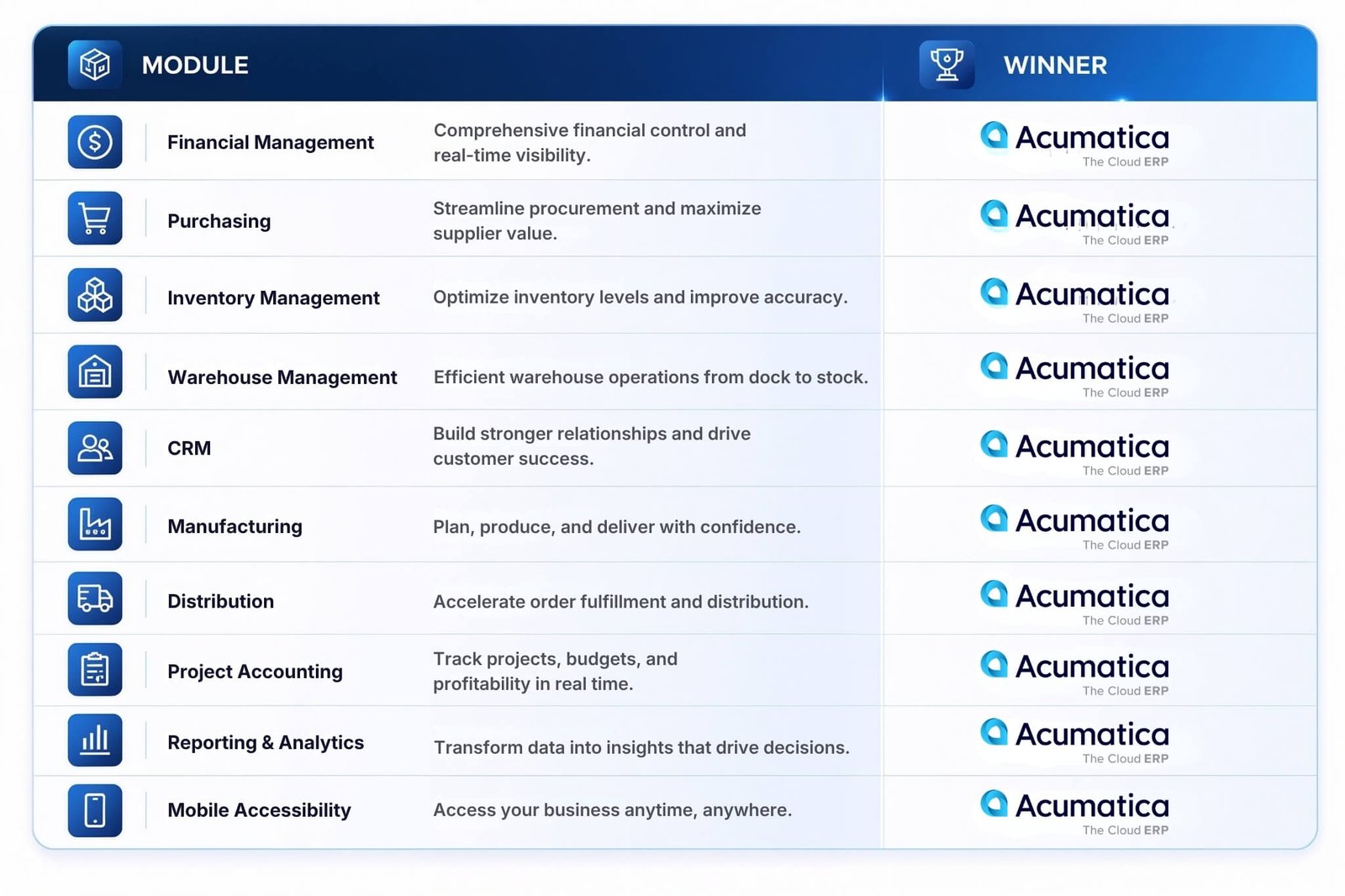
Module Comparison Scorecard
The purpose of this scorecard is not to declare an absolute winner, but to highlight which platform generally offers greater flexibility and scalability for growing businesses.
Overall Assessment
SAP Business One remains a capable ERP platform that successfully supports thousands of small and medium-sized businesses worldwide. It delivers strong financial management, inventory control, and operational functionality within a proven ERP framework.
However, when evaluated through the lens of growth, scalability, cloud accessibility, operational flexibility, and long-term business expansion, Acumatica tends to offer broader capabilities for organizations preparing for the next stage of growth.
This does not necessarily mean Acumatica is the right choice for every company. Businesses with relatively simple operational requirements, stable user counts, or existing investments in the SAP ecosystem may still find SAP Business One to be an excellent fit.
The next critical comparison is pricing and licensing—an area where the differences between these two ERP platforms become even more significant for CFOs and executive decision-makers.
Acumatica vs SAP Business One Pricing Comparison
For many CFOs, ERP pricing is where the evaluation process becomes significantly more complex.
The challenge is that ERP software costs extend far beyond the initial subscription fee or software license. A complete financial assessment should consider implementation, user growth, infrastructure requirements, maintenance, upgrades, training, and long-term scalability.
This is why organizations evaluating Acumatica and SAP Business One should focus on Total Cost of Ownership (TCO) rather than software pricing alone.
While exact pricing varies based on business requirements, deployment scope, user counts, modules, and implementation complexity, the licensing philosophy behind each platform differs considerably.
How Acumatica Pricing Works
Acumatica follows a licensing model that is not primarily based on the number of users accessing the system.
Instead, pricing is generally influenced by factors such as:
- Applications and modules deployed
- Business resource consumption
- Transaction volume and operational requirements
- Deployment scope
- Business complexity
This approach allows organizations to expand ERP access across departments without necessarily increasing software costs every time a new employee requires access.
For growing companies, this can simplify long-term budgeting because ERP adoption is not restricted by user-based licensing concerns.
Potential Advantages for Growing Businesses
- Easier to expand ERP access across departments
- Supports company-wide adoption
- More predictable as employee counts grow
- Encourages broader use of ERP data and reporting
- Reduces concerns around purchasing additional user licenses
Potential Considerations
- Costs may vary depending on business activity levels
- Resource requirements should be carefully evaluated during planning
- Organizations should assess future transaction growth when estimating long-term costs
How SAP Business One Pricing Works
SAP Business One traditionally follows a user-based licensing model.
Under this approach, organizations purchase licenses based on the number and type of users accessing the system.
Pricing can vary depending on:
- User license types
- Number of users
- Modules implemented
- Deployment method
- Add-ons and third-party solutions
For businesses with a relatively stable workforce and predictable ERP usage, this model can provide straightforward budgeting.
However, organizations expecting significant user growth should carefully assess how licensing costs may evolve over time.
Potential Advantages
- Familiar licensing structure
- Straightforward initial planning
- Suitable for organizations with limited user expansion
- Flexible deployment options
Potential Considerations
- Costs typically increase as user counts grow
- Additional departments may require additional licenses
- Company-wide ERP adoption can become more expensive over time
Licensing Model Differences
One of the most important distinctions between Acumatica and SAP Business One is how each platform approaches ERP access across the organization.
Consider a company with:
- 50 employees today
- 120 employees within three years
- Multiple departments requiring ERP visibility
Under a traditional user-based licensing model, ERP costs may increase as more employees require access to reports, approvals, dashboards, inventory information, financial data, or operational workflows.
Under Acumatica’s approach, organizations are often able to focus on business growth and process adoption without evaluating software costs every time additional users need system access.
This difference becomes increasingly important for businesses pursuing:
- Digital transformation
- Department-wide visibility
- Self-service reporting
- Multi-location operations
- Rapid organizational growth
For many CFOs, the licensing discussion is not simply about current costs—it is about how costs scale alongside business growth.
Hidden Costs CFOs Should Consider
Many ERP evaluations focus heavily on software subscription or license fees. In reality, the largest ERP expenses often emerge after implementation.
Before making a decision, finance leaders should evaluate the following cost categories.
1) User Growth Costs
As organizations expand, more employees require access to:
- Dashboards
- Reports
- Workflow approvals
- Inventory visibility
- Operational data
A licensing model that appears affordable today may become significantly more expensive after several years of growth.
2) Infrastructure Costs
Organizations should evaluate:
- Server requirements
- Hosting expenses
- Backup systems
- Security infrastructure
- Disaster recovery requirements
Cloud-first environments often reduce infrastructure management burdens, while on-premises environments may require additional internal resources.
3) Upgrade and Maintenance Costs
ERP systems require continuous maintenance.
Potential expenses include:
- Software updates
- System testing
- Customization validation
- Technical support
- Internal IT resources
The complexity of maintaining the ERP environment can have a significant impact on long-term costs.
4) Customization Costs
ERP customization is often necessary to support unique business processes.
Finance teams should evaluate:
- Initial customization expenses
- Future modification costs
- Upgrade compatibility
- Long-term maintenance requirements
The more heavily customized an ERP system becomes, the more important long-term governance becomes.
5) Training and User Adoption Costs
Even the best ERP platform cannot deliver ROI if employees fail to use it effectively.
Organizations should budget for:
- End-user training
- Process documentation
- Change management
- Ongoing education
Improved usability often reduces training effort and accelerates adoption.
Cost Comparison Overview
The table below summarizes how the two solutions generally compare from a cost structure perspective.
| Cost Factor | Acumatica | SAP Business One |
|---|---|---|
| Initial Software Cost | Varies based on applications and business requirements | Varies based on user licenses and modules |
| User Expansion Cost | Generally less dependent on user count growth | Typically increases as user counts increase |
| Department-Wide Adoption | Often easier to support at scale | Additional users may increase licensing costs |
| Infrastructure Cost | Typically lower infrastructure management burden in cloud environments | Depends on cloud or on-premises deployment |
| Upgrade Management | Generally streamlined in cloud deployments | Depends on deployment model and customization level |
| Maintenance Requirements | Typically reduced infrastructure overhead | Can vary significantly by environment |
| Multi-Entity Expansion | Generally well-suited for growth scenarios | May require additional planning and configuration |
| Long-Term Scalability | Strong alignment with growth-focused organizations | Suitable for businesses with moderate growth expectations |
| Budget Predictability | Often favorable for organizations expecting user growth | Often favorable for organizations with stable user counts |
| Total Cost of Ownership (5-Year Outlook) | Frequently advantageous in high-growth environments | Can be attractive for organizations with limited expansion plans |
CFO Takeaway
For organizations evaluating ERP purely on initial software costs, Acumatica and SAP Business One may appear relatively comparable.
However, the more important question is how ERP costs will evolve as the company grows.
If your business expects significant expansion in employee count, operational complexity, geographic presence, or ERP adoption across departments, long-term scalability should be a major factor in the evaluation process.
In many growth-oriented organizations, the most cost-effective ERP is not necessarily the one with the lowest upfront investment—it is the one that continues supporting business growth without creating financial or operational constraints in the future.
Acumatica vs SAP Business One Implementation Comparison
Selecting the right ERP platform is only half the challenge. The success of an ERP project ultimately depends on how effectively the system is implemented, adopted, and aligned with business processes.
For CFOs, implementation directly impacts project costs, operational disruption, and return on investment. For IT managers, implementation determines deployment complexity, resource requirements, integration effort, and long-term maintainability.
Both Acumatica and SAP Business One can deliver successful ERP outcomes when implemented correctly. However, there are important differences in deployment approach, customization flexibility, scalability considerations, and long-term administration.
Implementation Timeline
Implementation timelines vary significantly depending on:
- Company size
- Number of users
- Business complexity
- Number of modules deployed
- Data quality
- Integration requirements
- Customization scope
A straightforward financials and inventory implementation may be completed relatively quickly, while a multi-entity ERP rollout involving manufacturing, distribution, and advanced workflows will naturally require more planning and execution.
Acumatica
Acumatica implementations typically follow a phased cloud deployment approach, allowing organizations to focus on process optimization, user adoption, and business transformation rather than infrastructure management.
Projects often benefit from:
- Cloud-based deployment
- Reduced infrastructure preparation
- Faster environment provisioning
- Easier remote collaboration during implementation
SAP Business One
SAP Business One implementation timelines can vary depending on deployment strategy.
Organizations choosing cloud deployment may experience timelines similar to modern cloud ERP projects. However, companies implementing on-premises environments may require additional planning around infrastructure, servers, security, and system administration.
Implementation Timeline Verdict
Both platforms can be implemented successfully within reasonable project timelines. However, Acumatica’s cloud-first architecture often simplifies deployment preparation and reduces infrastructure-related project activities.
Advantage: Acumatica
Data Migration
Data migration is frequently one of the highest-risk components of any ERP implementation.
Organizations often migrate:
- Customer records
- Vendor records
- Inventory data
- Financial transactions
- Historical balances
- Open orders
- Product information
The quality of source data often has a greater impact on project success than the ERP platform itself.
Acumatica
Acumatica provides tools and frameworks that support structured migration from:
- Legacy ERP systems
- Accounting software
- Spreadsheet-based processes
- Industry-specific applications
The platform’s modern architecture can simplify integration and migration planning.
SAP Business One
SAP Business One also offers established migration approaches and benefits from a large implementation ecosystem with experience migrating data from various legacy systems.
Organizations with existing SAP environments may find certain migration paths particularly familiar.
Data Migration Verdict
Neither platform has a universal advantage. Project success depends primarily on data quality, migration planning, and implementation expertise.
Advantage: Acumatica
User Training and Adoption
Even the most powerful ERP system fails if employees do not use it effectively.
Successful ERP adoption requires:
- Clear training programs
- Process documentation
- Executive sponsorship
- Change management
- Ongoing support
Acumatica
Acumatica’s modern user experience is often viewed favorably by organizations transitioning from spreadsheets, disconnected systems, or older ERP platforms.
Benefits include:
- Browser-based accessibility
- Consistent navigation experience
- Role-based dashboards
- Self-service reporting capabilities
These factors can help accelerate adoption across departments.
SAP Business One
SAP Business One provides a mature and comprehensive interface with extensive functionality.
Organizations already familiar with SAP environments may benefit from established business processes and terminology.
However, user training requirements can vary depending on customization levels and process complexity.
User Training Verdict
For organizations prioritizing broad user adoption and accessibility across departments, Acumatica often provides a smoother transition experience.
Advantage: Acumatica
Customization and Flexibility
No two businesses operate exactly the same way.
ERP systems frequently require customization to support:
- Industry-specific processes
- Approval workflows
- Reporting requirements
- Integration needs
- Operational controls
Acumatica
Acumatica is known for its flexibility and modern platform architecture.
Organizations can configure:
- Business workflows
- Dashboards
- Approval processes
- User experiences
- Reporting structures
without necessarily requiring extensive platform modifications.
This flexibility is particularly valuable for growing businesses whose processes may evolve over time.
SAP Business One
SAP Business One also supports extensive customization through:
- Add-ons
- Extensions
- Partner-developed solutions
- Industry-specific enhancements
The maturity of the SAP ecosystem provides access to a wide range of specialized capabilities.
Customization Verdict
Both platforms offer strong customization options.
Acumatica generally provides greater flexibility for organizations seeking rapid process evolution, while SAP Business One benefits from a large ecosystem of extensions and partner solutions.
Advantage: Acumatica (Slight Edge)
Go-Live Complexity
The go-live phase is where planning becomes reality.
A successful ERP go-live requires:
- Data validation
- User readiness
- Process testing
- Integration verification
- Executive alignment
- Support planning
The level of complexity depends more on business scope than on software selection alone.
Acumatica
Cloud deployment can reduce several technical variables that often complicate go-live activities, including infrastructure readiness and environment management.
Also Read: ERP and AI Readiness: Key Insights from Netsense Executive Lunch & Learn in Malaysia
This allows implementation teams to focus more heavily on business processes and user adoption.
SAP Business One
Organizations deploying SAP Business One in cloud environments can achieve relatively streamlined go-live experiences.
However, on-premises deployments may introduce additional technical considerations related to servers, networking, backups, security, and system administration.
Go-Live Verdict
Cloud-first deployment often reduces technical complexity during go-live preparation.
Advantage: Acumatica
ERP Implementation Comparison Scorecard
The following table summarizes how Acumatica and SAP Business One compare across key implementation areas.
| Area | Acumatica | SAP Business One |
|---|---|---|
| Deployment Preparation | Strong advantage due to cloud-first architecture | Varies depending on cloud or on-premises deployment |
| Implementation Timeline | Generally streamlined | Can vary significantly by deployment model |
| Data Migration | Strong migration capabilities | Strong migration capabilities |
| User Training | Modern user experience supports adoption | Comprehensive but may require more training effort |
| Customization Flexibility | Highly configurable platform | Extensive customization through ecosystem |
| Integration Readiness | Modern API-driven architecture | Broad integration ecosystem |
| Infrastructure Requirements | Reduced infrastructure management | Greater flexibility but potentially more administration |
| Go-Live Complexity | Typically lower technical complexity | Depends heavily on deployment strategy |
| Long-Term Administration | Generally simplified in cloud environments | Varies by deployment and customization level |
| Scalability After Go-Live | Strong support for growth and expansion | Suitable for growing SMBs |
Key Takeaway
When evaluating ERP implementation projects, organizations should focus on more than software functionality. The ability to deploy efficiently, train users effectively, manage future growth, and maintain the platform over time often has a greater impact on long-term ERP success than individual features.
SAP Business One remains a proven ERP solution with a long track record across small and medium-sized businesses. Organizations that require deployment flexibility or have existing SAP alignment may find it to be an excellent fit.
However, for growing companies pursuing a cloud-first strategy, broad user adoption, and long-term scalability, Acumatica often provides a simpler implementation path and a more flexible foundation for future business growth.
The next question many decision-makers ask is whether these differences become more pronounced in specific industries—particularly manufacturing and distribution, where ERP requirements tend to be significantly more complex.
Acumatica vs SAP Business One for Manufacturing Companies
Manufacturing organizations often have some of the most demanding ERP requirements. Unlike businesses that primarily focus on sales and accounting, manufacturers must coordinate procurement, production, inventory, warehouse operations, quality control, and financial management within a single system.
As a result, ERP selection becomes a strategic decision that directly affects operational efficiency, production capacity, inventory accuracy, and profitability.
Both Acumatica and SAP Business One offer manufacturing capabilities, but they differ in how they support growing manufacturers, particularly those dealing with increasing operational complexity, multiple production facilities, and evolving supply chain requirements.
For manufacturers evaluating ERP platforms, five areas deserve special attention:
- Material Requirements Planning (MRP)
- Production Planning
- Bills of Materials (BOM)
- Shop Floor Visibility
- Demand Planning
Let’s examine how Acumatica and SAP Business One compare in each area.
Material Requirements Planning (MRP)
MRP helps manufacturers determine:
- What materials are needed
- How much inventory is required
- When purchases should be made
- How production schedules should be adjusted
Effective MRP reduces stock shortages, minimizes excess inventory, and improves production efficiency.
Acumatica
Acumatica Manufacturing Edition includes advanced MRP capabilities designed to help manufacturers align purchasing, inventory, and production activities.
Key strengths include:
- Real-time inventory visibility
- Dynamic planning capabilities
- Supply and demand balancing
- Material shortage identification
- Integrated purchasing recommendations
Because Acumatica operates on a unified cloud platform, planning decisions can be based on current operational data rather than outdated reports.
SAP Business One
SAP Business One includes MRP functionality that supports production planning and inventory management requirements for small and medium-sized manufacturers.
Capabilities include:
- MRP recommendations
- Purchase planning
- Production planning
- Inventory forecasting
- Resource planning support
For manufacturers with relatively straightforward production environments, SAP Business One often provides sufficient MRP functionality.
MRP Verdict
Both solutions provide MRP capabilities, but Acumatica generally offers greater flexibility and visibility for manufacturers experiencing growth and operational complexity.
Winner: Acumatica
Production Planning
Production planning determines how efficiently a manufacturer can convert demand into finished goods.
A strong ERP system should help organizations:
- Schedule production
- Allocate resources
- Manage work orders
- Monitor capacity
- Improve production efficiency
Acumatica
Acumatica provides production planning capabilities designed to support manufacturers managing multiple products, production stages, and operational constraints.
Benefits include:
- Integrated production scheduling
- Capacity planning support
- Work center management
- Production order visibility
- Real-time operational insights
As production environments become more complex, these capabilities can help reduce bottlenecks and improve throughput.
SAP Business One
SAP Business One supports production planning through:
- Production orders
- Capacity considerations
- Material planning
- Manufacturing workflows
The platform provides the core tools required by many small and medium-sized manufacturers.
Production Planning Verdict
For organizations expecting production complexity to increase over time, Acumatica often provides greater scalability and planning flexibility.
Winner: Acumatica
Bills of Materials (BOM)
The ability to manage Bills of Materials accurately is essential for production efficiency, inventory control, and cost management.
ERP systems should support:
- Multi-level BOMs
- Engineering changes
- Revision control
- Material tracking
- Product structure management
Acumatica
Acumatica supports sophisticated BOM management, allowing manufacturers to maintain detailed product structures while improving production accuracy.
Capabilities include:
- Multi-level BOM support
- Revision management
- Engineering change tracking
- Product configuration support
- Integrated cost visibility
SAP Business One
SAP Business One also provides BOM functionality that supports standard manufacturing requirements.
Capabilities include:
- Product structures
- BOM maintenance
- Production order integration
- Material consumption tracking
For many SMB manufacturers, these capabilities are sufficient for daily production management.
BOM Verdict
Both platforms perform well, but Acumatica generally offers more flexibility for manufacturers managing complex products and frequent engineering changes.
Winner: Acumatica
Shop Floor Management
As manufacturing operations grow, visibility into shop floor activities becomes increasingly important.
Manufacturers need to monitor:
- Production progress
- Labor activity
- Work center performance
- Material consumption
- Production bottlenecks
Acumatica
One of Acumatica’s key strengths is its ability to provide real-time operational visibility across manufacturing processes.
Benefits include:
- Production tracking
- Labor reporting
- Work center visibility
- Manufacturing dashboards
- Real-time production insights
This enables production managers to identify issues quickly and make informed decisions based on current operational conditions.
SAP Business One
SAP Business One provides production monitoring and operational tracking capabilities suitable for many manufacturing environments.
However, organizations with more advanced shop floor visibility requirements may require additional enhancements or integrations.
Shop Floor Verdict
Manufacturers seeking deeper operational visibility often find Acumatica better aligned with their long-term requirements.
Winner: Acumatica
Demand Planning
Demand planning helps manufacturers balance customer demand with production capacity and inventory investment.
Poor demand planning often results in:
- Stockouts
- Excess inventory
- Missed delivery commitments
- Reduced profitability
Acumatica
Acumatica supports demand planning through:
- Forecasting capabilities
- Inventory optimization
- Procurement planning
- Production alignment
- Operational analytics
The integration between financial, inventory, purchasing, and production data helps improve planning accuracy.
SAP Business One
SAP Business One provides forecasting and planning capabilities that support operational decision-making and inventory management.
For manufacturers with stable demand patterns, these capabilities may be sufficient.
Demand Planning Verdict
Acumatica generally provides stronger visibility and planning capabilities for manufacturers managing growth, seasonal demand fluctuations, and supply chain complexity.
Winner: Acumatica
Manufacturing Feature Comparison
| Manufacturing Capability | Acumatica | SAP Business One |
|---|---|---|
| Material Requirements Planning (MRP) | Excellent | Good |
| Production Planning | Excellent | Good |
| Multi-Level Bills of Materials | Excellent | Good |
| Engineering Change Management | Excellent | Moderate |
| Shop Floor Visibility | Excellent | Good |
| Work Center Management | Excellent | Moderate |
| Demand Planning | Excellent | Good |
| Inventory Integration | Excellent | Good |
| Production Analytics | Excellent | Good |
| Scalability for Growth | Excellent | Good |
What Manufacturing Leaders Should Consider
When evaluating ERP platforms, manufacturers should avoid focusing solely on current requirements.
A company that operates one facility today may operate three facilities in five years.
A manufacturer with 20 production users today may require 100 users across production, warehouse, procurement, finance, and management teams as the business grows.
This is why ERP selection should be based on future operational needs rather than current complexity alone.
SAP Business One May Be a Good Fit If:
- Manufacturing processes are relatively straightforward.
- User growth is expected to remain moderate.
- Production complexity is limited.
- The business prefers a traditional ERP approach.
- Existing SAP investments influence technology decisions.
Acumatica May Be a Better Fit If:
- Production operations are expected to expand.
- Multiple facilities or entities are involved.
- Real-time visibility is a priority.
- Manufacturing processes are becoming more complex.
- Leadership wants a cloud-first ERP platform that can scale alongside growth.
Which ERP Is Better for Manufacturers?
Both Acumatica and SAP Business One provide the core ERP capabilities manufacturers need to manage production, inventory, purchasing, and financial operations.
However, when evaluating manufacturing ERP from the perspective of scalability, operational visibility, production planning, and long-term growth, Acumatica generally emerges as the stronger option.
For manufacturers with relatively simple production requirements and stable growth expectations, SAP Business One remains a capable and proven solution.
For manufacturers planning to expand operations, increase production complexity, improve shop floor visibility, or support multiple facilities and business entities, Acumatica often provides the flexibility and scalability needed to support future growth without requiring a major ERP transition later.
Ultimately, the best manufacturing ERP is not simply the one that supports today’s production environment—it is the one that can continue supporting the business as operational demands evolve over the coming years.
Acumatica vs SAP Business One for Distribution Companies
For wholesale distributors, ERP is far more than an accounting system. It serves as the operational backbone that connects purchasing, inventory management, warehouse operations, sales fulfillment, supplier relationships, and financial reporting.
As distribution businesses grow, operational complexity increases rapidly. More warehouses, more products, more suppliers, and more customer orders create challenges that spreadsheets and disconnected systems can no longer manage effectively.
This is why ERP selection is especially important for distributors.
Both Acumatica and SAP Business One offer functionality that supports distribution operations. However, their capabilities differ when organizations begin scaling inventory, expanding warehouse networks, and pursuing greater supply chain visibility.
The most important areas distributors should evaluate include:
- Inventory Management
- Warehouse Management
- Procurement
- Supply Chain Visibility
- Multi-Warehouse Operations
Let’s compare how each platform performs across these critical areas.
Inventory Management
Inventory is often the largest operational asset for a distribution company.
Maintaining accurate inventory records directly impacts:
- Cash flow
- Customer satisfaction
- Fulfillment speed
- Stock availability
- Working capital efficiency
Acumatica
Acumatica provides real-time inventory visibility across locations, warehouses, and business units.
Key capabilities include:
- Real-time inventory tracking
- Lot and serial number management
- Inventory forecasting
- Replenishment automation
- Inventory valuation
- Multi-location inventory visibility
Because inventory data is updated across the system in real time, management teams can make purchasing and fulfillment decisions with greater confidence.
SAP Business One
SAP Business One provides comprehensive inventory management capabilities suitable for many small and medium-sized distributors.
Capabilities include:
- Inventory tracking
- Batch and serial number management
- Inventory valuation methods
- Stock movement monitoring
- Inventory reporting
The platform supports inventory control effectively, particularly for organizations with moderate operational complexity.
Inventory Management Verdict
Both solutions perform well, but Acumatica generally offers greater visibility and scalability for distributors managing large product catalogs and multiple locations.
Winner: Acumatica
Warehouse Management
Warehouse efficiency has a direct impact on customer service levels and operational costs.
An ERP system should help warehouse teams:
- Locate inventory quickly
- Improve picking accuracy
- Reduce fulfillment errors
- Increase operational productivity
Acumatica
Acumatica provides advanced warehouse management functionality designed to support modern distribution environments.
Capabilities include:
- Warehouse management workflows
- Barcode scanning support
- Mobile warehouse operations
- Picking and packing management
- Receiving processes
- Real-time warehouse visibility
These capabilities help distributors improve inventory accuracy and operational efficiency as warehouse activity grows.
SAP Business One
SAP Business One supports warehouse operations through:
- Bin location management
- Inventory transfers
- Warehouse tracking
- Goods receipt processes
- Warehouse reporting
For many distributors, these capabilities provide a solid operational foundation.
Warehouse Management Verdict
Organizations operating larger warehouses or expecting significant growth often benefit from Acumatica’s broader warehouse management capabilities.
Winner: Acumatica
Procurement and Purchasing
Effective procurement is critical for maintaining inventory availability while controlling costs.
Distribution businesses need ERP systems that can help:
- Manage suppliers
- Automate purchasing decisions
- Monitor purchasing performance
- Reduce stock shortages
- Optimize inventory investment
Acumatica
Acumatica supports procurement through:
- Vendor management
- Purchase requisitions
- Approval workflows
- Automated replenishment
- Demand-driven purchasing
- Purchasing analytics
The integration between purchasing, inventory, and forecasting helps improve decision-making across the organization.
SAP Business One
SAP Business One offers:
- Purchase order management
- Supplier management
- Purchasing workflows
- Procurement reporting
- Inventory-linked purchasing
These capabilities support the operational requirements of many distribution businesses.
Procurement Verdict
Acumatica generally provides greater automation and visibility, particularly for distributors managing large product volumes and complex purchasing operations.
Winner: Acumatica
Supply Chain Visibility
As supply chains become more complex, real-time visibility becomes increasingly important.
Distribution leaders need visibility into:
- Inventory availability
- Supplier performance
- Demand trends
- Purchasing activity
- Fulfillment performance
Without integrated visibility, organizations often struggle with delayed decision-making and inaccurate forecasting.
Acumatica
Acumatica connects inventory, purchasing, warehouse operations, sales, and finance within a unified platform.
Benefits include:
- Real-time operational dashboards
- Supply chain visibility
- Purchasing insights
- Inventory analytics
- Demand planning support
This allows management teams to identify risks and opportunities earlier.
SAP Business One
SAP Business One provides reporting and operational visibility across key business functions.
Capabilities include:
- Inventory reporting
- Procurement visibility
- Operational dashboards
- Supply chain monitoring
For many distributors, these capabilities provide sufficient visibility into daily operations.
Supply Chain Visibility Verdict
Organizations seeking more advanced operational insights and real-time decision-making often find Acumatica better aligned with their requirements.
Winner: Acumatica
Multi-Warehouse Operations
Many growing distributors eventually expand beyond a single warehouse.
Managing inventory across multiple facilities introduces challenges such as:
- Inventory balancing
- Inter-warehouse transfers
- Regional fulfillment
- Stock visibility
- Warehouse performance monitoring
ERP systems must provide centralized visibility while supporting local operational efficiency.
Acumatica
Acumatica is particularly strong in multi-warehouse environments.
Capabilities include:
- Real-time inventory visibility across warehouses
- Inter-warehouse transfers
- Centralized inventory control
- Multi-location reporting
- Warehouse performance analysis
This helps organizations scale distribution operations without sacrificing inventory accuracy.
SAP Business One
SAP Business One supports multiple warehouse operations and inventory tracking across locations.
The platform provides the tools required for many SMB distribution environments.
However, as operational complexity increases, organizations may require additional configuration or process management.
Multi-Warehouse Verdict
For distributors expecting geographic expansion and increasing warehouse complexity, Acumatica typically provides greater flexibility and scalability.
Winner: Acumatica
Distribution Feature Comparison
| Distribution Capability | Acumatica | SAP Business One |
|---|---|---|
| Inventory Visibility | Excellent | Good |
| Inventory Forecasting | Excellent | Good |
| Warehouse Management | Excellent | Good |
| Barcode & Mobile Operations | Excellent | Moderate |
| Procurement Automation | Excellent | Good |
| Supplier Management | Excellent | Good |
| Supply Chain Visibility | Excellent | Good |
| Multi-Warehouse Management | Excellent | Good |
| Demand Planning | Excellent | Good |
| Distribution Analytics | Excellent | Good |
| Scalability for Growth | Excellent | Good |
What Distribution Leaders Should Consider
When selecting an ERP system, distributors should evaluate not only current operational requirements but also future growth plans.
Questions leadership teams should ask include:
- Will inventory volume increase significantly?
- Are additional warehouses planned?
- Will procurement complexity grow?
- Is greater inventory visibility required?
- Will regional expansion create new operational challenges?
The answers to these questions often determine which ERP platform provides the best long-term value.
SAP Business One May Be a Good Fit If:
- Distribution operations are relatively straightforward.
- Inventory complexity is moderate.
- User growth is expected to remain stable.
- The organization values deployment flexibility.
- Existing SAP investments influence ERP strategy.
Acumatica May Be a Better Fit If:
- Distribution operations are expected to scale rapidly.
- Multiple warehouses are involved.
- Real-time inventory visibility is critical.
- Procurement processes require greater automation.
- Leadership wants a cloud-first platform capable of supporting long-term growth.
Which ERP Is Better for Distribution Companies?
Both Acumatica and SAP Business One provide strong capabilities for managing inventory, purchasing, warehouse operations, and distribution processes.
SAP Business One remains a proven ERP solution for distributors seeking reliable operational control within a traditional ERP framework.
However, when evaluated through the lens of scalability, warehouse visibility, procurement automation, multi-location management, and future growth, Acumatica generally offers a stronger platform for modern distribution businesses.
For distributors planning to expand product lines, increase warehouse capacity, improve fulfillment performance, or gain deeper operational insights, Acumatica often provides the flexibility and visibility required to support sustainable growth.
The next critical area to evaluate is multi-entity management—an increasingly important consideration for organizations operating across multiple business units, subsidiaries, or countries.
Acumatica vs SAP Business One for Multi-Entity Businesses
As businesses grow, operational complexity often increases faster than revenue.
What begins as a single company operating from one location can quickly evolve into a group structure with multiple subsidiaries, regional offices, business units, legal entities, or international operations.
At this stage, many organizations discover that managing multiple entities using disconnected systems, spreadsheets, or separate ERP databases creates significant challenges:
- Limited visibility across entities
- Duplicate data entry
- Delayed financial reporting
- Difficult consolidations
- Inconsistent business processes
- Reduced operational control
For CFOs and IT managers, the ability to manage multiple entities efficiently often becomes a critical ERP selection criterion.
While both Acumatica and SAP Business One can support multi-company operations, their approaches differ significantly when organizations begin scaling across regions and business units.
The most important areas to evaluate include:
- Subsidiary Management
- Regional Operations
- Multi-Currency Support
- Financial Consolidation
Managing Multiple Subsidiaries
Many growing organizations eventually operate through multiple legal entities.
Examples include:
- Holding companies
- Regional subsidiaries
- Separate operating companies
- Business units with independent financial reporting requirements
Without the right ERP platform, management teams often struggle to maintain visibility while preserving local operational control.
Acumatica
Acumatica is designed to support organizations operating multiple companies within a unified ERP environment.
Key advantages include:
- Shared operational visibility
- Centralized management
- Standardized business processes
- Cross-company reporting
- Simplified administration
This allows leadership teams to maintain consistency across the organization while still supporting entity-specific requirements.
SAP Business One
SAP Business One supports multiple company databases and multi-company environments.
Many organizations successfully manage subsidiaries using SAP Business One, particularly when entities operate relatively independently.
However, as the number of entities increases, organizations may require additional administration, reporting processes, and consolidation efforts.
Subsidiary Management Verdict
For organizations planning significant expansion through multiple legal entities, Acumatica generally provides a more scalable operational framework.
Winner: Acumatica
Supporting Regional Offices
Many businesses expand geographically before they become large enterprises.
A distributor may open regional branches.
A manufacturer may establish additional production facilities.
A professional services company may launch offices in multiple countries.
As operations expand, leadership teams need visibility into:
- Regional performance
- Inventory levels
- Operational efficiency
- Financial results
- Customer activity
Acumatica
Acumatica’s cloud-first architecture makes it particularly effective for organizations operating across multiple locations.
Benefits include:
- Real-time access from any location
- Centralized data management
- Consistent business processes
- Unified reporting
- Reduced IT infrastructure complexity
Because all stakeholders access a shared platform, decision-makers can gain visibility across the entire organization without relying on disconnected reporting processes.
SAP Business One
SAP Business One also supports regional operations and can be deployed successfully across multiple locations.
Organizations with relatively straightforward regional structures often find the platform sufficient for managing branch operations.
However, additional planning may be required to maintain reporting consistency and visibility across expanding business units.
Regional Operations Verdict
For organizations expecting regional expansion, Acumatica often provides greater operational flexibility and easier cross-location visibility.
Winner: Acumatica
Multi-Currency Management
For organizations operating internationally, multi-currency functionality is no longer optional.
CFOs require accurate visibility into:
- Revenue by currency
- Foreign exchange impact
- Accounts receivable
- Accounts payable
- Financial performance across regions
ERP systems must support both local operational requirements and global financial reporting standards.
Acumatica
Acumatica supports multi-currency operations and enables organizations to manage international transactions across multiple entities and regions.
Capabilities include:
- Multi-currency transactions
- Currency conversion management
- International financial reporting
- Global operational visibility
- Consolidated financial analysis
These capabilities are particularly valuable for organizations operating across multiple countries.
SAP Business One
SAP Business One also provides strong multi-currency support and has long been used by international SMBs managing global operations.
Capabilities include:
- Foreign currency transactions
- Currency conversion
- International accounting support
- Multi-country operations
For many businesses, SAP Business One provides the necessary tools to support international financial management.
Multi-Currency Verdict
Both platforms perform strongly in this category.
Winner: Acumatica
Financial Consolidation
Financial consolidation is often one of the most important requirements for CFOs managing multiple entities.
Without proper ERP support, finance teams frequently spend significant time:
- Gathering reports from multiple systems
- Reconciling intercompany transactions
- Consolidating spreadsheets
- Verifying financial accuracy
As the number of entities grows, manual consolidation processes become increasingly difficult to manage.
Acumatica
Acumatica provides strong support for multi-entity financial management and consolidation.
Benefits include:
- Consolidated financial reporting
- Improved visibility across entities
- Simplified intercompany management
- Faster reporting cycles
- Better executive decision-making
This allows finance teams to focus more on analysis and strategy rather than manual data preparation.
SAP Business One
SAP Business One supports financial reporting across multiple entities and can be configured to support consolidation requirements.
However, organizations with increasingly complex entity structures may require additional processes or tools to achieve the level of visibility expected by larger finance teams.
Financial Consolidation Verdict
For organizations managing multiple entities and seeking streamlined financial oversight, Acumatica typically offers a stronger framework.
Winner: Acumatica
Real-World Scenario: A Company Expanding Across Southeast Asia
Consider a business that begins operations in Malaysia and later expands into Singapore and Indonesia.
Phase 1: Malaysia
Initially, the company operates as a single legal entity with:
- One finance team
- One inventory system
- One reporting structure
Most ERP solutions can support this environment effectively.
Phase 2: Malaysia + Singapore
As the organization expands, leadership now requires:
- Multi-currency management
- Regional reporting
- Intercompany visibility
- Consistent business processes
Operational complexity begins to increase.
Phase 3: Malaysia + Singapore + Indonesia
At this stage, management typically requires:
- Consolidated financial reporting
- Multi-entity visibility
- Regional performance analysis
- Standardized workflows
- Cross-country operational insights
The ERP platform becomes a strategic business management tool rather than simply an accounting system.
In these scenarios, scalability and visibility often become more important than individual ERP features.
Multi-Entity Comparison Scorecard
| Multi-Entity Requirement | Acumatica | SAP Business One |
|---|---|---|
| Multiple Legal Entities | Excellent | Good |
| Subsidiary Management | Excellent | Good |
| Regional Operations | Excellent | Good |
| Multi-Currency Support | Excellent | Excellent |
| Consolidated Financial Reporting | Excellent | Good |
| Intercompany Visibility | Excellent | Good |
| Cross-Entity Reporting | Excellent | Good |
| Standardized Processes Across Entities | Excellent | Good |
| Scalability for Expansion | Excellent | Good |
| Long-Term Growth Flexibility | Excellent | Good |
What CFOs Should Consider
When evaluating ERP systems for multi-entity operations, CFOs should think beyond current requirements.
Questions worth considering include:
- Will the company acquire additional businesses?
- Will new subsidiaries be created?
- Is international expansion part of the growth strategy?
- Will finance teams require consolidated reporting?
- How much manual effort is currently spent on consolidation activities?
The answers often determine whether an ERP platform will remain effective as the organization grows.
Which ERP Is Better for Multi-Entity Businesses?
Both Acumatica and SAP Business One can support organizations operating multiple companies and international locations.
SAP Business One remains a capable solution for businesses with relatively straightforward multi-company requirements and moderate operational complexity.
However, for organizations pursuing aggressive growth, regional expansion, acquisitions, or multi-entity operations across multiple countries, Acumatica generally provides stronger capabilities for visibility, consolidation, scalability, and centralized management.
For CFOs seeking faster financial consolidation and for IT managers looking to support growth without increasing system complexity, Acumatica often delivers a more future-ready foundation for multi-entity business operations.
As businesses scale beyond a single entity, ERP success is no longer measured solely by accounting functionality—it is measured by how effectively the platform connects people, processes, and data across the entire organization.
Acumatica vs SAP Business One for CFOs
For Chief Financial Officers (CFOs), selecting an ERP system is about much more than accounting functionality. It is a strategic investment that influences financial visibility, operational efficiency, business agility, and long-term profitability.
An ERP should not only record financial transactions—it should provide timely, accurate insights that help finance leaders make better decisions.
As organizations grow, CFOs often face increasing pressure to answer questions such as:
- How profitable is each business unit?
- What is our current cash position?
- Which customers or products generate the highest margins?
- How are inventory levels affecting working capital?
- Are we staying within budget?
- Can our ERP continue supporting growth over the next five years?
The ability to answer these questions quickly and confidently depends on the capabilities of the ERP platform.
Below are the key financial areas CFOs should evaluate when comparing Acumatica and SAP Business One.
Financial Visibility
Modern finance teams need more than monthly reports. They need real-time access to financial information that supports faster decision-making across the business.
A finance leader should be able to monitor:
- Revenue performance
- Gross margin
- Operating expenses
- Accounts receivable and payable
- Inventory value
- Cash position
- Financial KPIs
without waiting for manual reports or spreadsheet consolidation.
Acumatica
Acumatica provides role-based dashboards and real-time financial reporting that combine operational and financial data within a single platform.
Key strengths include:
- Real-time financial dashboards
- Drill-down reporting
- Department-level visibility
- Multi-entity financial insights
- Role-based executive reporting
This enables finance teams to identify trends, investigate exceptions, and respond to business changes more quickly.
SAP Business One
SAP Business One also provides comprehensive financial reporting capabilities, including standard financial statements, dashboards, and analytical reports.
It offers finance teams the visibility required to manage daily operations while supporting budgeting and financial control.
Financial Visibility Verdict
Both platforms deliver strong reporting capabilities, but Acumatica generally offers greater flexibility and real-time visibility for organizations with expanding operational complexity.
Winner: Acumatica
Cash Flow Management
Cash flow is one of the most important financial indicators for growing businesses.
An ERP system should help finance leaders monitor:
- Cash inflows and outflows
- Outstanding receivables
- Supplier payments
- Inventory investment
- Short-term liquidity
Strong cash flow visibility enables better financial planning and reduces operational risk.
Acumatica
Acumatica integrates financial, purchasing, inventory, and sales data to provide finance teams with a more complete view of business cash flow.
Benefits include:
- Real-time receivables tracking
- Payables monitoring
- Cash position reporting
- Integrated operational data
- Faster financial decision-making
SAP Business One
SAP Business One includes comprehensive cash management functionality that supports:
- Bank reconciliation
- Cash flow reporting
- Receivables management
- Payables management
- Financial monitoring
These capabilities provide finance teams with the information needed to manage daily liquidity effectively.
Cash Flow Management Verdict
Both platforms perform well in this area. Acumatica gains a slight advantage through its broader operational integration and real-time visibility.
Winner: Acumatica (Slight Edge)
Budget Control
As organizations grow, controlling costs becomes increasingly challenging.
Finance teams require ERP systems that help them:
- Monitor budget performance
- Compare actual versus planned spending
- Track departmental expenses
- Improve financial accountability
Acumatica
Acumatica supports budgeting through integrated financial management and reporting capabilities.
Finance leaders can monitor budgets alongside operational activities, making it easier to identify variances and respond proactively.
SAP Business One
SAP Business One also provides budgeting functionality that enables organizations to establish financial plans and compare actual performance against budget.
For many SMBs, these capabilities adequately support financial governance.
Budget Control Verdict
Both ERP solutions provide effective budgeting functionality suitable for most growing businesses.
Winner: Tie
Forecasting
Financial forecasting enables organizations to make informed decisions regarding hiring, expansion, capital investment, and operational planning.
The value of forecasting depends heavily on the quality and timeliness of ERP data.
Acumatica
Because Acumatica integrates financial and operational information within a unified cloud platform, finance teams can leverage current business data to support forecasting activities.
This helps organizations:
- Improve financial planning
- Monitor business performance
- Respond to changing market conditions
- Align operational and financial decisions
SAP Business One
SAP Business One provides financial reporting and analytical capabilities that support forecasting and planning activities.
Organizations can use historical financial data and operational reports to build forecasts aligned with business objectives.
Forecasting Verdict
Acumatica generally provides greater flexibility by combining operational and financial information in real time, supporting more responsive forecasting.
Winner: Acumatica
Financial Consolidation
Financial consolidation becomes increasingly important as organizations expand into multiple legal entities, subsidiaries, or regional offices.
Without appropriate ERP support, finance teams often spend considerable time consolidating spreadsheets, reconciling transactions, and validating financial data.
Acumatica
Acumatica includes robust capabilities for:
- Multi-entity financial management
- Consolidated reporting
- Intercompany visibility
- Cross-entity financial analysis
These features help finance teams reduce manual work while improving reporting accuracy.
SAP Business One
SAP Business One supports financial reporting across multiple companies and can accommodate consolidation requirements with appropriate configuration.
However, organizations managing more complex corporate structures may require additional effort to achieve enterprise-wide visibility.
Financial Consolidation Verdict
For businesses managing multiple entities or planning regional expansion, Acumatica generally offers a stronger financial consolidation framework.
Winner: Acumatica
Cost Predictability
From a CFO’s perspective, ERP costs should remain aligned with business growth.
When evaluating long-term investment, finance leaders should consider:
- Software licensing
- User expansion
- Infrastructure
- Maintenance
- Upgrades
- Support
- Total Cost of Ownership (TCO)
The objective is not simply to minimize software costs but to ensure predictable financial planning as the business evolves.
Acumatica
Because Acumatica’s licensing model is not primarily based on the number of users, organizations can often expand ERP access across departments without the same licensing considerations associated with traditional user-based models.
This can provide greater cost predictability for businesses expecting significant workforce growth.
SAP Business One
SAP Business One’s user-based licensing approach can be highly appropriate for organizations with relatively stable user counts and predictable operational requirements.
As businesses expand, finance leaders should evaluate how additional users, modules, and system requirements may influence future ERP costs.
Cost Predictability Verdict
For organizations anticipating rapid growth, Acumatica often provides greater flexibility in long-term financial planning.
For organizations with stable organizational structures, SAP Business One remains a cost-effective option.
Winner: Acumatica
CFO Decision Scorecard
| CFO Requirement | Better Choice | Why It Matters |
|---|---|---|
| Financial Visibility | Acumatica | Real-time dashboards and operational insights support faster executive decision-making. |
| Cash Flow Management | Acumatica (Slight Edge) | Integrated operational and financial data improves liquidity monitoring. |
| Budget Control | Tie | Both platforms provide budgeting and actual-versus-budget reporting. |
| Financial Forecasting | Acumatica | Unified data supports more responsive forecasting and planning. |
| Multi-Entity Consolidation | Acumatica | Simplifies consolidated reporting across subsidiaries and business units. |
| Cost Predictability | Acumatica | Licensing approach may provide greater flexibility as organizations grow. |
| Financial Governance | Tie | Both solutions provide strong financial controls and compliance support. |
| Scalability for Finance Operations | Acumatica | Well suited for organizations expecting operational and organizational growth. |
What Should CFOs Prioritize?
Choosing an ERP should never be based solely on the feature checklist or the lowest upfront software cost. The more important consideration is whether the platform will continue supporting the finance function as the organization becomes larger and more complex.
If your business expects stable operations with modest growth, SAP Business One offers a mature and reliable financial management solution that continues to serve many small and medium-sized businesses effectively.
However, if your organization plans to expand into new markets, increase the number of business entities, provide ERP access to more employees, or improve real-time financial visibility across departments, Acumatica generally provides greater flexibility and scalability for the finance function.
Ultimately, the best ERP for a CFO is the one that transforms finance from a reporting function into a strategic partner—providing timely insights, stronger governance, and the confidence to support sustainable business growth.
Acumatica vs SAP Business One for IT Managers
For IT managers, selecting an ERP system is about far more than software functionality. The platform must support business growth while remaining secure, scalable, maintainable, and easy to integrate with the organization’s broader technology ecosystem.
An ERP implementation is a long-term technology investment. The system selected today should continue meeting business requirements for years to come without creating unnecessary technical debt or increasing administrative complexity.
When comparing Acumatica and SAP Business One, IT decision-makers should evaluate seven key areas:
- Security
- Integrations
- Cloud Infrastructure
- Scalability
- System Maintenance
- Upgrades
- User Management
Each of these factors influences not only the success of the ERP implementation but also the long-term efficiency of IT operations.
Security
ERP systems store some of the organization’s most valuable business information, including financial records, customer data, supplier information, inventory, pricing, payroll, and operational processes.
For IT managers, security should be evaluated beyond basic access controls. Considerations include:
- Role-based permissions
- Authentication methods
- Data protection
- Audit trails
- Compliance requirements
- Backup and disaster recovery
- Secure remote access
Acumatica
Acumatica includes enterprise-grade security capabilities designed for cloud environments.
Key strengths include:
- Role-based access control
- Granular user permissions
- Audit logging
- Secure browser-based access
- Multi-factor authentication support through identity providers
- Regular cloud security updates
Because the platform is cloud-first, security updates can be deployed more consistently without requiring extensive infrastructure maintenance.
SAP Business One
SAP Business One also provides comprehensive security capabilities suitable for SMB environments.
Features include:
- User authorization management
- Role-based permissions
- Audit functionality
- Data access controls
- Security configuration options
Organizations deploying SAP Business One on-premises have greater control over infrastructure security but also assume greater responsibility for maintaining that environment.
Security Verdict
Both ERP platforms provide strong security capabilities. The better choice depends largely on deployment strategy and internal IT governance.
Winner: Tie
Integrations
Modern ERP systems rarely operate in isolation.
Most organizations require integration with:
- CRM platforms
- E-commerce systems
- Payroll software
- Banking platforms
- Business Intelligence tools
- Warehouse automation systems
- Shipping providers
- Manufacturing equipment
- Customer portals
The ease of integrating these systems has a significant impact on long-term IT efficiency.
Acumatica
Acumatica is built with a modern, API-first architecture that supports integration with a wide range of business applications.
Common integration scenarios include:
- CRM
- E-commerce platforms
- Payment gateways
- Shipping carriers
- Microsoft productivity tools
- Business Intelligence platforms
Its modern development framework also simplifies future integration projects as business requirements evolve.
SAP Business One
SAP Business One benefits from a mature ecosystem of certified partners, extensions, and industry-specific add-ons.
Organizations already using SAP technologies may find integration particularly straightforward within the SAP ecosystem.
However, integration complexity can vary depending on deployment model, customizations, and third-party applications.
Integration Verdict
Both platforms offer excellent integration capabilities.
Acumatica generally provides greater flexibility for organizations building modern cloud-based technology stacks, while SAP Business One benefits from its extensive partner ecosystem.
Winner: Acumatica (Slight Edge)
Cloud Infrastructure
Cloud strategy has become a major consideration for IT leaders.
Questions often include:
- Should infrastructure remain on-premises?
- Is remote access a business priority?
- How much infrastructure should internal IT manage?
- How will disaster recovery be handled?
- What is the long-term cloud strategy?
Acumatica
Acumatica was designed as a cloud-first ERP platform.
Benefits include:
- Browser-based access
- Reduced server administration
- Simplified infrastructure management
- Faster environment provisioning
- Support for distributed workforces
- Centralized application management
This enables IT teams to focus more on innovation and business enablement rather than maintaining ERP infrastructure.
SAP Business One
SAP Business One provides deployment flexibility through both cloud and on-premises options.
This allows organizations to choose an infrastructure model based on:
- Regulatory requirements
- Existing IT investments
- Internal governance policies
- Business preferences
For some organizations, particularly those with strict infrastructure control requirements, this flexibility can be a significant advantage.
Cloud Infrastructure Verdict
Organizations pursuing a cloud-first strategy will often find Acumatica better aligned with their long-term IT roadmap.
Organizations requiring on-premises deployment may prefer SAP Business One.
Winner: Acumatica (Cloud Strategy)
Scalability
Business growth places increasing demands on IT systems.
ERP platforms should scale efficiently as organizations add:
- Employees
- Business units
- Warehouses
- Legal entities
- Countries
- Products
- Transactions
IT managers should evaluate not only whether the ERP can scale technically, but also how easily it can scale operationally.
Acumatica
Acumatica is designed to support growing organizations through:
- Flexible cloud architecture
- Broad user adoption
- Multi-entity support
- Modern application framework
- Continuous platform evolution
Its licensing approach also reduces the administrative challenges often associated with expanding ERP access across departments.
SAP Business One
SAP Business One supports growth for many SMBs and has been successfully deployed across a wide range of industries.
However, organizations experiencing rapid expansion should carefully evaluate long-term licensing, administration, and infrastructure considerations.
Scalability Verdict
For organizations planning significant operational growth, Acumatica generally provides greater long-term flexibility.
Winner: Acumatica
System Maintenance
Ongoing maintenance directly affects IT workload and operational stability.
Maintenance activities typically include:
- System monitoring
- Performance optimization
- Security updates
- Infrastructure management
- Backup verification
- User support
Acumatica
Because Acumatica is cloud-first, much of the underlying infrastructure management is simplified.
Benefits include:
- Reduced server maintenance
- Centralized application management
- Simplified environment administration
- Lower infrastructure overhead
This allows IT teams to spend more time supporting business initiatives rather than maintaining servers.
SAP Business One
Maintenance requirements vary depending on deployment.
Cloud deployments generally reduce infrastructure responsibilities, while on-premises environments require organizations to manage servers, storage, networking, backups, and operating systems.
Maintenance Verdict
For organizations seeking to reduce infrastructure administration, Acumatica generally offers a lower operational burden.
Winner: Acumatica
Upgrades
ERP systems evolve continuously to improve functionality, security, and performance.
The upgrade process should be predictable and minimize business disruption.
Acumatica
Cloud-based deployment simplifies many aspects of version management.
Advantages include:
- More streamlined upgrade planning
- Consistent platform updates
- Reduced infrastructure dependency
- Easier long-term platform maintenance
Organizations should still test customizations and integrations before production upgrades, but overall administration is generally simplified.
SAP Business One
Upgrade planning depends on deployment model and customization complexity.
Organizations with heavily customized on-premises environments may require more extensive planning and testing during upgrade cycles.
Upgrade Verdict
Acumatica generally provides a simpler long-term upgrade experience for organizations embracing cloud ERP.
Winner: Acumatica
User Management
As organizations grow, IT departments must efficiently manage increasing numbers of ERP users while maintaining strong governance.
Key considerations include:
- User provisioning
- Role assignment
- Access reviews
- Department-based permissions
- Remote access
- Security governance
Acumatica
Acumatica supports centralized user management with role-based permissions and broad accessibility across departments.
Its licensing approach also encourages organizations to extend ERP access beyond finance teams to operations, warehouse staff, sales, purchasing, and management without the same user licensing considerations associated with traditional per-user models.
SAP Business One
SAP Business One provides comprehensive user administration with detailed authorization controls.
Organizations can assign permissions based on business responsibilities while maintaining governance across departments.
Because licensing is typically user-based, organizations often evaluate both operational requirements and licensing implications when expanding access.
User Management Verdict
Both platforms provide strong administrative controls.
For organizations expecting significant workforce expansion and broader ERP adoption, Acumatica often offers greater flexibility.
Winner: Acumatica
IT Decision Scorecard
| IT Consideration | Better Choice | Why It Matters |
|---|---|---|
| Security | Tie | Both platforms provide robust security, access controls, and audit capabilities. |
| Integrations | Acumatica (Slight Edge) | Modern API architecture supports cloud-based integration strategies. |
| Cloud Infrastructure | Acumatica | Designed for cloud-first deployment with reduced infrastructure management. |
| Scalability | Acumatica | Supports growing organizations, multiple entities, and expanding operational complexity. |
| System Maintenance | Acumatica | Lower infrastructure overhead helps reduce ongoing IT administration. |
| Upgrades | Acumatica | Cloud deployment generally simplifies version management and updates. |
| User Management | Acumatica | Flexible user access supports broader ERP adoption across departments. |
What Should IT Managers Prioritize?
The right ERP platform should support both today’s operational requirements and tomorrow’s technology strategy.
If your organization prefers deployment flexibility, maintains significant on-premises infrastructure, or already operates within the SAP ecosystem, SAP Business One remains a proven and reliable ERP solution.
However, if your IT roadmap emphasizes cloud adoption, simplified infrastructure management, modern integrations, scalability, and reduced long-term administrative effort, Acumatica generally provides a stronger foundation for future growth.
Ultimately, the best ERP for an IT manager is not simply the one with the most features—it is the one that enables the business to innovate faster, integrate more effectively, and scale confidently while minimizing technical complexity.
Total Cost of Ownership (TCO) Comparison
When evaluating ERP software, many organizations focus on the initial implementation budget or software licensing fees. However, for CFOs and IT managers, the more meaningful question is:
What will this ERP system cost to own and operate over the next five years?
This is where Total Cost of Ownership (TCO) becomes a critical decision factor.
TCO includes far more than software licensing. It encompasses implementation, infrastructure, maintenance, user growth, upgrades, training, support, and the internal resources required to keep the system running effectively.
An ERP solution with a lower upfront cost may ultimately become more expensive if it requires ongoing investments as the business expands.
The following sections compare Acumatica and SAP Business One from a long-term ownership perspective rather than focusing solely on initial acquisition costs.
Year 1 Cost
The first year of an ERP project typically represents the highest investment because it includes software acquisition, implementation, data migration, user training, and project management.
Common Year 1 cost components include:
- Software licensing or subscription
- Implementation services
- Business process workshops
- Data migration
- User training
- System configuration
- Initial integrations
- Project management
Acumatica
Acumatica implementations often emphasize cloud deployment, allowing organizations to avoid many infrastructure-related expenses associated with traditional on-premises environments.
Because licensing is not primarily tied to the number of users, companies can also plan broader ERP adoption without immediately increasing software licensing costs as additional employees require access.
SAP Business One
Year 1 costs for SAP Business One depend heavily on deployment strategy.
Organizations implementing an on-premises environment may incur additional expenses related to:
- Server hardware
- Database infrastructure
- Backup systems
- Security infrastructure
- IT administration
Cloud deployments generally reduce these infrastructure costs but still follow a user-based licensing model.
Year 1 Assessment
For many organizations, the initial investment between the two platforms can be comparable once implementation scope is considered.
Rather than focusing solely on upfront software pricing, decision-makers should evaluate how the ERP will support business growth over time.
Year 3 Cost
By the third year, organizations have typically expanded ERP usage beyond the initial implementation.
Common changes include:
- Additional employees
- More departments using ERP
- Increased transaction volumes
- Additional workflows
- New integrations
- Business process optimization
At this stage, operational scalability becomes increasingly important.
Acumatica
Organizations often benefit from:
- Broad user adoption across departments
- Simplified expansion as business needs evolve
- Lower infrastructure administration in cloud environments
- Flexible support for additional operational requirements
SAP Business One
Organizations may experience additional costs associated with:
- Expanding user licenses
- Additional infrastructure (depending on deployment)
- New integrations
- Increased administration requirements
These costs vary significantly depending on business growth and implementation strategy.
Year 3 Assessment
Companies experiencing moderate to rapid growth often begin seeing meaningful differences in long-term ownership costs, particularly when ERP access expands beyond finance and operations into sales, purchasing, warehouse, executive management, and customer service.
Year 5 Cost
Five years after implementation, ERP systems become deeply integrated into daily business operations.
During this period, organizations often experience:
- Business expansion
- Additional legal entities
- New warehouses
- Regional offices
- Higher transaction volumes
- Increased reporting requirements
- More users across departments
These changes significantly influence long-term ERP economics.
Acumatica
Organizations planning long-term growth often value:
- Cloud-first infrastructure
- Broad user accessibility
- Simplified platform administration
- Strong scalability
- Flexible expansion across business units
These characteristics can help reduce the operational impact of future growth.
SAP Business One
SAP Business One continues to provide strong ERP capabilities after many years of operation.
However, organizations should periodically reassess:
- User licensing requirements
- Infrastructure management
- Upgrade planning
- System administration
- Expansion costs
As organizational complexity increases, these areas may require additional investment.
Year 5 Assessment
For organizations with ambitious growth strategies, evaluating five-year ownership costs often provides a more accurate picture of ERP value than comparing Year 1 budgets alone.
User Growth Impact
One of the most significant long-term cost drivers is workforce expansion.
Consider the following example:
| Business Stage | ERP Users |
|---|---|
| Initial Implementation | 40 |
| After 3 Years | 90 |
| After 5 Years | 180 |
As businesses grow, ERP access is no longer limited to finance teams.
Additional users often include:
- Sales representatives
- Purchasing teams
- Warehouse staff
- Production supervisors
- Project managers
- Executives
- Customer service teams
Acumatica
Acumatica’s licensing philosophy encourages broader ERP adoption across the organization without making user count the primary licensing driver.
For businesses expecting continuous growth, this approach can simplify long-term planning and encourage wider use of business data.
SAP Business One
SAP Business One’s user-based licensing model works well for organizations with predictable workforce growth.
As the number of ERP users increases, organizations should evaluate how licensing costs align with long-term expansion plans.
User Growth Assessment
If broad ERP adoption across departments is part of the organization’s digital transformation strategy, Acumatica generally provides greater flexibility for future expansion.
Infrastructure Impact
Infrastructure costs extend well beyond servers.
Organizations should consider:
- Hardware
- Storage
- Operating systems
- Database management
- Backup infrastructure
- Disaster recovery
- Performance monitoring
- Security management
Acumatica
Because Acumatica is designed as a cloud-first ERP platform, organizations typically experience:
- Reduced server administration
- Simplified infrastructure management
- Faster deployment of new environments
- Lower internal infrastructure overhead
This enables IT teams to spend more time supporting strategic initiatives instead of maintaining ERP infrastructure.
SAP Business One
Infrastructure requirements depend largely on deployment choice.
Cloud deployments reduce much of the infrastructure burden, while on-premises deployments require organizations to manage hardware, networking, backups, operating systems, and related infrastructure throughout the ERP lifecycle.
Infrastructure Assessment
Organizations pursuing a cloud-first IT strategy will generally find Acumatica better aligned with reducing long-term infrastructure responsibilities.
Maintenance Impact
Every ERP system requires ongoing maintenance.
Typical activities include:
- Software updates
- Security patches
- Performance monitoring
- User administration
- Integration maintenance
- Customization reviews
- Technical support
The complexity of these activities directly influences total ownership costs.
Acumatica
Cloud deployment simplifies many routine administrative tasks and reduces the need for infrastructure maintenance.
Organizations can typically focus more on process improvement and user adoption rather than server administration.
SAP Business One
Maintenance requirements vary according to deployment model and the extent of system customization.
Organizations operating on-premises environments generally assume greater responsibility for ongoing infrastructure maintenance.
Maintenance Assessment
Both platforms require continuous governance and support. However, Acumatica’s cloud-first architecture often reduces the operational workload associated with long-term system maintenance.
Five-Year TCO Comparison
The following table summarizes the key Total Cost of Ownership considerations for growing businesses.
| Cost Area | Acumatica | SAP Business One |
|---|---|---|
| Initial Software Investment | Comparable depending on implementation scope | Comparable depending on licensing and deployment |
| User Expansion Costs | Generally less dependent on user count | Typically increases as user numbers grow |
| Infrastructure Investment | Lower for cloud-first environments | Depends on cloud or on-premises deployment |
| System Administration | Lower infrastructure overhead | Varies based on deployment model |
| Upgrade Management | Generally simplified through cloud deployment | Depends on deployment and customization |
| Maintenance Requirements | Reduced infrastructure maintenance | Can require greater internal IT involvement |
| Multi-Entity Expansion | Strong support for organizational growth | May require additional planning as complexity increases |
| Long-Term Scalability | Excellent for growing organizations | Strong for SMBs with moderate growth |
| Five-Year Cost Predictability | Generally favorable for businesses expecting expansion | Often favorable for organizations with stable operational requirements |
| Overall TCO Outlook | Frequently advantageous for high-growth organizations | Competitive for businesses with predictable scale and limited user growth |
CFO & IT Manager Takeaway
Total Cost of Ownership is not about identifying the ERP with the lowest purchase price—it is about identifying the platform that delivers the greatest long-term business value.
For organizations with relatively stable operations, moderate user growth, and limited expansion plans, SAP Business One continues to provide a mature and reliable ERP solution with a predictable ownership model.
However, businesses pursuing digital transformation, cloud adoption, broader ERP access across departments, or expansion into multiple business units and regions often find that Acumatica offers a more scalable cost structure over the long term.
Also Read: Acumatica vs Odoo: Which ERP Is Right for Your Business?
When evaluating ERP platforms, finance and technology leaders should look beyond the first implementation budget and consider where the organization expects to be in three, five, or even ten years. The ERP that aligns with that future—not just today’s requirements—is often the one that delivers the strongest return on investment.
Pros and Cons
Every ERP platform involves trade-offs. There is no single solution that is objectively the best for every organization. The right choice depends on factors such as company size, industry, growth plans, IT strategy, budget, and operational complexity.
For decision-makers evaluating Acumatica vs SAP Business One, understanding both the strengths and limitations of each platform is just as important as comparing features. An objective assessment helps CFOs and IT managers determine which ERP aligns best with their organization’s current needs and long-term strategy.
The following comparison highlights the key advantages and considerations of both ERP solutions.
Acumatica Pros and Cons
Acumatica is a cloud-native ERP designed for growing small and mid-sized businesses that need flexibility, scalability, and real-time visibility across their operations. It is particularly well suited for organizations pursuing digital transformation, multi-entity growth, or industry-specific workflows.
| Pros | Cons |
|---|---|
| Cloud-native architecture with browser-based access from anywhere. | Organizations familiar with traditional on-premises ERP systems may require change management during adoption. |
| Licensing model is not primarily based on named user count, making broad ERP adoption more practical as teams grow. | Pricing is tailored to business requirements, so obtaining a final quote requires consultation with an implementation partner. |
| Strong scalability for businesses expecting expansion, additional entities, or higher transaction volumes. | The breadth of functionality may be more than very small businesses require. |
| Modern, intuitive user interface that generally supports faster user adoption. | Successful implementation still depends on experienced consulting and business process planning. |
| Real-time dashboards and role-based reporting provide strong operational visibility for executives and managers. | Advanced capabilities may require additional configuration to match complex business processes. |
| Comprehensive functionality for manufacturing, distribution, construction, professional services, and field service industries. | Organizations migrating from legacy systems should allocate sufficient time for data cleansing and migration planning. |
| Flexible workflow automation and business process customization without extensive development. | As with any ERP platform, highly customized environments require governance during future upgrades. |
| Strong API framework for integrating CRM, eCommerce, payroll, logistics, and third-party applications. | Some industry-specific requirements may still rely on partner-developed extensions. |
| Excellent support for multi-company, multi-entity, and multi-currency operations. | Implementation timelines vary depending on project scope and organizational readiness. |
| Cloud deployment reduces infrastructure management and ongoing server maintenance. | Businesses with strict on-premises infrastructure requirements may prefer platforms that emphasize local deployment options. |
Best Fit for Acumatica
Acumatica is generally an excellent choice for organizations that:
- Expect rapid business growth.
- Plan to expand ERP usage across multiple departments.
- Require real-time operational and financial visibility.
- Operate multiple companies, subsidiaries, or locations.
- Prefer a cloud-first IT strategy.
- Need industry-specific ERP capabilities for manufacturing, distribution, construction, professional services, or field service.
- Want an ERP platform that can scale without requiring major system replacement as the business grows.
SAP Business One Pros and Cons
SAP Business One is a mature ERP platform with a long history of supporting small and medium-sized businesses across a wide range of industries. It provides strong financial management, inventory control, procurement, and operational capabilities while benefiting from SAP’s extensive global partner ecosystem.
| Pros | Cons |
|---|---|
| Proven ERP platform used by thousands of SMBs worldwide. | User-based licensing can increase software costs as more employees require ERP access. |
| Comprehensive financial management with strong accounting capabilities. | Scaling ERP access across multiple departments may require additional user licenses. |
| Mature ecosystem of implementation partners, add-ons, and industry extensions. | User experience may feel less modern compared to newer cloud-native ERP platforms. |
| Flexible deployment options, including cloud and on-premises environments. | On-premises deployments may require greater infrastructure management and ongoing IT administration. |
| Strong inventory, purchasing, and operational management features. | Multi-entity reporting and financial consolidation can become more complex as organizations expand. |
| Well suited for businesses already using SAP technologies or planning broader SAP adoption. | Significant customization may increase upgrade planning and long-term maintenance effort. |
| Reliable reporting and business intelligence capabilities. | Remote accessibility depends on deployment model and system configuration. |
| Supports manufacturing and distribution operations for many SMBs. | Organizations pursuing aggressive growth should carefully evaluate long-term licensing and scalability considerations. |
| Established global reputation with extensive documentation and implementation resources. | Modern API-based integrations may require additional planning depending on existing architecture. |
| Suitable for organizations with stable operational structures and predictable user growth. | Future expansion into multiple entities or regions may introduce additional administrative complexity. |
Best Fit for SAP Business One
SAP Business One is generally well suited for organizations that:
- Have relatively stable operational requirements.
- Expect moderate business growth.
- Prefer deployment flexibility, including on-premises infrastructure.
- Already use SAP products or have internal SAP expertise.
- Require a mature ERP platform with an extensive implementation partner ecosystem.
- Have predictable ERP user growth and straightforward organizational structures.
Side-by-Side Summary
| Evaluation Area | Acumatica | SAP Business One |
|---|---|---|
| Cloud-First Strategy | ⭐ Excellent | ✓ Good (deployment dependent) |
| Scalability | ⭐ Excellent | ✓ Good |
| User Experience | ⭐ Modern and intuitive | ✓ Mature and familiar |
| Manufacturing Capabilities | ⭐ Excellent | ✓ Good |
| Distribution Capabilities | ⭐ Excellent | ✓ Good |
| Multi-Entity Management | ⭐ Excellent | ✓ Good |
| Workflow Automation | ⭐ Highly flexible | ✓ Good |
| API & Integration Framework | ⭐ Modern API-first architecture | ✓ Strong ecosystem with partner integrations |
| Infrastructure Management | ⭐ Lower for cloud deployments | ✓ Depends on deployment model |
| Best for High-Growth Companies | ⭐ Strong Fit | ✓ Suitable for moderate growth |
Final Perspective
Both Acumatica and SAP Business One are capable ERP platforms, and both have successfully helped organizations improve financial management and operational efficiency.
SAP Business One remains a strong choice for companies seeking a mature ERP solution with comprehensive core functionality, deployment flexibility, and access to SAP’s well-established ecosystem.
However, organizations planning for long-term growth, cloud adoption, broader ERP usage across departments, and increasing operational complexity will often find Acumatica better positioned to support those objectives. Its cloud-native architecture, flexible licensing philosophy, modern user experience, and scalability make it particularly attractive for businesses preparing for the next stage of expansion.
The best ERP decision is not about selecting the platform with the longest feature list—it is about choosing the solution that aligns most closely with your organization’s business strategy, technology roadmap, and growth ambitions over the coming years.
Why Companies Move from SAP Business One to Acumatica
It’s important to recognize that not every company using SAP Business One should migrate to Acumatica. Many organizations continue to run SAP Business One successfully, and it remains a proven ERP solution for small and medium-sized businesses worldwide.
However, as businesses grow, their operational requirements often evolve. What worked well during the early stages of growth may no longer provide the flexibility, visibility, or scalability needed several years later.
As a result, some organizations evaluate cloud-native ERP platforms like Acumatica as part of their long-term digital transformation strategy.
Below are some of the most common business drivers that lead companies to compare—or eventually move from—SAP Business One to Acumatica.
1. Cloud Adoption Becomes a Business Priority
One of the biggest reasons organizations consider moving to Acumatica is the desire to accelerate cloud adoption.
Many businesses are shifting away from managing on-premises infrastructure in favor of cloud platforms that simplify IT operations and improve accessibility.
Business leaders increasingly expect employees to access ERP securely from:
- Headquarters
- Branch offices
- Customer sites
- Manufacturing facilities
- Warehouses
- Home offices
Why Acumatica Appeals to Cloud-First Organizations
Acumatica was designed as a cloud-native ERP platform, offering:
- Browser-based access
- Centralized data management
- Reduced infrastructure maintenance
- Faster deployment of new users and locations
- Support for distributed and hybrid work environments
For organizations pursuing a cloud-first IT roadmap, these capabilities can simplify day-to-day operations while reducing infrastructure overhead.
Does This Mean SAP Business One Cannot Support the Cloud?
No.
SAP Business One also supports cloud deployments through hosting partners and cloud environments. Many organizations successfully operate SAP Business One in the cloud.
The difference is that Acumatica’s architecture was built specifically with cloud delivery as its primary deployment model, whereas SAP Business One supports both cloud and on-premises strategies.
2. Growing User Numbers Change the Cost Equation
As companies expand, ERP usage often extends beyond the finance department.
Additional users may include:
- Sales teams
- Procurement staff
- Warehouse personnel
- Production supervisors
- Project managers
- Customer service representatives
- Executives
The result is that an ERP initially used by 25 employees may eventually be accessed by 100 or more users across the organization.
Why Some Companies Re-Evaluate Their ERP
When ERP adoption becomes company-wide, organizations often reassess how their licensing model aligns with long-term growth.
Acumatica’s licensing approach is not primarily based on named user counts. This allows organizations to broaden ERP access across departments without making user count the primary licensing consideration.
For businesses expecting significant workforce growth, this can support wider collaboration and encourage employees to work from a single source of business data.
Is User-Based Licensing a Disadvantage?
Not necessarily.
For organizations with relatively stable user counts and predictable growth, SAP Business One’s licensing model may remain practical and cost-effective.
The key consideration is whether the company’s long-term expansion plans align with its ERP licensing strategy.
3. Business Operations Become More Complex
Growth rarely means simply adding more employees.
It often involves:
- Multiple warehouses
- Additional product lines
- Regional offices
- New subsidiaries
- International operations
- Higher transaction volumes
- More complex approval workflows
As complexity increases, leadership teams require better visibility across the organization.
Why Acumatica Is Often Evaluated
Many organizations consider Acumatica because it is designed to support:
- Multi-entity operations
- Multi-location inventory management
- Role-based dashboards
- Workflow automation
- Real-time reporting
- Integrated operational and financial visibility
These capabilities can help reduce manual processes and improve coordination across departments.
When SAP Business One May Still Be the Right Choice
Organizations with:
- Straightforward operations
- Limited geographic expansion
- Stable organizational structures
- Moderate transaction volumes
may find that SAP Business One continues to meet their requirements effectively.
The need to migrate depends on changing business needs—not simply on the age of the ERP system.
4. Modernizing Business Processes
Digital transformation is not just about replacing software.
It is about improving how the organization operates.
Many companies seek ERP platforms that support:
- Automated workflows
- Mobile accessibility
- Real-time analytics
- Self-service reporting
- Better collaboration across departments
- Faster executive decision-making
How Acumatica Supports Modernization
Acumatica’s modern architecture enables organizations to streamline many day-to-day processes through:
- Browser-based access
- Configurable workflows
- Real-time dashboards
- API-driven integrations
- Connected business processes
This allows employees across finance, operations, manufacturing, distribution, and management to work from a shared source of information.
Modernization Is Also About Change Management
It is worth noting that adopting a modern ERP platform also requires organizational commitment.
Successful modernization depends on:
- Executive sponsorship
- Process redesign
- User training
- Data quality
- Continuous improvement
Technology alone does not guarantee transformation.
Common Signs That It May Be Time to Evaluate a New ERP
Rather than asking, “Should we replace SAP Business One?“, leadership teams may find it more useful to ask whether their current ERP still aligns with the business they are becoming.
The following situations often prompt organizations to begin an ERP evaluation:
- ERP access is needed across many departments.
- The business is expanding into multiple subsidiaries or countries.
- Management requires real-time visibility instead of relying on spreadsheets.
- Existing workflows involve significant manual effort.
- IT teams want to reduce infrastructure management.
- Executives need faster financial consolidation and reporting.
- Growth plans are expected to significantly increase operational complexity.
Experiencing one or more of these challenges does not automatically mean a migration is necessary, but it does indicate that reviewing the organization’s ERP strategy could be worthwhile.
Should Every SAP Business One Customer Move to Acumatica?
No.
SAP Business One continues to be a reliable ERP platform for many organizations, particularly those with stable operations, moderate growth expectations, and established business processes. For these companies, there may be little business value in replacing an ERP system that already meets operational needs.
However, organizations pursuing rapid expansion, cloud-first initiatives, broader ERP adoption across departments, or increasingly complex multi-entity operations often evaluate Acumatica because its architecture and licensing philosophy are designed to support long-term scalability.
Ultimately, the decision should not be based on which ERP is “better” in general, but on which platform best supports the organization’s future business strategy.
If your company expects the next five years to look very different from the last five, comparing Acumatica and SAP Business One through the lens of growth, modernization, and total cost of ownership is a worthwhile exercise before making your next ERP investment.
When SAP Business One Is the Better Choice
After comparing features, pricing, implementation, scalability, industry capabilities, and long-term Total Cost of Ownership, it’s clear that Acumatica offers significant advantages for many growing businesses. However, that does not mean it is automatically the right ERP for every organization.
A credible ERP evaluation should acknowledge that SAP Business One remains an excellent choice in many business scenarios.
The best ERP is not the one with the longest feature list or the newest technology—it is the one that best aligns with an organization’s size, operational complexity, growth strategy, IT roadmap, and budget.
Below are several situations where SAP Business One may be the more appropriate choice.
1. Your Business Is Relatively Small and Operationally Stable
Not every company needs an ERP platform designed for rapid expansion.
If your organization has:
- A single legal entity
- One office or warehouse
- Straightforward financial processes
- Limited manufacturing or distribution complexity
- Stable operational requirements
then SAP Business One may provide all the functionality your business needs without introducing unnecessary complexity.
For organizations that expect operations to remain relatively consistent over the next several years, SAP Business One offers a mature and reliable ERP foundation.
2. Your ERP User Count Is Expected to Remain Stable
One of the most discussed differences between Acumatica and SAP Business One is licensing.
However, licensing should always be evaluated in the context of business growth.
If your organization expects:
- Minimal employee growth
- A relatively small ERP user base
- Limited expansion across departments
then a user-based licensing model may remain practical and cost-effective.
For companies where ERP access is primarily limited to finance, operations, and a small number of managers, SAP Business One can be an economical long-term option.
3. Your Organization Already Invests Heavily in the SAP Ecosystem
Technology decisions should never be made in isolation.
If your business already relies on SAP technologies, your existing ecosystem may influence the ERP decision.
Examples include:
- SAP analytics tools
- SAP databases
- SAP integration platforms
- Existing SAP implementation expertise
- Internal teams familiar with SAP processes
Remaining within the SAP ecosystem can reduce change management efforts and allow organizations to leverage existing technical knowledge.
Migrating to a different ERP platform may introduce additional implementation effort, user training, and process redesign that should be carefully evaluated against the expected business benefits.
4. You Require an On-Premises ERP Deployment
Although cloud ERP adoption continues to grow, some organizations still have legitimate reasons to deploy business-critical systems on-premises.
Examples include:
- Internal IT governance policies
- Regulatory or compliance requirements
- Data residency considerations
- Existing infrastructure investments
- Industry-specific operational requirements
SAP Business One supports both cloud and on-premises deployment models, giving organizations greater flexibility in choosing the infrastructure that aligns with their business and regulatory needs.
If maintaining direct control over ERP infrastructure is a strategic priority, SAP Business One may be the more suitable option.
5. Your Business Processes Are Well Established and Require Minimal Change
ERP implementations are not only technology projects—they are business transformation initiatives.
Organizations with highly standardized and mature processes may prefer to optimize their existing operations rather than undertake significant process redesign.
If your company:
- Has established workflows that work well
- Requires only incremental system improvements
- Is satisfied with current reporting capabilities
- Does not anticipate major operational changes
then the business case for migrating to a new ERP platform may be less compelling.
In these situations, continuing to enhance an existing SAP Business One environment may provide a stronger return on investment than replacing it entirely.
6. The Cost of Migration Outweighs the Expected Benefits
Replacing an ERP system is a significant investment.
Beyond software costs, organizations must consider:
- Data migration
- User training
- Process redesign
- Integration updates
- Change management
- Temporary productivity impacts during transition
If the current SAP Business One implementation already meets business requirements, and future growth is expected to be moderate, the financial and operational costs of migration may outweigh the potential advantages of moving to another platform.
An ERP replacement should always be justified by measurable business value—not simply by the availability of newer technology.
SAP Business One Is Still a Strong ERP for Many Businesses
SAP Business One continues to be one of the world’s most established ERP solutions for small and medium-sized businesses.
It remains a strong choice for organizations that:
- Have stable operational requirements.
- Expect moderate rather than rapid growth.
- Maintain a relatively small ERP user base.
- Prefer deployment flexibility, including on-premises options.
- Already leverage SAP technologies or internal SAP expertise.
- Want a proven ERP platform with a broad global partner ecosystem.
For these businesses, SAP Business One can continue delivering reliable financial management, inventory control, procurement, and operational visibility for many years.
The Right ERP Depends on Your Growth Strategy
The comparison between Acumatica and SAP Business One should not be viewed as determining a universal winner.
Instead, the more valuable question is:
Which ERP best supports where your business will be three to five years from now?
If your organization expects stable operations with limited structural change, SAP Business One may be the better strategic fit.
If your business is preparing for rapid expansion, broader ERP adoption, multi-entity operations, cloud-first initiatives, or increasing operational complexity, Acumatica will often provide greater flexibility and scalability over the long term.
Ultimately, the best ERP decision is one that aligns technology with business strategy—not one based solely on feature comparisons or software popularity.
When Acumatica Is the Better Choice
While SAP Business One is an excellent ERP solution for many organizations, there are business scenarios where Acumatica’s architecture, licensing model, and cloud-first approach provide a stronger long-term fit.
Companies experiencing rapid growth often discover that their ERP requirements evolve much faster than expected. Expanding teams, additional business entities, higher transaction volumes, and increasing operational complexity place new demands on both finance and IT.
Rather than selecting an ERP based solely on today’s requirements, many organizations evaluate which platform can best support where the business will be in the next three to five years.
Below are the situations where Acumatica is often the stronger strategic choice.
1. Your Company Is Growing Rapidly
Growth is positive—but it also creates operational challenges.
As companies expand, they typically experience:
- More employees
- More customers
- More products
- Higher transaction volumes
- More complex approval workflows
- Greater reporting requirements
An ERP that comfortably supports today’s operations may become increasingly difficult to manage as the business grows.
Acumatica is designed with scalability in mind, allowing organizations to expand without fundamentally changing how the ERP platform operates.
Its cloud-native architecture enables businesses to scale operationally while maintaining centralized visibility across departments.
Acumatica is particularly well suited for organizations that expect:
- Rapid revenue growth
- New product lines
- Geographic expansion
- Operational complexity to increase over time
Rather than replacing the ERP again a few years later, many companies choose a platform that can grow alongside the business from the beginning.
2. Your Business Operates Multiple Companies or Plans to Expand
Many growing organizations eventually move beyond operating as a single legal entity.
Examples include:
- Holding companies
- Regional subsidiaries
- Multiple brands
- Separate operating companies
- International branches
Managing these entities through disconnected systems or separate databases often creates reporting delays and additional administrative work.
Acumatica provides strong support for:
- Multi-company operations
- Multi-entity accounting
- Intercompany visibility
- Consolidated financial reporting
- Shared operational data
For CFOs, this can reduce the time required for financial consolidation.
For IT managers, it simplifies administration by providing a unified platform capable of supporting multiple business entities as the organization expands.
If multi-entity growth is part of your long-term strategy, choosing an ERP that supports this from the outset can reduce future implementation costs and operational disruption.
3. Your Organization Is Pursuing a Cloud-First Strategy
Cloud technology has become a strategic priority for many organizations seeking greater flexibility, business continuity, and lower infrastructure overhead.
Instead of maintaining ERP servers internally, many businesses now prefer secure browser-based access that allows employees to work from anywhere.
Acumatica was designed as a cloud-native ERP platform, offering benefits such as:
- Browser-based access
- Centralized application management
- Reduced infrastructure maintenance
- Faster deployment
- Automatic scalability
- Easier remote collaboration
For IT departments, this often translates into less time spent maintaining infrastructure and more time supporting business innovation.
Organizations adopting Microsoft 365, cloud collaboration platforms, or hybrid work models frequently find Acumatica aligns naturally with their broader technology strategy.
4. You Want Company-Wide ERP Adoption
Many businesses initially implement ERP for finance and operations before gradually extending access to other departments.
As digital transformation progresses, additional users often include:
- Sales teams
- Purchasing departments
- Warehouse personnel
- Production supervisors
- Project managers
- Customer service representatives
- Executives
This broader adoption helps create a single source of truth across the organization.
One of Acumatica’s distinguishing characteristics is its licensing philosophy, which is not primarily based on named user counts.
Rather than limiting ERP access to control licensing costs, organizations can encourage employees across departments to use the system for reporting, approvals, inventory inquiries, dashboards, and operational workflows.
For growing businesses, this approach can improve collaboration, increase data visibility, and support organization-wide decision-making.
5. Your Workforce Is Increasingly Remote or Distributed
Modern businesses no longer operate exclusively from a single office.
Employees may work from:
- Regional offices
- Manufacturing facilities
- Warehouses
- Customer sites
- Home offices
- International locations
ERP accessibility has therefore become an important productivity consideration.
Acumatica’s cloud-native architecture enables authorized users to securely access the system through a web browser without relying on complex VPN configurations or office-based infrastructure.
This is particularly valuable for organizations with:
- Multiple branches
- Field service teams
- Remote sales representatives
- Executives who travel frequently
- Hybrid work environments
Providing secure access to real-time business information helps employees make faster decisions while maintaining consistent operational processes across locations.
Acumatica Is Designed for Businesses That Expect Change
Many ERP evaluations focus on solving today’s operational challenges.
However, the most successful ERP implementations often begin with a different question:
What will our business look like five years from now?
If your organization expects to remain relatively stable, SAP Business One may continue to be an excellent long-term solution.
But if your company is preparing for rapid growth, expanding into multiple entities, adopting a cloud-first IT strategy, increasing ERP usage across departments, or supporting a geographically distributed workforce, Acumatica often provides a stronger foundation for long-term success.
Its modern architecture, scalable licensing philosophy, cloud-native design, and broad operational capabilities make it well suited for organizations that view ERP not simply as accounting software, but as the digital platform that supports future business growth.
Ultimately, the best ERP is not the one that best fits your business today—it is the one that continues delivering value as your business evolves tomorrow.
Final Verdict: Which ERP Fits Growing Companies Better?
Choosing between Acumatica and SAP Business One is not about determining which ERP is universally better. Both platforms are mature, capable solutions that have helped thousands of businesses improve financial management, operational efficiency, and decision-making.
The more important question is:
Which ERP best supports your company’s current needs while preparing you for future growth?
Throughout this comparison, we’ve examined both solutions across the areas that matter most to CFOs and IT managers—from financial management and implementation to pricing, Total Cost of Ownership (TCO), scalability, cloud strategy, manufacturing, distribution, and multi-entity operations.
The conclusion is clear: the right ERP depends on your business strategy, operational complexity, and growth ambitions.
Decision Matrix
The following table summarizes which ERP is generally better suited for different business scenarios.
| Business Scenario | Recommended ERP | Why |
|---|---|---|
| Small local business with straightforward operations | SAP Business One | Provides robust ERP functionality without introducing unnecessary complexity. |
| Small or medium-sized business with stable growth | SAP Business One | A mature ERP platform that supports predictable operational requirements. |
| Growing wholesale distributor | Acumatica | Strong inventory visibility, warehouse management, procurement automation, and scalability. |
| Manufacturing company planning production expansion | Acumatica | Advanced manufacturing capabilities, production planning, and shop floor visibility. |
| Professional services or project-based business | Acumatica | Comprehensive project accounting, resource management, and profitability tracking. |
| Construction or field service company | Acumatica | Industry-specific functionality designed for complex project and service operations. |
| Company operating multiple subsidiaries or business entities | Acumatica | Simplifies multi-entity management, financial consolidation, and cross-company reporting. |
| Business expanding into multiple countries | Acumatica | Well suited for multi-currency, multi-entity, and international growth. |
| Organization pursuing a cloud-first strategy | Acumatica | Cloud-native architecture reduces infrastructure management and supports remote access. |
| Business expecting rapid employee growth | Acumatica | Flexible licensing philosophy supports broader ERP adoption as teams expand. |
| Company requiring extensive workflow automation | Acumatica | Highly configurable workflows and business process automation. |
| Organization with significant investment in SAP technologies | SAP Business One | Aligns well with an existing SAP ecosystem and internal SAP expertise. |
| Business requiring on-premises ERP deployment | SAP Business One | Flexible deployment options, including on-premises infrastructure. |
| Organization with limited IT resources seeking reduced infrastructure management | Acumatica | Cloud-first deployment minimizes ongoing infrastructure administration. |
| Business focused on long-term digital transformation | Acumatica | Modern architecture designed to support evolving business processes and future scalability. |
Quick Recommendations by Decision-Maker
Choose Acumatica if you are a CFO looking for:
- Better real-time financial visibility.
- Faster financial consolidation across multiple entities.
- A scalable ERP that supports business expansion.
- Long-term cost predictability as the organization grows.
- Company-wide ERP adoption without limiting access to business data.
Choose Acumatica if you are an IT Manager looking for:
- A cloud-native ERP platform.
- Reduced infrastructure management.
- Modern API-based integrations.
- Easier scalability as the business grows.
- Simplified system administration and upgrades.
Choose SAP Business One if your organization:
- Has relatively stable operational requirements.
- Expects moderate rather than rapid growth.
- Already relies heavily on SAP technologies.
- Requires on-premises deployment.
- Wants a proven ERP platform with a long track record in the SMB market.
Our Overall Assessment
Based on the comparisons presented throughout this guide, SAP Business One remains an excellent ERP solution for organizations with stable operations, moderate growth expectations, and well-established business processes. Its mature functionality, comprehensive financial management capabilities, deployment flexibility, and global ecosystem continue to make it a strong choice for many small and medium-sized businesses.
However, for companies actively preparing for the next stage of growth, Acumatica generally offers a stronger long-term platform.
Its cloud-native architecture, flexible licensing philosophy, modern user experience, real-time reporting, workflow automation, and support for multi-entity operations make it particularly well suited for organizations pursuing digital transformation and operational scalability.
Rather than simply solving today’s challenges, Acumatica is designed to support the increasing complexity that often accompanies business growth.
Need Help Choosing the Right ERP?
Every organization has unique operational requirements, industry challenges, and growth objectives. While comparison guides provide a valuable starting point, the best ERP decision is based on understanding your specific business processes—not just comparing feature lists.
If you’re evaluating Acumatica vs SAP Business One and want expert guidance tailored to your organization, the ERP specialists at Netsense Business Solutions can help.
Our consultants work closely with finance leaders, IT managers, and business executives to evaluate operational requirements, identify process improvement opportunities, and recommend the ERP solution that best supports long-term business goals.
Whether you’re replacing a legacy ERP system, planning a cloud migration, or selecting your first enterprise solution, a structured ERP assessment can help reduce implementation risks and ensure your investment delivers measurable business value.
Ready to explore whether Acumatica is the right fit for your business? Contact Netsense Business Solutions to schedule a personalized ERP consultation and discover how a modern cloud ERP can support your company’s next stage of growth.
Why Work with Netsense Business Solutions
Selecting an ERP is only the first step. The long-term success of an ERP project depends just as much on the implementation approach, business process alignment, and post-go-live support as it does on the software itself.
Whether you choose Acumatica or another ERP platform, the objective should be the same: implementing a solution that improves operational efficiency, provides reliable business insights, and supports sustainable growth.
This is where an experienced implementation partner can make a meaningful difference.
At Netsense Business Solutions, we believe ERP projects should begin with understanding your business—not with demonstrating software features. Every organization has unique processes, challenges, and growth objectives, so recommendations should be based on business requirements rather than a one-size-fits-all approach.
ERP Assessment Before Technology Selection
One of the most common reasons ERP projects underperform is that organizations select software before fully understanding their operational requirements.
A structured ERP assessment helps identify:
- Current operational challenges
- Business process bottlenecks
- Reporting requirements
- Industry-specific needs
- Growth objectives
- Integration requirements
- Future scalability considerations
Rather than focusing solely on product features, the assessment establishes whether the chosen ERP platform aligns with both current operations and long-term business strategy.
Business Process Review
Implementing a new ERP is an opportunity to improve how the business operates—not simply to digitize existing inefficiencies.
Before implementation begins, it is important to evaluate how information flows across departments, including:
- Finance
- Sales
- Purchasing
- Inventory
- Manufacturing
- Project Management
- Customer Service
A business process review can help identify opportunities to:
- Eliminate duplicate work
- Improve collaboration between departments
- Increase data accuracy
- Reduce manual tasks
- Standardize workflows
- Support better decision-making
By aligning technology with business processes, organizations are more likely to realize measurable improvements after implementation.
Structured ERP Implementation
A successful ERP implementation requires more than technical configuration.
It involves careful planning across multiple stages, including:
- Solution design
- System configuration
- Data migration
- Integration planning
- User training
- Testing
- Go-live preparation
A structured implementation methodology helps reduce project risk while ensuring the ERP platform supports day-to-day business operations from the outset.
Equally important, implementation should remain aligned with business objectives throughout the project—not just technical milestones.
Migration with Minimal Business Disruption
For organizations replacing an existing ERP system, migration can be one of the most critical phases of the project.
A successful migration strategy should prioritize:
- Data accuracy
- Business continuity
- Validation and testing
- User readiness
- Risk mitigation
This includes carefully reviewing historical data, cleansing outdated information where appropriate, and ensuring critical financial and operational records are transferred accurately to the new environment.
The goal is to help organizations transition smoothly while minimizing disruption to daily operations.
Driving User Adoption
Even the most capable ERP platform delivers limited value if employees do not use it effectively.
Successful adoption depends on more than classroom training. It requires users to understand how the system supports their daily responsibilities and contributes to broader business objectives.
Organizations that invest in user adoption often experience:
- Faster productivity after go-live
- Higher data quality
- More consistent business processes
- Greater employee confidence
- Better return on ERP investment
Supporting users throughout the transition helps maximize the long-term value of the ERP platform.
Long-Term Partnership and Support
ERP implementation is not the end of the journey.
As businesses grow, operational requirements continue to evolve. New products, additional business entities, changing regulations, and evolving customer expectations may all require system enhancements over time.
Ongoing support can help organizations:
- Optimize existing workflows
- Introduce new functionality
- Adapt to changing business requirements
- Plan future enhancements
- Maximize long-term ERP value
Rather than viewing ERP as a one-time project, many successful organizations treat it as a continuous business improvement initiative.
Supporting Businesses Through Every Stage of Growth
Whether your organization is evaluating ERP solutions for the first time, replacing a legacy system, or planning a cloud migration, selecting the right implementation approach is just as important as selecting the right software.
At Netsense Business Solutions, our focus is on helping organizations align technology with business objectives through structured assessment, thoughtful implementation, and ongoing collaboration.
By combining industry experience with a consultative approach, we work alongside finance leaders, IT managers, and business executives to help ensure ERP investments deliver lasting operational value—not only at go-live, but throughout every stage of business growth.
Ready to Evaluate Acumatica for Your Business?
If you’re comparing Acumatica vs SAP Business One and want expert guidance tailored to your business requirements, the ERP specialists at Netsense Business Solutions are here to help.
Whether you’re planning a new ERP implementation, replacing a legacy system, or exploring a cloud-first ERP strategy, we’ll help you evaluate the right solution based on your operational goals, industry requirements, and long-term growth plans.
Get in touch with our team today:
🌐 Contact Us: https://netsense.my/contact-us/
📧 Email: sales@netsensebs.com
☎ Office: +603 2788 3705
Our consultants are ready to discuss your ERP journey and help you make a confident, future-ready investment.

Frequently Asked Questions (FAQ)
Is Acumatica better than SAP Business One?
Neither ERP is universally better—it depends on your business requirements.
SAP Business One is a mature ERP platform that serves many small and medium-sized businesses effectively, particularly those with stable operations and moderate growth expectations.
Acumatica generally becomes the stronger choice for organizations seeking a cloud-native ERP, greater operational scalability, modern workflow automation, broader ERP adoption across departments, and support for multi-entity operations.
The best ERP is the one that aligns with your company’s long-term business strategy rather than simply offering the largest feature set.
Does Acumatica charge per user?
Acumatica’s licensing model is not primarily based on named user counts.
Instead, licensing is generally based on factors such as the applications used and the organization’s operational requirements.
This allows businesses to expand ERP access across finance, sales, purchasing, warehouse, operations, and management teams without making user count the primary licensing consideration.
Organizations should consult an authorized Acumatica partner for licensing recommendations tailored to their specific environment.
Is SAP Business One cloud-based?
Yes.
SAP Business One supports both cloud and on-premises deployments.
Organizations can select the deployment model that best matches their IT strategy, regulatory requirements, existing infrastructure, and operational preferences.
This deployment flexibility is one of SAP Business One’s strengths.
Which ERP is easier to implement?
Implementation complexity depends more on:
- Business process complexity
- Data quality
- Number of integrations
- Customizations
- Organizational readiness
- User adoption
than on the ERP software itself.
Both Acumatica and SAP Business One require careful planning, stakeholder engagement, testing, and training.
Working with an experienced implementation partner is often the biggest factor influencing project success.
Which ERP is better for manufacturing?
For manufacturers with growing operational complexity, Acumatica generally offers stronger capabilities.
It provides comprehensive functionality for:
- Production management
- Material planning
- Shop floor visibility
- Manufacturing scheduling
- Production costing
- Engineering change management
SAP Business One also supports manufacturing operations, particularly for small and medium-sized manufacturers with relatively straightforward production requirements.
Which ERP is better for distribution companies?
Both ERP platforms support wholesale distribution.
However, Acumatica generally offers stronger capabilities for:
- Multi-warehouse management
- Inventory visibility
- Procurement automation
- Warehouse operations
- Supply chain reporting
- Distribution scalability
Organizations expecting significant growth in inventory volume or warehouse operations often find Acumatica better suited for long-term expansion.
Which ERP is more scalable?
For organizations planning rapid business growth, Acumatica generally provides greater scalability.
It is designed to support:
- Multiple entities
- Multiple locations
- Growing transaction volumes
- Organization-wide ERP adoption
- Cloud-first operations
SAP Business One also scales successfully for many SMBs but may require organizations to evaluate licensing, infrastructure, and administration more carefully as complexity increases.
Which ERP has a lower Total Cost of Ownership (TCO)?
There is no universal answer because TCO depends on:
- Company size
- Number of users
- Deployment model
- Infrastructure
- Customization
- Support requirements
- Business growth
For organizations with relatively stable operations, SAP Business One may provide a competitive long-term ownership model.
For businesses expecting significant growth, cloud adoption, and broader ERP usage across departments, Acumatica often delivers a more favorable long-term TCO.
Can SAP Business One manage multiple companies?
Yes.
SAP Business One supports multi-company operations and can manage multiple legal entities.
However, organizations with increasingly complex corporate structures, regional subsidiaries, or international expansion should carefully evaluate financial consolidation, reporting, and administration requirements as the business grows.
Why do some companies move from SAP Business One to Acumatica?
Organizations typically evaluate Acumatica when business requirements evolve beyond their original ERP implementation.
Common reasons include:
- Pursuing a cloud-first strategy
- Expanding into multiple business entities
- Increasing ERP adoption across departments
- Improving workflow automation
- Enhancing real-time reporting
- Supporting rapid organizational growth
Migration decisions should always be driven by business objectives rather than software age alone.
Which ERP is better for CFOs?
Both platforms provide strong financial management capabilities.
However, CFOs often favor Acumatica when they require:
- Real-time financial dashboards
- Faster financial consolidation
- Better operational visibility
- Multi-entity reporting
- Greater scalability
- Long-term cost flexibility
Organizations with stable financial operations may find SAP Business One fully meets their requirements.
Which ERP is better for IT managers?
IT managers typically evaluate ERP platforms based on:
- Security
- Cloud architecture
- Integrations
- Infrastructure management
- Upgrades
- Scalability
Organizations pursuing cloud transformation frequently find Acumatica better aligned with modern IT strategies because of its cloud-native architecture and API-first integration capabilities.
SAP Business One remains an excellent option for organizations requiring deployment flexibility or maintaining existing SAP infrastructure.
Is Acumatica suitable for mid-sized companies?
Yes.
Acumatica is specifically designed for small and mid-sized businesses that expect continued growth.
It is widely used across industries including:
- Manufacturing
- Distribution
- Construction
- Professional Services
- Retail
- Field Service
Its flexibility allows organizations to scale without replacing their ERP as operational complexity increases.
Is SAP Business One suitable for growing companies?
Absolutely.
SAP Business One continues to support thousands of growing SMBs worldwide.
It is particularly well suited for organizations with:
- Predictable operational growth
- Stable business structures
- Straightforward financial processes
- Moderate ERP user expansion
Companies experiencing rapid expansion should periodically reassess whether their ERP continues to align with long-term business objectives.
How do I choose between Acumatica and SAP Business One?
Start by evaluating your business—not the software.
Key questions include:
- How quickly is your business growing?
- Will you open new branches or subsidiaries?
- Do you need cloud-first deployment?
- How many employees will eventually require ERP access?
- How complex are your manufacturing or distribution operations?
- Will you expand internationally?
- What level of financial visibility does management require?
Once these questions are answered, compare how each ERP supports those business goals.
Rather than selecting software based solely on features or pricing, work with an experienced ERP consulting partner to perform a structured business assessment. This approach helps ensure your ERP investment supports both your current operational requirements and your long-term growth strategy.